WhatsApp Template Messages: Examples & Approval Rules
What WhatsApp template messages are, the marketing, utility and authentication categories with examples, component limits, why templates get rejected and what happens after approval.
A WhatsApp template message is a pre-approved message format that a business uses to start a conversation, or to message a customer more than 24 hours after their last message. Templates are reviewed by Meta, usually within 24 hours, and belong to one of three categories: marketing, utility or authentication.
Getting templates approved, and keeping them in good standing, decides whether your campaigns and updates reach anyone. This guide explains the categories with examples, the limits on each part of a template, the most common reasons for rejection and what happens after approval.
Key takeaways
- Templates are the only messages you can send outside the 24-hour customer service window.
- Promotional content of any kind makes a template marketing, even inside an order update.
- Meta reviews templates within 24 hours; common rejections are badly placed variables, duplicate wording and asking for sensitive numbers.
- You can have 250 templates per messaging account, or 6,000 once your business is verified with an approved display name.
- After approval, low-quality templates are paused (3 hours, then 6) and disabled on the third strike.
What a template message is and when you need one
When a customer messages your business, a 24-hour customer service window opens and you can reply with any free-form message. Outside that window, or to message someone first, you must use an approved template, and the person must have opted in to hear from you.
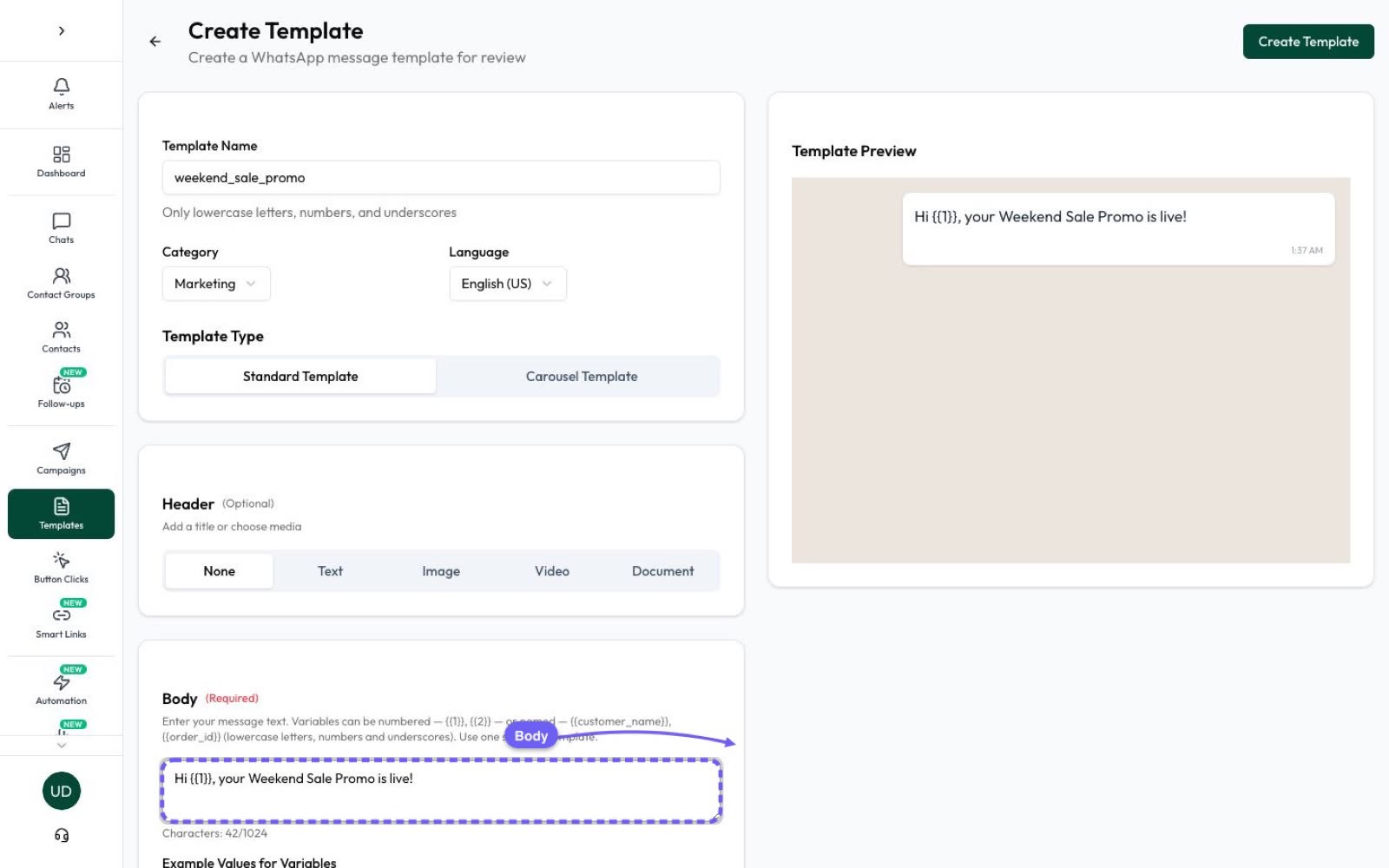
Templates can include a header (text, image, video or document), a body with variables, a footer and buttons. Standard templates hold one message; carousel templates show several cards the customer can swipe.
The three categories, with examples
All examples use sample names and numbers.
Marketing
- “Hi {{1}}, our Diwali sale is live! Everything is 20% off until Sunday.” [Shop now] [Stop promotions]
- “{{1}}, the sneakers you looked at are back in stock in size 9.” [View]
- “New batch for Class 12 Physics starts 3 November. Book a free demo class.” [Book demo]
Utility
- “Hi {{1}}, your order #{{2}} has been shipped and should arrive by {{3}}.” [Track order]
- “Your site visit at Example Heights is confirmed for {{1}} at {{2}}.”
- “Reminder: your appointment with Dr. Example is tomorrow at {{1}}. Reply 1 to confirm.”
Utility templates must be non-promotional and either specific to the customer, requested by them, or essential (for example a safety notice).
Authentication
Authentication templates carry one-time passcodes. They must be created from Meta’s template library with a copy-code or one-tap button; URLs, media and emojis are not allowed and parameters are limited to 15 characters. Only authentication templates may carry OTPs.
How Meta assigns, and changes, your category
- Content that mixes an update with an offer, or that is unclear, is marketing.
- Retargeting is marketing even if the customer asked for it.
- Since 9 April 2025, a template submitted as utility that Meta judges to be marketing is approved as marketing.
- Since 16 April 2025, businesses warned for misusing categories lose the 24-hour notice before a category change. You can request a review within 60 days.
Anatomy of a template: component limits
| Component | Limit |
|---|---|
| Header text | 60 characters |
| Body | 1,024 characters |
| Footer | 60 characters |
| Buttons in total | Up to 10 |
| Quick-reply buttons | Up to 10 |
| Website (URL) buttons | Up to 2 |
| Phone-number button | 1 |
| Copy-code button | 1 (code up to 20 characters) |
| Button label | Up to 25 characters |
Variables can be numbered, like {{1}} and {{2}}, or named, like {{first_name}}.
Approval checklist
- Pick the category honestly: any promotion means marketing.
- Don’t start or end the body with a variable, and don’t pack many variables into short text.
- Give sample values for every variable.
- Don’t copy the wording of a template you already have.
- Never ask for full card numbers or national ID numbers (such as Aadhaar).
- Follow WhatsApp’s Commerce Policy for what you sell.
- Add an easy way to opt out of promotions.
Why templates get rejected, and how to fix or appeal
- Variable formatting: wrong syntax, or a variable at the very start or end of the body.
- Too many variables for the length of the text.
- Duplicate content of an existing template.
- Commerce or Business policy issues with the product or offer.
- Requests for sensitive data such as full card or ID numbers.
Fix the issue and resubmit, or appeal if you think the decision was wrong; Meta says appeals are decided within 24 hours.
After approval: quality, pacing and pausing
Each template gets a quality rating (Green, Yellow or Red) based on how customers react, including blocks and reports. New or low-rated templates may be paced (sent in batches). A template whose quality drops is paused for 3 hours, then 6 hours, and disabled the third time.
Limits to remember: 250 templates per messaging account (6,000 once your business is verified and has an approved display name), up to 100 new templates an hour, and templates unused for 12 months are archived and later deleted.
What each template category costs in India
From 1 October 2026, Meta’s list rates for Indian numbers are ₹0.8631 per marketing message and ₹0.1150 per utility or authentication message, plus 18% GST. See WhatsApp API pricing in India.
In Automate AI Marketing you create templates, track their Approved, Pending or Rejected status, and send them to the audience you choose. The AI Template Studio add-on can draft templates for you.
Frequently asked questions
How long does WhatsApp template approval take?
Meta reviews templates within 24 hours.
Can I add an offer to an order update?
Yes, but the whole template then counts as marketing and is charged at the marketing rate.
How many templates can I create?
250 per messaging account, or 6,000 once your business is verified and has an approved display name.
What happens to a low-quality template?
It is paused for 3 hours, then 6 hours, and disabled the third time its quality drops.
Sources
- Meta: Template categorization
- Meta: Templates overview
- Meta: Template review
- Meta: Template components
- Meta: Template quality
- Meta: Pricing on the WhatsApp Business Platform
WhatsApp rules and prices change. We check these guides against Meta’s documentation, but always confirm current terms with Meta before you rely on them. Questions? Message us on WhatsApp at +91 79000 03693.