AI Lead Scoring on WhatsApp: Find Your Hottest Leads First
How AI lead scoring works on WhatsApp chats: the buying signals that matter, hot, warm and cold thresholds, a daily routine for acting on scores, the limits of AI scoring, and how AI Sales Center scores leads from 0 to 100 with the reason shown.
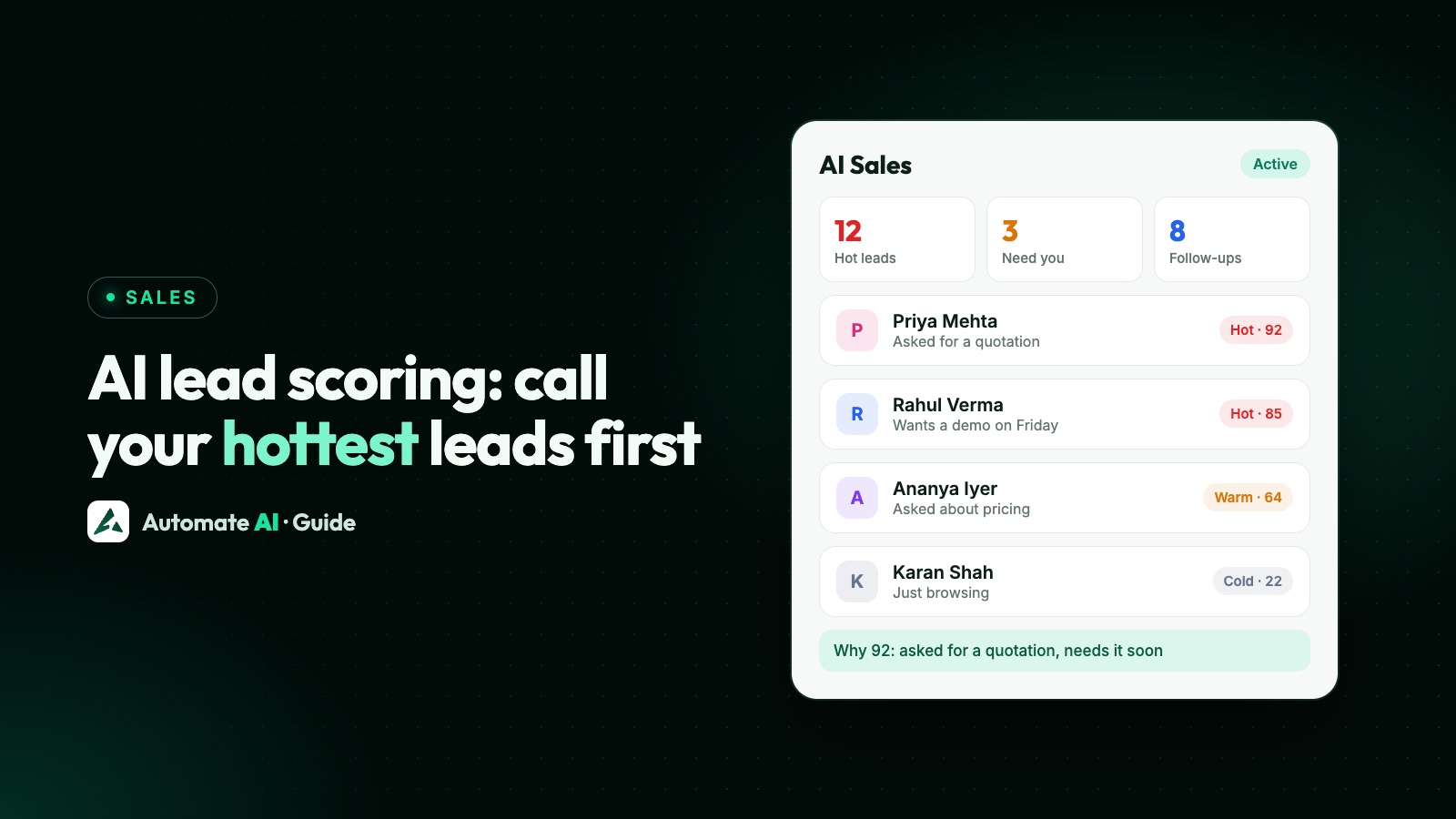
AI lead scoring reads what each lead actually said on WhatsApp, turns buying signals such as “please send a quotation” into a score, and sorts your list so the team talks to the people most likely to buy first. It speeds up a salesperson’s judgement; it doesn’t replace it.
This guide covers the signals worth scoring, how to set hot and warm thresholds, a daily routine for acting on scores, where AI scoring falls short, and how AI Sales Center does it in Automate AI. For CRM basics such as statuses, assignment and pipelines, see WhatsApp CRM.
Key takeaways
- Score leads on what the customer said, not on guesses: a quotation request beats “just browsing”.
- Every score needs a reason in the customer’s own words, so salespeople can trust it or overrule it.
- Work the list in a fixed order: needs a person, hot, follow-ups due, then warm.
- AI suggests and creates tasks; your team decides, and closes each lead as converted, lost or not interested.
- In Automate AI, AI Sales Center scores leads from 0 to 100 (hot from 80, warm from 50 by default) and is included in Series 2, 3 and 4.
What AI lead scoring is, and what it isn’t
Classic lead scoring adds points for what you know about a lead: where they came from, which form they filled, which pages they visited. On WhatsApp you have something better, the conversation itself. Someone who asks for a delivery date and mentions a budget is telling you they’re close.
| Rule-based scoring | AI scoring from chats | |
|---|---|---|
| Based on | Source, form fields, clicks | What the customer wrote |
| Tells you | Who they are | What they want, and how soon |
| Misses | Intent inside the conversation | Anything said on calls or in person |
| Best for | Sorting new leads before the first reply | Prioritising leads who are already chatting |
Either way, a score is a ranking aid. It isn’t a probability, and it isn’t a decision.
The buying signals worth scoring
These are the signals AI Sales Center looks for in the customer’s own messages, and how each moves the score. It’s a sensible list for any team, even if you score by hand.
| Signal | Example (sample) | Effect on the score |
|---|---|---|
| Wants to buy | “I’ll take two. How do I pay?” | Strong increase |
| Asked for a demo | “Can you show me how it works on Friday?” | Strong increase |
| Asked about pricing | “What’s the price for 50 units?” | Medium increase |
| Shared a budget | “We can spend about ₹2 lakh” | Increase |
| Needs it soon | “We need it before Diwali” | Increase |
| Interested in a product | “Is the 2 BHK in Wakad still available?” | Increase |
| Bought before | “I ordered from you last year” | Increase |
| Engaged positively, or comparing competitors | “Looks good” · “Another shop quoted less” | Small increase |
| Raised an objection | “Delivery takes too long” | Small decrease |
| Sounded negative | “I don’t think this is for us” | Large decrease |
| Said not interested | “Not interested, thanks” | Keeps the score very low |
How AI Sales Center scores a lead
Each time a customer writes, AI Sales Center reads the recent conversation (messages that arrive close together are read together) and picks out the signals above from the customer’s own words. The score is then added up from fixed points per signal, so the AI never picks the number itself and the same signals always give the same score.
- Score: 0 to 100. By default a lead is Hot from 80, Warm from 50 and Cold below that; you can change both thresholds.
- Why this score: the signals it found plus up to two quotes, for example: Customer asked about pricing, needs it soon. Customer said: “need 50 units by 10 Nov”.
- Also captured: what they’re interested in, any objection (with the customer’s words), budget and timeline if they gave them, a short summary and the next best action.
- Stage: New, Qualified, Interested or Demo / Proposal. A lead only counts as Converted when your team moves it to a status you marked as a conversion.
- Left alone: contacts who opted out, blocked numbers and chats marked irrelevant.
What your team sees
| Where | What it shows |
|---|---|
| AI Sales › Overview | Hot Leads, Needing Human Assistance, Follow-ups Due and AI-Assisted Conversions; Priority Leads; the Sales Funnel from New to Converted |
| AI Sales › Leads | Filters for All open, Hot, Warm, Cold, Needs a person, AI stopped and Closed; search by name or phone; each lead’s reason, summary, interest, objection and next best action |
| AI Sales › Activities | A timeline of the AI’s decisions |
| In each chat | The AI lead card in the contact panel, with the score and next best action |
Agents see leads from their own chats; owners and managers see every lead and change the settings.
Acting on scores: a daily routine
- Needs a person, first thing: a customer asked for a human or a callback, is unhappy, or asked something the AI couldn’t answer. Reply or call within the hour.
- Hot leads: call or message personally, using the next best action as a starting point. A personal reply beats a template.
- Follow-ups due: clear today’s tasks. If the customer gave a time (“call me after 6”), keep to it.
- Warm leads: one helpful message, such as the brochure, an answer to their objection or a sample. If they last wrote more than 24 hours ago, it must be an approved template.
- Cold leads: leave them out of daily work. Include them in occasional campaigns only if they opted in to hear from you.
- Close the loop: mark leads Converted, Not interested, Lost, Irrelevant or Spam, so the list stays honest and the AI leaves them alone.
For wording at each stage, see 30 follow-up message examples; for how often to follow up, see lead follow-up cadence.
Smart follow-ups and escalation: AI suggests, people act
AI Smart Follow-up creates follow-up tasks for your team on the Follow-ups page. It never messages customers on its own. If the customer gave a clear day and time, the task uses it; otherwise the task, set about a day later, asks your team to agree a time. By default, AI follow-ups keep to business hours, start no sooner than 60 minutes after the message, are re-planned when the customer replies, stop when the lead converts, and are capped at 3 per lead in 30 days. You can change each of these.
AI Human Escalation alerts the teammates you chose, in the app and on WhatsApp, when:
- the AI could not answer;
- the customer asked for a person or a callback;
- a hot lead needs a salesperson;
- a pricing or technical question comes up;
- the customer is unhappy;
- an objection went unanswered.
After a team member replies by hand, the AI stays quiet for 30 minutes by default. AI Sales Closer, the fourth part, keeps the AI Assistant’s replies focused on your sales goal and handles objections using only your knowledge base.
The limits of AI scoring
- It only knows the chat. A lead who said yes on a phone call still looks lukewarm, so update or close the lead yourself.
- Short chats score low. A one-line enquiry isn’t a cold lead; it’s a lead nobody has talked to yet.
- Signals can mislead. Comparing competitors can mean shopping around or ready to switch. Read the quotes in the reason.
- A score isn’t a probability. 85 doesn’t mean an 85% chance of buying; it means more buying signals than a lead at 60.
- People overrule. If the score is wrong, act on your judgement, stop the AI for that lead or close it with the right outcome.
- Privacy still applies. Don’t ask for card numbers, full ID numbers or health details in chat, whatever the score says.
Review ten scored leads with your team each week. If hot leads keep turning out cold, raise the Hot threshold; if good leads hide in Warm, lower it.
Set up AI Sales Center in Automate AI
- Open AI Sales › Settings (owners and managers).
- Turn on AI Sales Center. AI Lead Scoring, AI Smart Follow-up, AI Human Escalation and AI Sales Closer switch on together; each can be switched off on its own.
- Choose the sales goal: book a demo, request a quotation, schedule a call, purchase a product, complete registration, connect with a sales representative, or a goal of your own.
- Choose which AI analyses conversations, from the AI set up for your account in Settings › AI Assistant.
- Choose who is alerted when a person is needed (Settings › AI Assistant › Human Escalation).
- Set the lead score thresholds (Hot from, Warm from) and the follow-up rules.
- Pick the statuses that mean converted, so conversions are counted from your own pipeline.
- Check Safety and cost: how long the AI stays quiet after a team member replies, and the most AI analyses per day.
AI Sales Center is included in Series 2, 3 and 4 at no extra charge and works on the WhatsApp chats you already have. See AI Sales Center and pricing.
Frequently asked questions
How does AI Sales Center calculate a lead score?
The AI picks out buying signals from the customer’s own messages, such as asking about pricing or for a demo, and the score from 0 to 100 is added up from fixed points per signal. The reason, with the customer’s words, is shown next to it.
What do Hot, Warm and Cold mean?
By default, Hot is 80 or more, Warm is 50 to 79 and Cold is below 50. Owners and managers can change both thresholds.
Does AI Sales Center send messages to my leads?
No. Smart Follow-up creates follow-up tasks for your team. The AI never messages customers on its own.
Can I correct a lead the AI got wrong?
Yes. Open Lead actions to stop the AI for that customer, or close the lead as Converted, Not interested, Irrelevant, Lost or Spam. Closed leads move to the Closed list and the AI leaves them alone.
Can agents see every lead?
No. Agents see leads from their own chats; owners and managers see every lead and change the settings.
Which plans include AI Sales Center?
Series 2, 3 and 4, at no extra charge. Series 1 is for marketing only.
Sources
- Meta: Send messages (customer service window)
- Meta: Getting opt-in for WhatsApp
- WhatsApp Business Messaging Policy
- Automate AI: AI Sales Center
WhatsApp rules and prices change. We check these guides against Meta’s documentation, but always confirm current terms with Meta before you rely on them. Questions? Message us on WhatsApp at +91 836 977 8812.