How to Automate WhatsApp Lead Follow-Ups Without Losing the Personal Touch
A follow-up playbook for sales teams on WhatsApp: what to automate and what to keep personal, a follow-up cadence that stops on reply, reminders and statuses for your team, AI follow-ups that wait for approval, template rules after 24 hours, and message examples for Indian businesses.
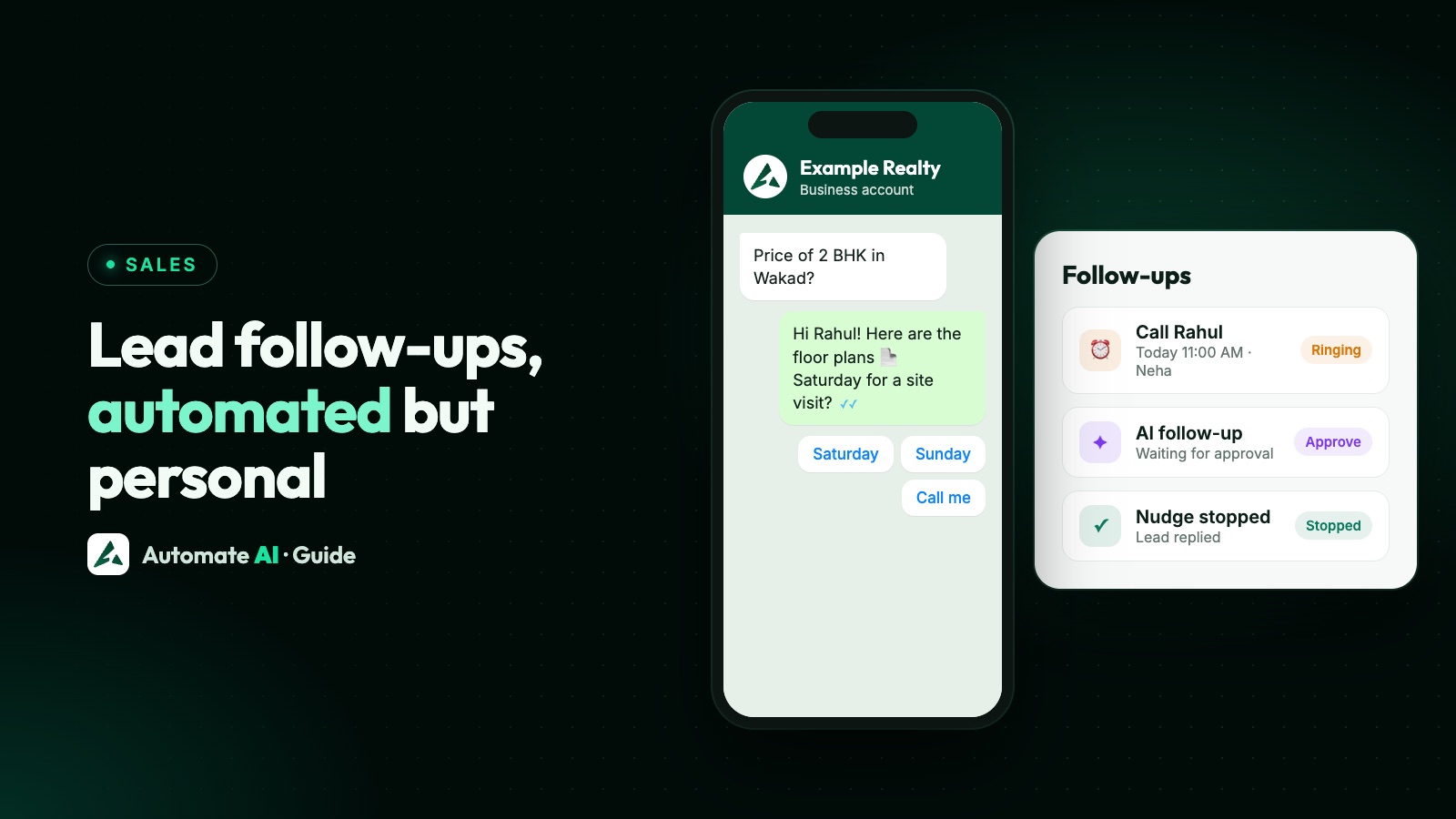
The best WhatsApp follow-up systems automate the reminders, not the relationship. Let software send the first reply in seconds, nudge leads who go quiet, and remind your team who to call. Keep the conversations that decide a sale (pricing, objections, site visits, negotiations) with a person.
This playbook shows what to automate, a follow-up cadence that stops as soon as the lead replies, how statuses and reminders keep salespeople on track, and the WhatsApp rules that apply after 24 hours. It complements our guides to lead generation (getting leads) and WhatsApp automation (sequences in general).
Key takeaways
- Automate the first reply, quiet-lead nudges and team reminders; keep negotiations and objections human.
- Every automated sequence should stop when the lead replies.
- After 24 hours without a reply from the lead, only approved templates can be sent.
- Use statuses for each stage and reminders so nobody forgets a call.
- Let AI suggest follow-ups, but have a person approve them for important leads.
What to automate, and what to keep personal
| Automate | Keep personal |
|---|---|
| Instant first reply with your brochure or price list | Answering detailed questions about a specific requirement |
| Qualifying questions with buttons (budget, location, timeline) | Handling objections and negotiating |
| A nudge when a lead goes quiet | A call when a hot lead goes quiet |
| Reminders to the salesperson | Site visits, demos and closing |
| Appointment and payment reminders | Saying thank you after a sale |
Customers can tell a canned message from a real one. Automation earns its keep on speed and consistency; people earn it on judgement and trust.
A follow-up cadence that respects the lead
| When | What | Who |
|---|---|---|
| Within minutes | Thank them, share what they asked for, ask one question | Automatic |
| Same day | Personal message or call from the assigned salesperson | Person, prompted by a reminder |
| After 1 to 2 days of silence | A short, helpful nudge (a picture, a review, an answer to a common question) | Automatic, stops on reply |
| After about a week | A useful update or offer, as an approved template | Automatic, stops on reply |
| After that | A monthly check-in only if they opted in to updates | Campaign or drip |
Follow-up messages that sound human
Sample messages with example businesses. Use the lead’s name and what they actually asked about.
- Real estate: “Hi Rahul, here are the 2 BHK floor plans you asked about in Wakad. Would Saturday morning work for a site visit?”
- Coaching: “Hi Priya, sharing the JEE batch timetable. Any questions about fees or timings? Happy to call if easier.”
- B2B: “Hi Arjun, following up on the quote for 50 units. Would a quick call tomorrow help finalise the specs?”
- Gentle nudge: “Just checking you got the brochure, Neha. Shall I hold a slot for you this week?”
- Closing the loop: “No worries if now isn’t the right time. Reply LATER and we’ll check back next month.”
Avoid fake urgency, guilt (“you didn’t reply”) and long paragraphs. One message, one question.
Keep your team on track: statuses, reminders and re-inquiries
- Statuses for each stage (New, Interested, Site visit booked, Negotiation, Won, Lost), with a short note when you change one.
- Follow-up reminders that ring for the assigned salesperson at the set time, until they press Done, Snooze or Stop.
- Repeating reminders per status, at a fixed time each day, skipping days you’re closed.
- Re-inquiry flags: when a lead you’d already moved on writes again, the chat is marked so it doesn’t get lost.
- Assignment: every lead has an owner, and managers can see who’s handling what.
Reports such as a per-person staff activity view show follow-ups set, done and missed, which is where most leads are lost.
Where AI helps, and where it shouldn’t decide alone
- Scoring: AI can read a chat and score a lead from 0 to 100 with a reason, so salespeople call the hottest first.
- Suggesting the next step: “Share the brochure”, “Offer a site visit”, “Hand over to a person”.
- Drafting follow-ups in the lead’s language and tone.
- Escalating when a customer asks for a person or the AI isn’t sure.
Keep a human approval step for important leads, a cap on how many follow-ups AI may send, and stop on reply and on conversion. That keeps AI fast without making it pushy.
Lead follow-ups in Automate AI
- Auto Follow-ups: a sequence after a contact’s last message that stops automatically when they reply (help).
- Follow-ups page: every scheduled follow-up across the team, with reminders that ring at the right time (help).
- [Drip Campaigns](/features/drip-campaign/): template sequences that respect business hours and stop on reply.
- [AI Sales Center](/features/ai-sales-center/): lead scores with reasons, next best actions, smart follow-ups that by default wait for your approval, stop on reply or conversion, and alerts when a person is needed.
- Statuses, notes, re-inquiry filter and staff activity report in the shared inbox.
Frequently asked questions
How many times should I follow up with a lead on WhatsApp?
There’s no official number. A fast first reply, a personal message the same day, and one or two helpful nudges over the next week is a sensible start. Stop as soon as they reply or say no, and respect WhatsApp’s template rules after 24 hours.
Can WhatsApp follow-ups be automated?
Yes, with the WhatsApp Business API: sequences that stop on reply, reminders for your team, and AI-suggested follow-ups. Messages after 24 hours of silence must be approved templates.
How do I follow up without sounding like a bot?
Use the lead’s name and what they asked about, keep it to one short message and one question, and let a person handle negotiations and objections.
What happens if a lead stops replying?
Send one or two useful nudges as templates, then pause. If they opted in to updates, include them in occasional campaigns; otherwise leave it.
Can AI send follow-ups automatically?
It can, but for important leads keep a person approving AI follow-ups, cap the number, and stop on reply or conversion.
Sources
- Meta: Send messages (customer service window)
- Meta: Per-user marketing template limits
- WhatsApp Business Messaging Policy
- Automate AI Help: Auto Follow-ups
- Automate AI Help: AI Sales Center
WhatsApp rules and prices change. We check these guides against Meta’s documentation, but always confirm current terms with Meta before you rely on them. Questions? Message us on WhatsApp at +91 836 977 8812.