The WhatsApp 24-Hour Window, Explained
The WhatsApp 24-hour customer service window opens when a customer messages you. Inside it you can reply freely; after it closes you can only send approved templates. Here’s what opens it, what it costs since October 2026, and how to re-engage customers.
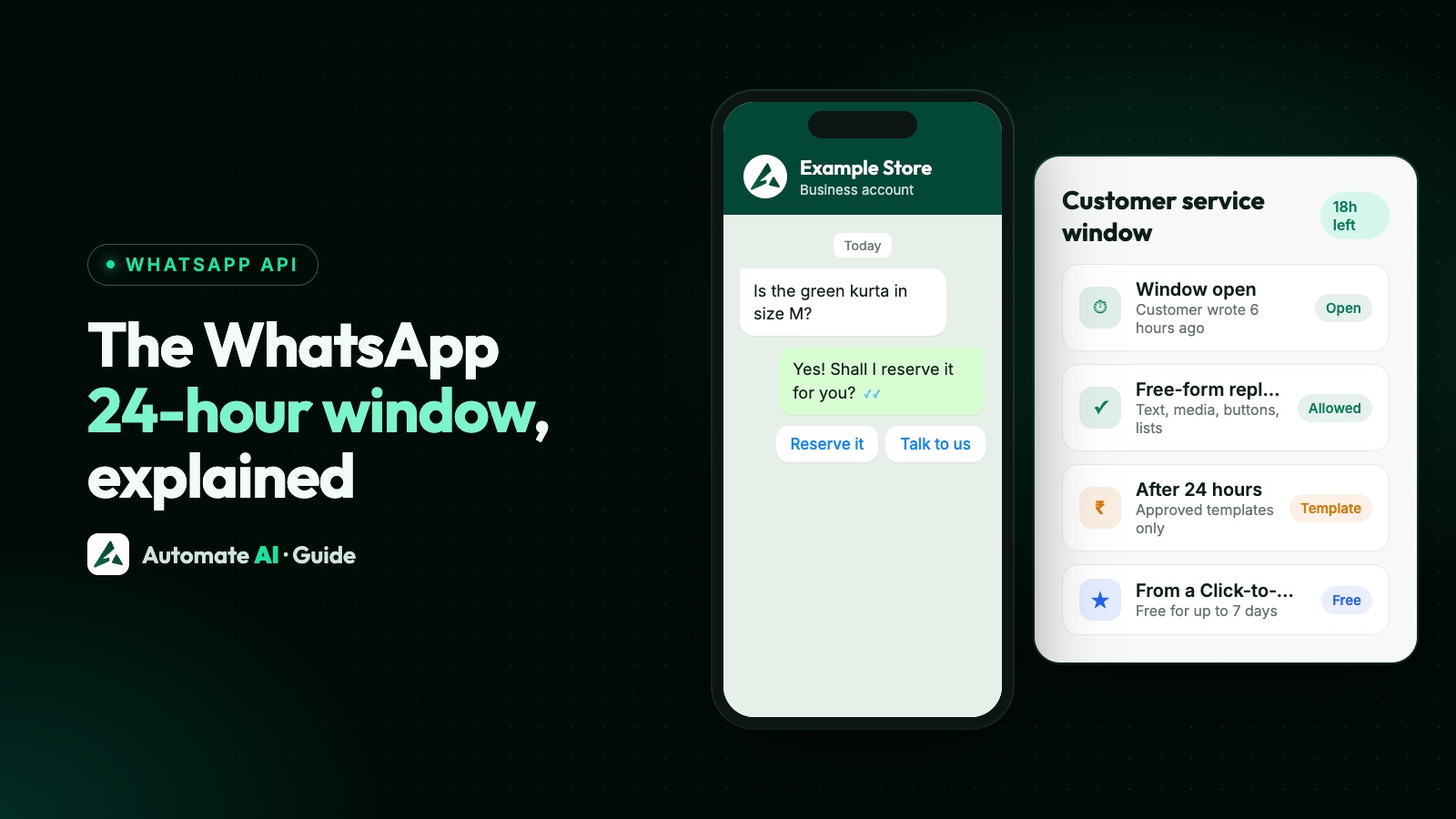
Every time a customer messages your business on WhatsApp, a 24-hour customer service window opens. Inside it you can reply with any kind of message: text, images, documents, buttons or lists. Once 24 hours pass without a new message from the customer, the window closes and you can only send approved template messages until they write again.
The window decides what you can send and what you pay. This guide covers what opens and resets it, what you can send inside and outside it, the pricing rules that apply since 1 October 2026, and how to bring a customer back after it closes.
Key takeaways
- The window opens, and resets, every time the customer sends you a message. It lasts 24 hours from their latest message.
- Inside the window: reply with any message type, no template needed.
- Outside the window: only approved templates (marketing, utility or authentication).
- Since 1 October 2026 the first 1,000 service replies per number each month are free; utility templates are charged even inside an open window.
- Chats that start from a Click-to-WhatsApp ad can get a free window of up to 7 days if you reply within 24 hours.
What opens the 24-hour window
The window opens when the customer sends you a message, of any kind: a text, a photo, a voice note, a tap on a quick-reply button or a reaction to a message. It lasts 24 hours from that message. Each new message from the customer restarts the clock, so an active conversation can stay open all day.
Your own messages never open or extend the window. Sending a template doesn’t open it either: the window only opens once the customer replies to that template.
What you can send inside and outside the window
| Inside the 24-hour window | After the window closes | |
|---|---|---|
| Free-form text, images, video, documents | Yes | No |
| Reply buttons, list messages | Yes | No |
| Approved templates (marketing, utility, authentication) | Yes | Yes, the only option |
| Who can be messaged | The customer who wrote to you | Anyone who opted in to hear from you |
If you try to send a normal (non-template) message after the window has closed, Meta rejects it with error 131047 (“re-engagement message”). The fix is simple: send a template instead, or wait for the customer to write again.
What it costs (rules since 1 October 2026)
- Customer messages to you: always free.
- Your service replies (non-template replies inside the window): the first 1,000 per business number each month are free, then charged.
- Utility templates (order updates, reminders): charged per delivered message, even inside an open window since 1 October 2026.
- Marketing and authentication templates: charged per delivered message, inside or outside the window.
For most businesses this means everyday customer support stays free or close to it, while anything you start yourself is a paid template. Exact rates for India are in WhatsApp API pricing in India, and what’s free is summed up in Is WhatsApp API free?.
Longer free windows from ads
When a customer messages you from a Click-to-WhatsApp ad (on the WhatsApp app for Android or iPhone), Meta opens a free entry point window. If you reply within 24 hours, that reply is free and your messages to that customer stay free for up to 7 days, templates included. It’s one reason Click-to-WhatsApp ads are popular for lead generation: you pay for the ad, and the follow-up conversation is free for a week.
More in Click-to-WhatsApp ads: how to create them and what they cost.
How to re-engage a customer after the window closes
- Pick the right template category. An order or appointment update is utility; an offer or a “we miss you” message is marketing. Meta checks the category when you submit the template.
- Make sure they opted in. Templates can only go to people who agreed to hear from your business on WhatsApp. See WhatsApp opt-in.
- Add a reply button. A button such as “Yes, I’m interested” or “Call me back” gives the customer a one-tap way to reopen the window.
- Reply fast when they answer. Their reply opens a new 24-hour window, so you can continue with normal messages.
Common mistakes
- Replying the next morning to an evening enquiry. If more than 24 hours have passed, a normal reply fails. Use an away message and reply within the window, or send a utility or marketing template.
- Assuming a sent template opens the window. It doesn’t; only the customer’s reply does.
- Sending reminders as free-form messages. Scheduled reminders usually go out after the window has closed, so they must be templates.
- Forgetting the window is per customer. Each contact has their own window, based on their latest message.
How Automate AI helps
In the Automate AI shared inbox, each chat shows whether the customer’s window is still open (except on coexistence numbers, where replies sent from the phone app aren’t visible to the inbox). When it has closed, the message box switches to choosing an approved template instead of letting a message fail, and campaign reports explain failed messages in plain words, such as “More than 24 hours have passed since the customer last replied.” The AI Assistant and chatbot reply within seconds, so customers get an answer while the window is open. Plans and message rates are on the pricing page.
Frequently asked questions
What is the 24-hour window on WhatsApp?
It’s the customer service window that opens when a customer messages your business. For 24 hours after their latest message you can reply with any message type. After that, only approved templates can be sent until they write again.
Does the 24-hour window reset?
Yes. Every new message from the customer, including a tap on a quick-reply button, restarts the 24 hours.
Can I send a message after 24 hours on WhatsApp Business API?
Only an approved template message, to someone who opted in to hear from you. A normal message fails with error 131047.
Are messages inside the 24-hour window free?
Your first 1,000 non-template service replies per business number each month are free. After that, and for any templates you send, Meta charges per delivered message. Utility templates are charged even inside the window since 1 October 2026.
Does the 24-hour rule apply to the WhatsApp Business app?
No. The window is a rule of the WhatsApp Business Platform (API). The free Business app has its own limits instead, such as broadcast lists of 256 contacts.
Sources
- Meta: Pricing on the WhatsApp Business Platform
- Meta: Send messages (customer service windows)
- Meta: Error codes (131047 re-engagement message)
- Meta: Get opt-in for WhatsApp
- WhatsApp Business Messaging Policy
WhatsApp rules and prices change. We check these guides against Meta’s documentation, but always confirm current terms with Meta before you rely on them. Questions? Message us on WhatsApp at +91 836 977 8812.