WhatsApp Channels vs Communities vs Groups vs Broadcasts: Which Should a Business Use?
WhatsApp Channels, Communities, groups, broadcast lists and API campaigns compared for businesses: who you can reach, size limits, privacy, two-way replies, cost, and which one fits announcements, customer groups and promotions.
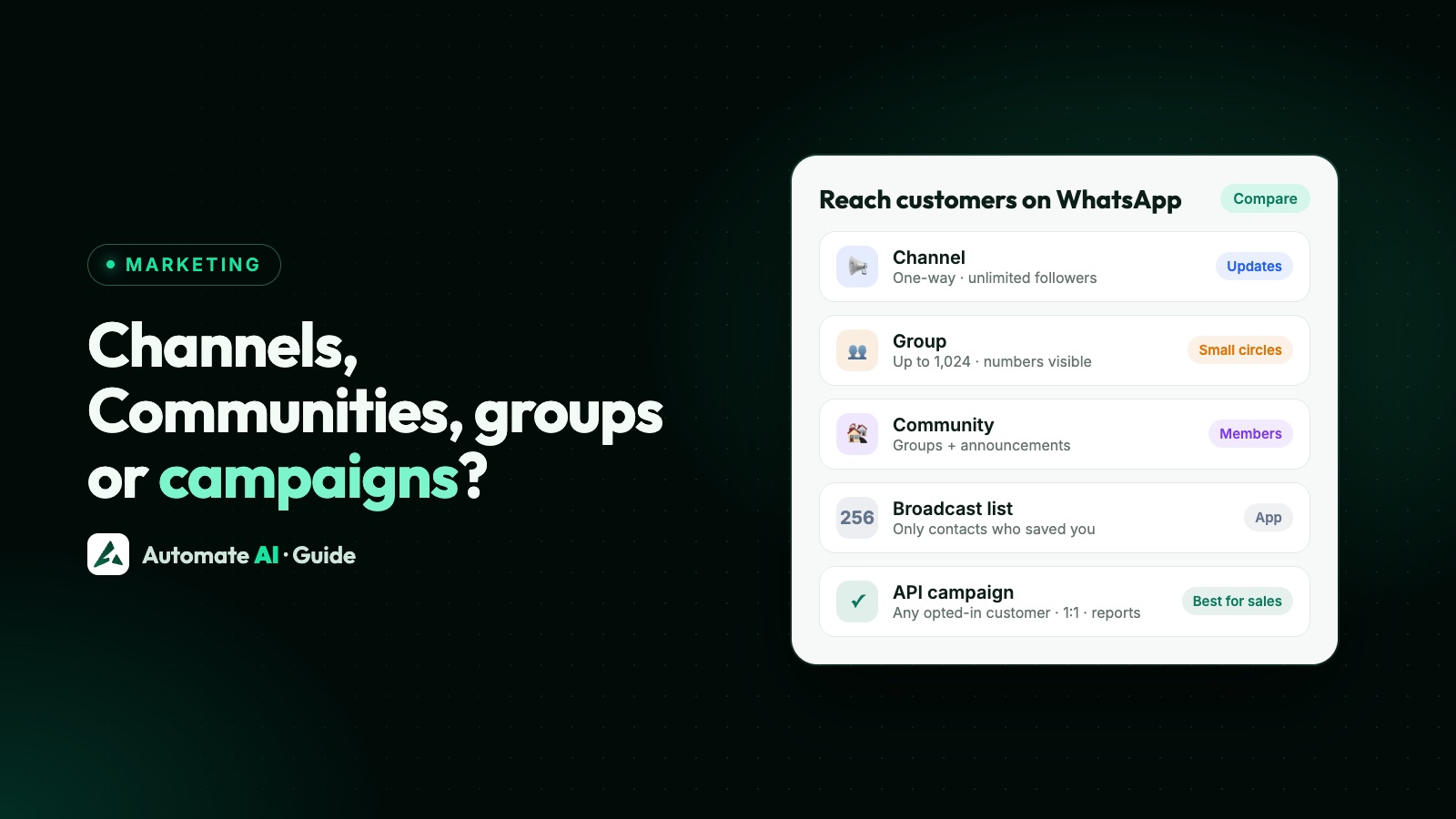
For a business, the short answer is: use a Channel for one-way updates to a large audience, a WhatsApp Business API campaign for personal offers and updates to customers who opted in, and groups or Communities only for small groups of people who already know each other. Broadcast lists on the Business app work only for people who saved your number, 256 at a time.
Each tool has different limits, privacy and costs. This guide compares them side by side and shows which fits announcements, promotions, customer support and community building.
Key takeaways
- Channels: one-way, unlimited followers, phone numbers hidden on both sides; followers can only react and vote.
- Groups: up to 1,024 members, two-way, members can see each other’s numbers; not for marketing to strangers.
- Communities: groups under one umbrella with an announcement group; can’t currently be created on the WhatsApp Business app.
- Broadcast lists (Business app): up to 256 contacts per list, delivered only to people who saved your number.
- API campaigns: any opted-in customer, personalised 1:1 messages with buttons and reports, charged per delivered message.
The five options at a glance
| Channel | Group | Community | Broadcast list (app) | API campaign | |
|---|---|---|---|---|---|
| Who receives it | Followers | Members | Members of its groups | Contacts who saved your number | Opted-in customers |
| Size | Unlimited followers | Up to 1,024 | Up to 2,000 members | 256 per list | Up to your messaging limit |
| Replies | Reactions and polls only | Everyone can post | Announcements: admins only | Private 1:1 replies | Private 1:1 replies |
| Phone numbers visible to others | No | Yes, to members | Yes, inside its groups | No | No |
| Personalised | No | No | No | No | Yes (name, order, offer) |
| Delivery reports | No | No | No | Ticks only | Delivered, read, clicked, replied |
| Cost | Free | Free | Free | Free (some countries cap free broadcasts) | Per delivered template |
WhatsApp Channels
A Channel is a one-way broadcast: you post text, photos, videos, links and polls, and followers read them in the Updates tab. Followers can react with an emoji or vote, but can’t reply. Followers don’t see the admins’ phone numbers or each other’s, and channel history is kept for up to 30 days. You can add up to 16 extra admins.
- Good for: new arrivals, menus, daily rates, event updates, content for a large audience who chose to follow you.
- Not good for: personal offers, order updates, support, or anything that needs a reply.
- Business app: businesses can create channels, though Meta notes some features may not be available to everyone yet.
- Verification and earning: verified channels come with Meta Verified plans; channel subscriptions, promoted channels and ads in Status are rolling out gradually by country.
Groups and Communities
A group holds up to 1,024 members and everyone can post. A Community brings related groups together with an announcement group where only admins post, up to 2,000 members in total. They suit a club, a batch of students, a residents’ association or a small customer circle where people already know each other.
You can’t currently create a Community on the WhatsApp Business app. On the WhatsApp Business API, Meta’s Groups API lets a business with an Official Business Account create small groups of up to 8 participants who join by invite link, for things like a client account team or a small project group.
Broadcast lists on the WhatsApp Business app
A broadcast list sends the same message to up to 256 contacts, and each person gets it as a private chat. The catch: only people who saved your number receive it. In some countries WhatsApp has started capping free broadcast messages each month, and offers paid business broadcasts in a few markets.
Broadcast lists are fine for a small shop with a loyal circle of customers. They break down when you need to reach hundreds of customers, personalise messages, or see who read and replied. See WhatsApp broadcast limits and WhatsApp Business app limitations.
Campaigns on the WhatsApp Business API
With the API you send approved templates to customers who opted in, whether or not they saved your number. Each message is private and can be personalised with their name, order or offer, and can carry an image, buttons or a coupon code. You see delivered, read, clicked and replied counts, and replies land in a shared inbox for your team.
It costs per delivered message (see WhatsApp API pricing in India), and your reach grows with your messaging limit: 250 unique people a day to start, 2,000 after business verification, then up to unlimited.
Which should your business use?
| Goal | Best option |
|---|---|
| Announce new stock or content to a big audience | Channel |
| Send personal offers to past customers | API campaign |
| Order, booking and payment updates | API (utility templates) |
| Answer customer questions | 1:1 chats in a shared inbox |
| Run a members’ club or student batch | Community or group (with consent) |
| A few loyal customers who saved your number | Broadcast list |
Many businesses use two together: a Channel for public updates and API campaigns plus a shared inbox for anything personal. Post your channel link in campaigns and on your WhatsApp QR code to grow both.
API campaigns on Automate AI
Automate AI handles the API side: upload or sync your opted-in contacts, pick an approved template, send now or schedule, and see delivered, read and replied counts live. There’s no 256-contact limit, opted-out contacts are skipped automatically, and every reply reaches your team’s shared inbox, where the AI Assistant can answer first. See WhatsApp campaigns and pricing.
Frequently asked questions
What is the difference between a WhatsApp Channel and a Community?
A Channel is a one-way broadcast to unlimited followers who can’t see each other or reply. A Community groups related WhatsApp groups together, with an announcement group and up to 2,000 members who can interact in the groups.
How many members can a WhatsApp group have?
Up to 1,024 members.
Can a business create a WhatsApp Community?
Not from the WhatsApp Business app at the moment. A business can create Channels, groups and broadcast lists from the app.
Is a WhatsApp Channel better than a broadcast list?
For a large audience, yes: Channels have no follower limit and don’t need people to save your number. For personal, two-way messages, use API campaigns instead; Channels don’t allow replies.
Can I send marketing messages to a WhatsApp group?
Only to people who chose to join it. Adding customers to groups for marketing exposes their numbers and leads to reports; use opted-in API campaigns instead.
Sources
- WhatsApp Help: About channels
- WhatsApp Help: About communities
- WhatsApp Help: Group size
- WhatsApp Help: Broadcast lists
- Meta: Groups API
- Meta: Channel subscriptions and promoted channels (June 2025)
WhatsApp rules and prices change. We check these guides against Meta’s documentation, but always confirm current terms with Meta before you rely on them. Questions? Message us on WhatsApp at +91 836 977 8812.