Why WhatsApp Business Messages Aren’t Delivered (and How to Fix It)
Why WhatsApp Business API messages fail or stay on “sent”: Meta’s per-user marketing limit (131049), customers who stopped marketing messages (131050), numbers not on WhatsApp (131026), the 24-hour window (131047), paused templates and rate limits, with a fix for each.
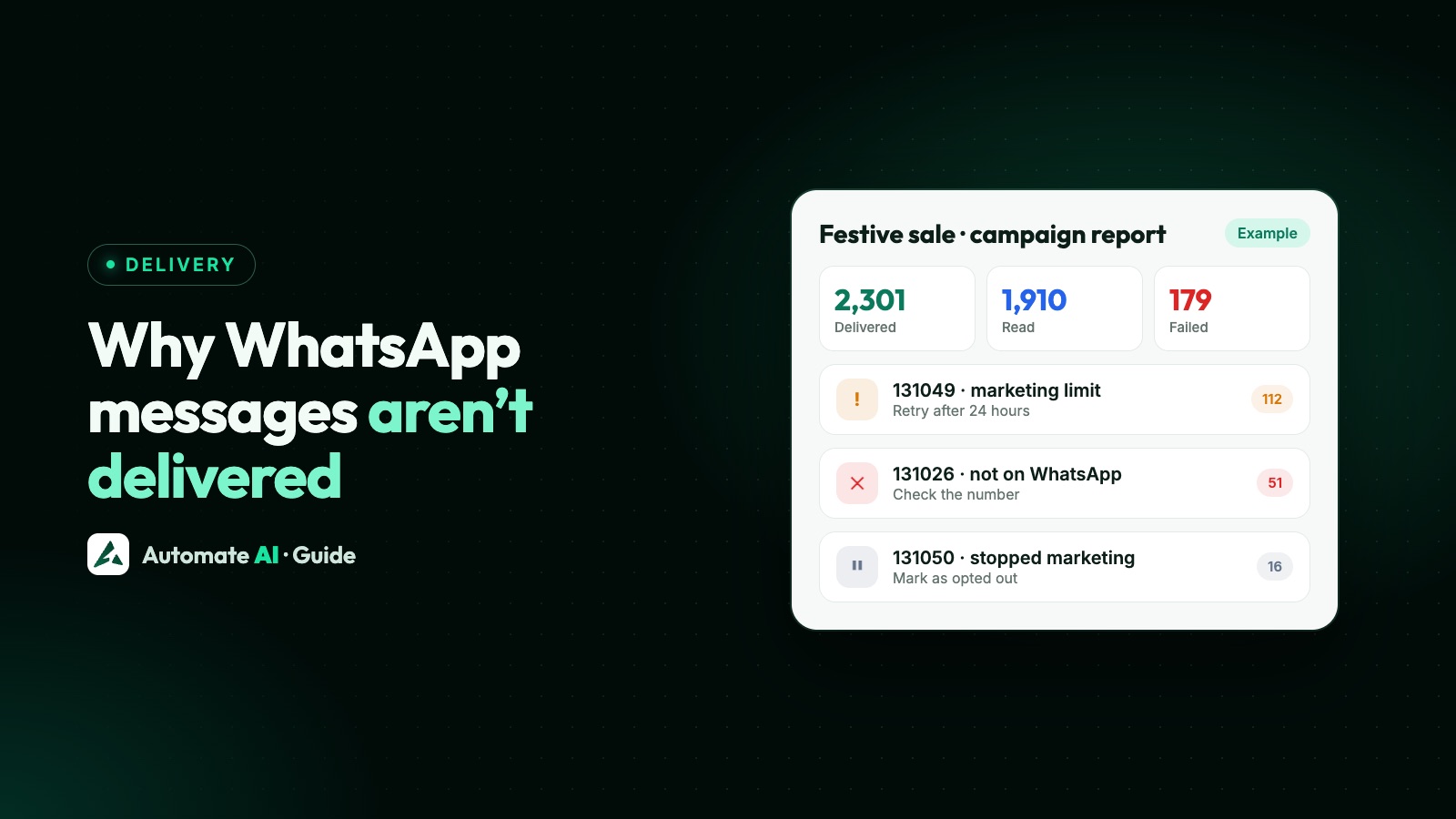
Most undelivered WhatsApp Business messages fail for one of five reasons: Meta held back a marketing message to protect the user’s experience (error 131049), the person stopped marketing messages from you (131050), the number can’t receive WhatsApp messages (131026), the 24-hour window had closed for a normal message (131047), or your template or number hit a limit.
Each failure comes back from Meta with an error code. This guide explains the common ones in plain words, what you can do about each, and how to keep your delivery rate high on the next campaign.
Key takeaways
- 131049 means Meta chose not to deliver a marketing template to that person right now; don’t retry immediately.
- 131050 means the customer turned off marketing messages from your business: respect it.
- 131026 usually means the number isn’t on WhatsApp or the app is too old.
- 131047 means you sent a normal message after the 24-hour window closed; use a template.
- Engaged, opted-in audiences and relevant templates are the best long-term fix.
Sent, delivered, read and failed
Every message you send through the API moves through statuses that Meta reports back to your software:
| Status | What it means |
|---|---|
| Sent | WhatsApp accepted the message from your business |
| Delivered | It reached the customer’s phone |
| Read | The customer opened it (only if they haven’t turned off read receipts) |
| Failed | It couldn’t be delivered; an error code explains why |
A message can stay on “sent” for a while if the customer’s phone is off or offline. WhatsApp keeps trying to deliver it for up to 30 days by default.
The common error codes, explained
| Code | What happened | What to do |
|---|---|---|
| 131049 | Meta didn’t deliver a marketing template to keep the user’s experience healthy (per-user marketing limit) | Don’t resend straight away; wait at least 24 hours, send to engaged customers, make the offer more relevant |
| 131050 | The customer stopped marketing messages from your business | Don’t send them marketing; utility updates about their orders still work |
| 131026 | Message undeliverable: number not on WhatsApp, app outdated, or hasn’t accepted the latest terms | Check the number and country code; reach them another way |
| 131047 | More than 24 hours since the customer last messaged you | Send an approved template instead |
| 131048 | Spam rate limit: too many messages blocked or reported | Pause, review your audience and content, check your quality rating |
| 131056 | Too many messages to the same number in a short time | Slow down messages to that customer |
| 135000 | Dropped by business portfolio pacing: early feedback on a large send was poor | Review the template and audience; send to engaged customers first |
| 130429 | Too many API calls per second for your number | Send more slowly; your provider should queue and retry |
| 132015 / 132016 | Template paused or disabled because of low quality | Edit or replace the template; see quality rating |
| 131042 | A payment problem on your Meta account | Fix the payment method in Business Manager or top up your provider wallet |
The full list is in WhatsApp API error codes.
Error 131049: the per-user marketing limit
Meta limits how many marketing templates a person receives from businesses. The limit adapts to how often that person reads marketing messages and how many they’re getting, and Meta doesn’t publish a fixed number. When it applies, your message isn’t delivered and returns 131049. Utility and authentication templates aren’t affected, and marketing messages sent while the customer’s 24-hour window is open don’t count.
- Don’t retry immediately. Meta asks you to wait at least 24 hours; repeated retries within 24 hours can block further attempts to that person for up to a day. Try again later with a more relevant message.
- Send to engaged customers first. People who replied or bought recently are more likely to receive and read your message.
- Make it worth opening. A clear, personal offer beats a generic blast.
- Don’t over-send. Several marketing messages a week to the same person raises the chance of 131049, blocks and reports.
Error 131050: the customer stopped marketing messages
WhatsApp lets people stop marketing messages from a business through the Offers and announcements setting in that chat. After that, your marketing templates to them fail with 131050 until they turn them back on. This is the customer’s choice: mark them as opted out and keep sending only the utility messages they need, such as order updates.
Other reasons messages don’t arrive
- Wrong number format. Use the full number with country code (for India, 91 followed by the 10-digit number), no spaces, zeros or plus signs added by mistake.
- The customer blocked you. Blocked messages fail, and blocks lower your quality rating.
- Messaging limit reached. Your business portfolio can message only a limited number of unique people outside the 24-hour window in any rolling 24 hours: 250 for new businesses, 2,000 after verification, then 10,000, 100,000 and unlimited as you grow. See WhatsApp broadcast limits.
- Template not approved or paused. Only approved, active templates can be sent.
- Wallet or payment issue. If your Meta payment method or provider wallet runs out, sends stop.
- Media problems. Images or documents that are too large or in an unsupported format fail to send.
How to improve your delivery rate
- Clean your list before a campaign: remove numbers that failed with 131026 last time.
- Respect opt-outs and keep opted-out customers out of marketing sends.
- Segment by interest or recent activity instead of sending to everyone.
- Add a “Stop promotions” button so people can opt out without blocking you.
- Watch your quality rating and pause campaigns that get blocked or reported. See quality rating and template pausing.
- Retry failed messages later, not straight away, and only once.
How Automate AI shows and handles failures
Automate AI campaign reports show sent, delivered, read, replied and failed counts live, and each failed message carries a plain-language reason, for example “WhatsApp blocked this message to maintain healthy ecosystem engagement” for 131049 or “Message undeliverable” for 131026. Contacts marked as opted out are skipped by campaigns automatically, and you can resend to people a campaign missed. See WhatsApp campaigns.
Frequently asked questions
What does WhatsApp error 131049 mean?
Meta chose not to deliver a marketing template to that person to keep their experience healthy, usually because they’ve received many marketing messages recently or don’t engage with them. Wait at least 24 hours and send something more relevant.
Why do my WhatsApp messages show sent but not delivered?
The customer’s phone may be off, offline or out of space. WhatsApp keeps trying for up to 30 days by default. If it fails, the error code tells you why.
What is error 131026 on WhatsApp?
The message can’t be delivered: the number usually isn’t on WhatsApp, the app is very old, or the user hasn’t accepted the latest terms. Check the number and reach the customer another way.
Can I resend failed WhatsApp messages?
Yes, but not immediately for 131049. Wait at least 24 hours and send to customers likely to engage. Don’t resend to numbers that failed with 131026 or customers who opted out (131050).
Do utility messages get blocked by the marketing limit?
No. The per-user limit applies to marketing templates. Utility templates such as order updates and authentication codes aren’t affected.
Sources
- Meta: Error codes
- Meta: Per-user marketing template limits
- Meta: Messaging limits
- Meta: Message status webhooks
- Meta: Business portfolio pacing
WhatsApp rules and prices change. We check these guides against Meta’s documentation, but always confirm current terms with Meta before you rely on them. Questions? Message us on WhatsApp at +91 836 977 8812.