How to Get the WhatsApp Verified Badge (Blue Tick) for Your Business
How to get the verified badge (blue tick, formerly the green tick) on WhatsApp: Meta Verified for the WhatsApp Business app, the free Official Business Account request on the API, eligibility, steps, India pricing, and what the badge does and doesn’t change.
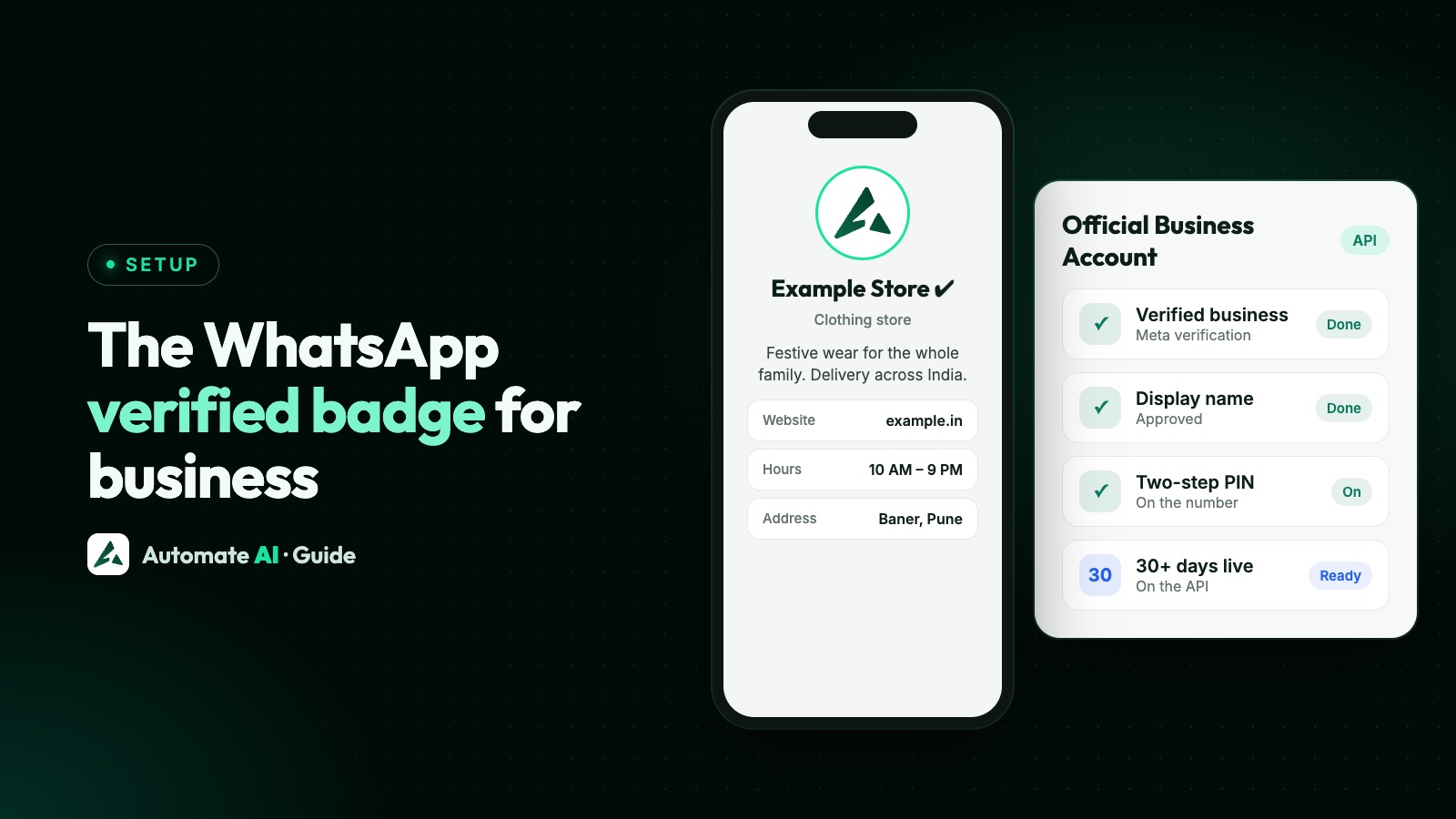
There are two ways to get the verified badge on WhatsApp, and which one applies depends on how you use WhatsApp. On the free WhatsApp Business app, the badge comes with a paid Meta Verified subscription. On the WhatsApp Business API, you request an Official Business Account (OBA), which has no fee but has strict requirements.
Either way the badge is now a blue checkmark beside your business name (businesses used to call it the “green tick”). This guide covers both routes, who is eligible, the steps, what it costs in India, and what the badge does and doesn’t change.
Key takeaways
- WhatsApp Business app: subscribe to Meta Verified in the app (Tools → Meta Verified). Plans in India started at ₹639 a month when launched.
- WhatsApp Business API: request an Official Business Account in WhatsApp Manager; there’s no fee.
- OBA needs Meta business verification, an approved display name, two-step verification and at least 30 days on the platform.
- The badge doesn’t raise messaging limits or lower message prices; business verification is what unlocks higher limits.
- Some features need the badge, such as WhatsApp Groups on the API and certain India payment options.
Two routes to the badge
| WhatsApp Business app | WhatsApp Business API | |
|---|---|---|
| Programme | Meta Verified subscription | Official Business Account (OBA) |
| Cost | Monthly subscription | No fee |
| Where to apply | In the app: Tools → Meta Verified | WhatsApp Manager, or through your provider |
| Main requirements | Active business account with profile name and photo, recent activity, supported country | Business verification, approved display name, two-step verification, 30+ days on the platform, policy compliance |
| Review time | Up to 3 business days | Varies; reapply after 30 days if rejected |
| Extras | Impersonation protection, support, verified channel, more linked devices | Badge only |
Meta Verified on the WhatsApp Business app
Meta Verified for WhatsApp started in June 2024 with India among the first countries, and from September 2024 it’s been available to eligible small businesses in India using the WhatsApp Business app. It’s a monthly subscription that adds the badge and other benefits.
Who is eligible
- You’re 18 or older and your number is in a supported country.
- Your account has been on the WhatsApp Business app for a while, has sent messages recently, and has a profile name and photo.
- The number is used only on the Business app (not connected to the API).
- Government and political organisations aren’t eligible.
How to apply
- Open the WhatsApp Business app → Tools → Meta Verified.
- Pick a package and pay through the app.
- Meta reviews your business, usually within 3 business days. If it can’t verify you, the payment is refunded.
Plans and price in India
When Meta launched business subscriptions in India in July 2024, plans started at ₹639 a month for one app. Prices change with offers, so check the current price in the app. Meta’s help centre lists four business packages: Standard (badge, impersonation protection, in-app support, one verified channel, 4 linked devices), Plus, Premium and Max, which add priority support, more verified channels, more linked devices and protection for more accounts.
Official Business Account on the WhatsApp API
If your number is on the WhatsApp Business API (directly or through a provider), the badge comes from an Official Business Account request. Meta lists five requirements:
- Your business follows the WhatsApp Business Messaging Policy.
- The number has been registered on the platform for at least 30 days.
- Your business portfolio has passed Meta business verification. See Meta business verification for WhatsApp.
- Two-step verification is turned on for the number.
- Your display name is approved. See WhatsApp display name rules.
How to request it
In WhatsApp Manager open Overview → your phone number → Profile → Official business account → Submit request. Since June 2025 providers can also submit the request through Meta’s API. If it’s rejected, you can apply again after 30 days.
What the badge does, and doesn’t, change
| Changes with the badge? | |
|---|---|
| Customer trust and fewer impersonation worries | Yes |
| Messaging limits (250 → 2,000 → 10,000 …) | No; business verification, quality and usage decide limits |
| Price per message | No; pricing depends on category and country |
| Template approval | No |
| WhatsApp Groups on the API | Yes, groups require an Official Business Account |
| India in-chat payment options | Some require a verified business with the checkmark |
So treat the badge as a trust signal, not a growth hack. If your goal is to message more people, focus on business verification and messaging limits and a healthy quality rating.
Common reasons requests are rejected
- Business verification not done or done for a different legal name than the display name.
- Display name doesn’t match your website or brand.
- Number too new (under 30 days on the platform).
- Two-step verification off.
- Thin online presence, such as no website or a website that doesn’t mention the business name.
Getting ready with Automate AI
Most of the OBA checklist is groundwork you need anyway: a verified business, an approved display name and a well-filled business profile. Automate AI’s team helps with this on a call or screen share when you connect your number, and the platform works the same with or without the badge. See how to get started with the WhatsApp Business API and our pricing.
Frequently asked questions
How do I get the green tick on WhatsApp Business?
The green tick is now a blue checkmark. On the WhatsApp Business app, subscribe to Meta Verified (Tools → Meta Verified). On the WhatsApp Business API, request an Official Business Account in WhatsApp Manager once you meet Meta’s requirements.
How much does the WhatsApp blue tick cost in India?
On the WhatsApp Business app it comes with a Meta Verified subscription; Meta’s India plans started at ₹639 a month for one app at launch, and the current price is shown in the app. On the API, the Official Business Account request has no fee.
What are the requirements for an Official Business Account?
Policy compliance, at least 30 days on the WhatsApp Business Platform, Meta business verification, two-step verification on the number and an approved display name.
Does the verified badge increase WhatsApp messaging limits?
No. Messaging limits depend on business verification, message quality and how much of your current limit you use. The badge is a trust signal.
Can I get Meta Verified on a WhatsApp API number?
Meta Verified is for the WhatsApp Business app. API numbers get the badge through an Official Business Account request instead.
Sources
- Meta: Official Business Accounts
- WhatsApp Help: Meta Verified plans and benefits
- WhatsApp Help: Eligibility for Meta Verified
- Meta: Meta Verified subscription plans for businesses in India (July 2024)
- Meta: Messaging limits
WhatsApp rules and prices change. We check these guides against Meta’s documentation, but always confirm current terms with Meta before you rely on them. Questions? Message us on WhatsApp at +91 836 977 8812.