WhatsApp Business App Limitations: When to Move to the API
The real limits of the free WhatsApp Business app: 256-contact broadcast lists that only reach saved contacts, 4 linked devices, 50 quick replies, 20 labels, no team assignment or reports, and automation that depends on your phone. When the WhatsApp Business API makes sense.
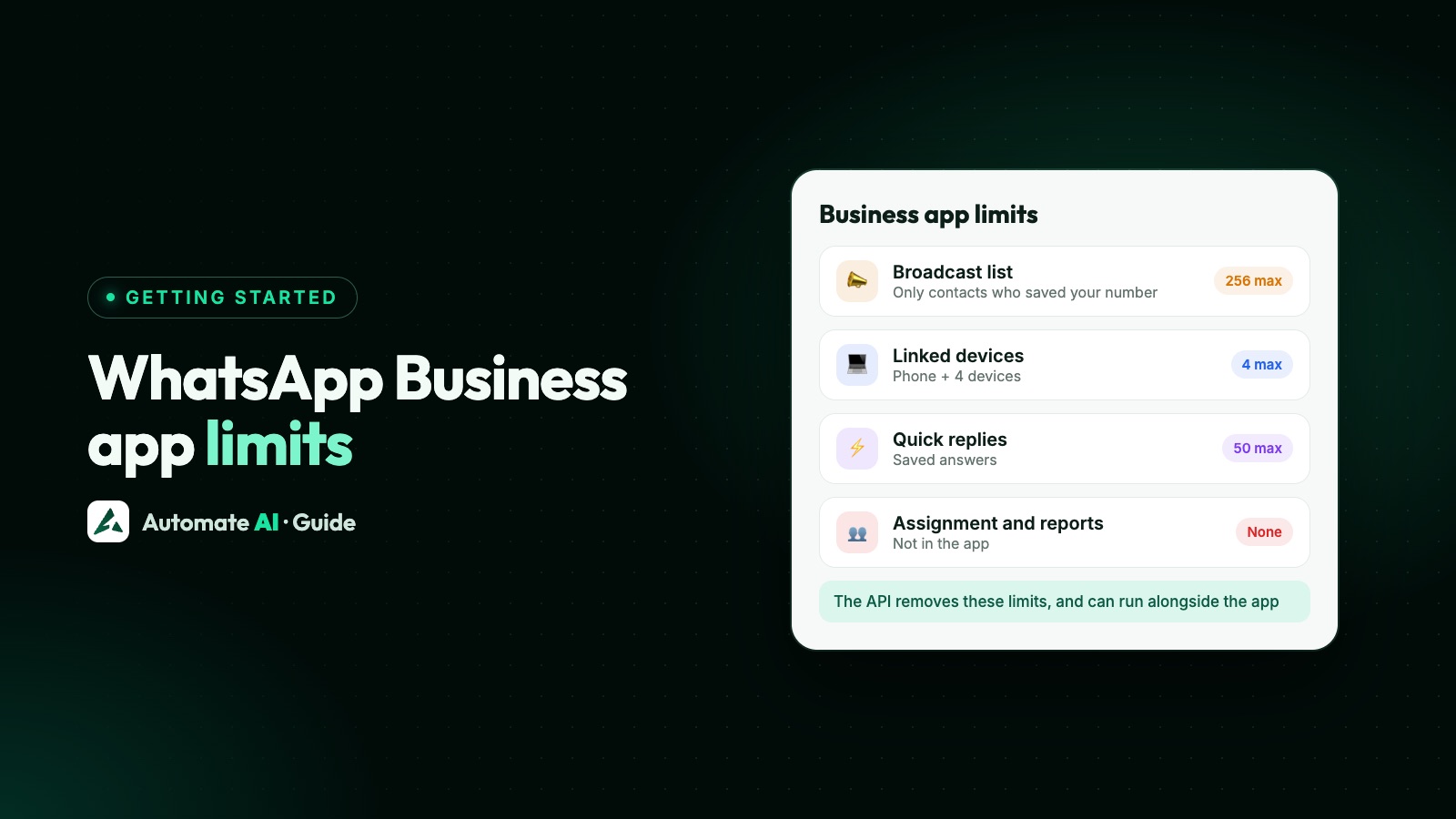
The WhatsApp Business app is free and great for getting started, but it’s built for one person on one phone. Broadcast lists hold 256 contacts and only reach people who saved your number, you can link 4 devices, and there’s no chat assignment, team reporting or API for your other software.
When more than a couple of people answer chats, when campaigns need to reach customers who haven’t saved you, or when you want chatbots and AI that run without your phone, it’s time to look at the WhatsApp Business API, which you can add without giving up the app thanks to coexistence.
Key takeaways
- Broadcast lists: 256 contacts, only to people who saved your number; paid business broadcasts only in some countries.
- Devices: phone + 4 linked devices (up to 10 with a Meta Verified multi-agent plan).
- Tools: 50 quick replies, 20 labels, greeting and away messages.
- No shared inbox with assignment, no reports per person, no API or webhooks.
- The API removes these limits and can run alongside the app on the same number.
The limits at a glance
| Area | WhatsApp Business app | WhatsApp Business API (with a provider) |
|---|---|---|
| Bulk messages | Broadcast lists of 256, saved contacts only | Campaigns to any opted-in contact, up to your messaging limit |
| Who can reply | Phone + 4 linked devices | Unlimited users with their own logins |
| Assignment and roles | None (multi-agent only with Meta Verified) | Assignment, roles, departments |
| Automation | Greeting, away, 50 quick replies | Keyword replies, chatbots, AI, drip sequences |
| Reports | Basic message statistics | Delivery, read, reply and click reports; per-agent activity |
| Integrations | None | REST API, webhooks, CRM, Shopify, lead sources |
| Cost | Free | Provider plan + per-message charges |
Broadcasts: 256 contacts and the saved-number rule
WhatsApp’s Help Center says a broadcast list can include up to 256 contacts, and only people who have saved your number in their phone receive it. Broadcasts aren’t available on WhatsApp Web, Windows or Mac, and WhatsApp says a monthly broadcast limit is rolling out gradually in some countries.
In some countries the Business app also offers paid business broadcasts, reviewed by Meta and charged per delivery. Sending spam leads to warnings and then suspensions. On the API, there is no list size: you send approved templates to opted-in contacts up to your messaging limit. Details in WhatsApp broadcast limits.
Devices and teams
The app supports one phone and up to four linked devices; linked devices log out if the phone isn’t used for 14 days. Everyone on those devices shares one identity: there’s no record of who replied and no way to assign a chat. A paid Meta Verified plan with multi-agent raises this to as many as 10 devices with assignment. Full comparison: WhatsApp Business for multiple users.
Automation and tools
- Greeting and away messages, and up to 50 quick replies: see WhatsApp auto reply.
- Up to 20 labels (being renamed lists) to organise chats.
- A catalog with up to 10 images per item; items are reviewed against WhatsApp’s policy.
- Meta’s AI agent in some countries, for eligible businesses.
What’s missing for growing teams: chatbots with branching menus, AI trained on your own documents with handover, follow-up sequences, lead scoring, and connections to your other systems.
Signs you’ve outgrown the app
- More than two people need to answer chats, or customers get duplicate replies.
- You can’t tell who replied, or which chats are waiting.
- Your broadcasts miss customers who never saved your number.
- Leads from ads, IndiaMART or your website need to arrive automatically.
- You want replies at night without someone holding the phone.
- You need reports on campaigns and team response times.
Moving up without losing the app
You don’t have to choose. With coexistence, you connect your existing Business app number to the API, keep the app on your phone, and sync up to 6 months of chats. Your team works in a shared inbox, and campaigns, chatbots and AI run on the API. Compare the options in coexistence vs full migration, and see what the WhatsApp Business API is.
Automate AI includes unlimited users, contacts and campaigns on every plan; see pricing and the shared inbox.
Frequently asked questions
How many contacts can I add to a WhatsApp Business broadcast list?
Up to 256 per list, and only contacts who have saved your number receive the broadcast.
How many devices can use one WhatsApp Business app account?
One phone plus up to four linked devices, or up to 10 with a Meta Verified plan that includes multi-agent.
Is the WhatsApp Business app enough for my business?
For one or two people with a small number of chats, often yes. Teams, large campaigns, automation and integrations need the WhatsApp Business API.
Can I use the WhatsApp Business app and the API together?
Yes, with coexistence: the same number works in the app and through the API.
Does the WhatsApp Business app have an API?
No. Programmatic sending, webhooks and integrations are only available on the WhatsApp Business Platform (the API).
Sources
- WhatsApp Help Center: Broadcast lists
- WhatsApp Help Center: Business broadcasts
- WhatsApp Help Center: Linked devices on WhatsApp Business
- WhatsApp Help Center: Meta Verified for business
- WhatsApp Help Center: Quick replies
- WhatsApp Help Center: Labels
- WhatsApp Help Center: Catalog
WhatsApp rules and prices change. We check these guides against Meta’s documentation, but always confirm current terms with Meta before you rely on them. Questions? Message us on WhatsApp at +91 836 977 8812.