Meta Business Portfolio Restricted: How It Affects WhatsApp and How to Fix It
What a restricted or disabled Meta business portfolio (Business Manager) means, the causes Meta lists, how it affects your WhatsApp Business accounts, numbers and Click-to-WhatsApp ads, where to see it in Business Support Home, how to request a review and how to prevent it.
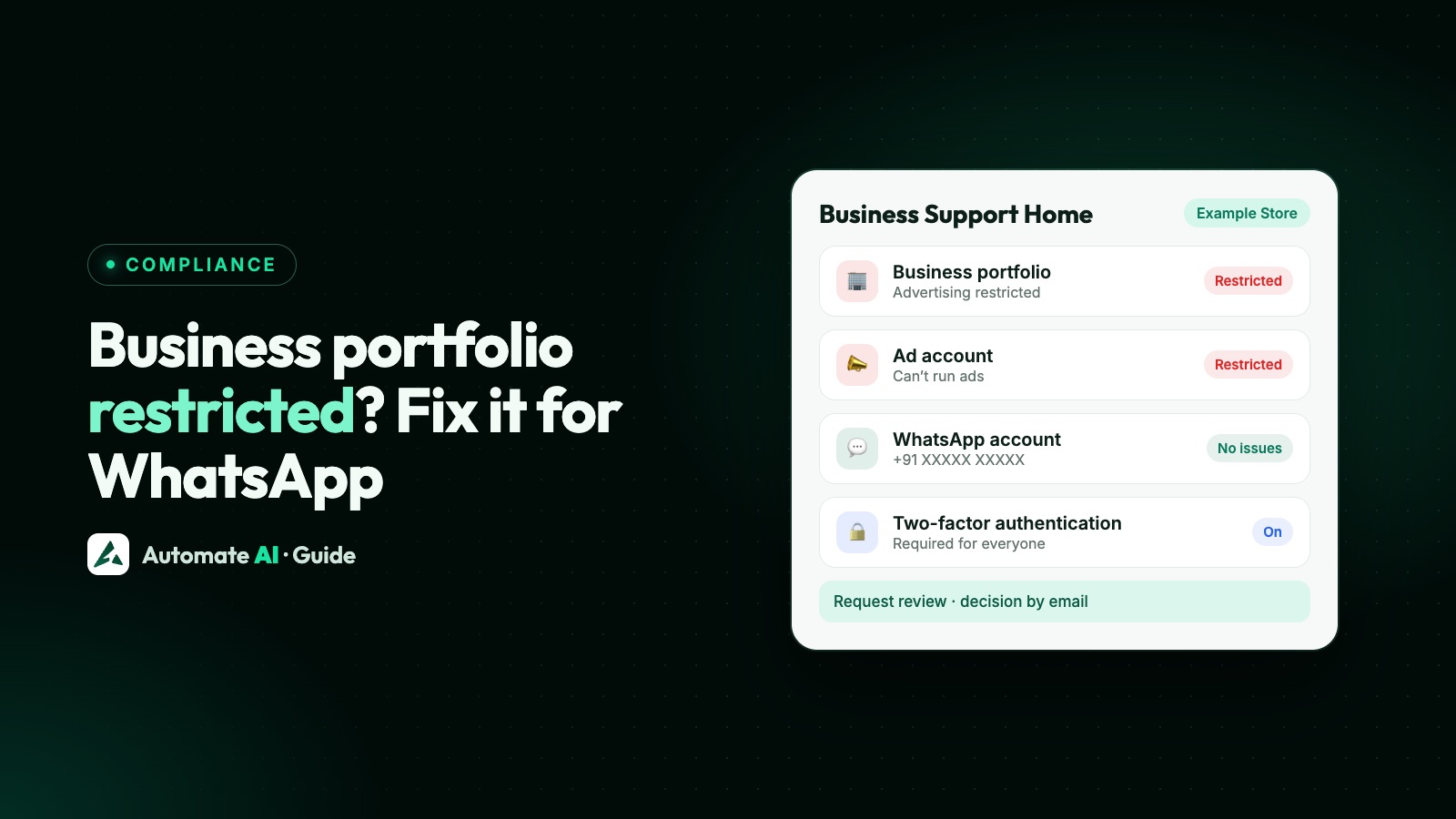
A restricted business portfolio (the old Business Manager) means Meta has limited what the portfolio and its assets can do, usually after policy violations, attempts to get around enforcement, inauthentic accounts, or links to assets Meta has already taken down; you see the reason and a Request review option in Business Support Home.
For WhatsApp, the first job is to work out what is restricted. A restriction on the portfolio’s advertising stops ads, including Click-to-WhatsApp ads. A restriction on the WhatsApp account itself blocks templates or messaging. They are reviewed separately. This guide shows how to tell them apart, how each affects your numbers, how to appeal, and how to keep the portfolio safe.
Key takeaways
- Your business portfolio holds your WhatsApp accounts, Messaging accounts, business verification and messaging limit, so problems at portfolio level can reach WhatsApp.
- Advertising restrictions and WhatsApp messaging restrictions are different; Business Support Home lists each asset’s status separately.
- Meta’s listed causes include severe or repeated policy violations, evading enforcement, inauthentic accounts and links to abusive assets.
- Request a review in Business Support Home. Meta says ad-related reviews typically take 48 hours and WhatsApp violation appeals 24 to 48 hours.
- Don’t open a new portfolio to get around a restriction: Meta treats evasion as a reason to restrict.
- Prevent it with two-factor authentication, more than one trusted person with full control, accurate admin emails and real business details.
What a business portfolio is, and what “restricted” means
A business portfolio is the container in Meta Business Suite (formerly Business Manager) that owns your business assets: Facebook Pages, ad accounts, and for WhatsApp, your WhatsApp accounts (each holding one phone number) and Messaging accounts (templates and billing). Each WhatsApp or Messaging account belongs to exactly one portfolio. Business verification and your WhatsApp messaging limit are also set at portfolio level.
Meta can restrict a whole portfolio or individual assets inside it. Its Advertising Standards describe a restricted asset as one that can’t be used to advertise across Meta’s technologies, and say that a person restricted from advertising doesn’t necessarily stop other members of the business from advertising. A disabled asset can’t be used until a review reverses the decision.
| What’s restricted | What you’ll notice | Where to look |
|---|---|---|
| The portfolio’s advertising access | Ads stop, including Click-to-WhatsApp ads; you may be unable to create ad accounts or new business portfolios | Business Support Home (Account Quality) |
| A WhatsApp account (policy enforcement) | Template or messaging blocks, no new phone numbers, a banner in WhatsApp Manager, API errors 368 or 131031 | Business Support Home › your WhatsApp account |
| An ad account | Ads from that account stop; WhatsApp messaging is a separate asset | Business Support Home › the ad account |
| A person’s Facebook account | That person can’t do certain actions, such as creating business accounts | Their own account status |
Why Meta restricts business portfolios
Meta’s Ads Review Policy lists what it considers when it restricts business assets:
- Severely or repeatedly violating Meta’s policies.
- Evading or attempting to evade Meta’s review process and enforcement actions.
- Using inauthentic user accounts to set up business assets and run ads.
- Managing assets connected to other abusive assets, or behaving like assets Meta has already taken down.
Meta’s Advertising Standards add that if it sees signs of misrepresentation or suspicious activity, you may be asked to complete a verification process. On the WhatsApp side, Meta enforces against accounts that repeatedly break the WhatsApp Business Messaging Policy, Commerce Policy or Business Terms, for example through spam, template misclassification, or high-risk categories such as adult content, alcohol and tobacco, drugs, gambling and unsafe supplements. Severe harms such as scams lead to immediate offboarding.
Check what you sell against businesses WhatsApp doesn’t allow, and if a Click-to-WhatsApp ad was the trigger, see Click-to-WhatsApp ad rejected.
How it affects your WhatsApp accounts and numbers
Whether your WhatsApp messaging keeps working depends on which asset is restricted. The quickest check is Meta’s health status: request GET /<PHONE_NUMBER_ID>?fields=health_status (your provider can do this for you). Meta returns a status for the number, the WhatsApp Business Account, the business portfolio and the app. If any of them is BLOCKED, the overall status is BLOCKED and the response includes an error code and a possible solution.
| What you see | What it means |
|---|---|
| Error 368 when sending | The WhatsApp Business Account has been restricted or disabled for violating a platform policy |
| Error 131031 | The account is restricted or disabled for a policy violation, or the request data (such as a two-step PIN) didn’t match |
| “Your WhatsApp Business account is currently restricted” during setup (2655089, 3441040) | You can’t continue with that account until the restriction is resolved in Business Support Home |
| “To add a phone number, you’ll need to address any restrictions” (2388107) | The restriction blocks adding numbers |
| “You’re no longer allowed to use Meta technologies to advertise” (1404163) | You can’t run ads, manage advertising assets, or create new ad accounts or business portfolios |
| “The Meta Business Account that you selected can’t be verified” | Meta says the portfolio doesn’t comply with its policies to use the WhatsApp Business Platform |
If WhatsApp terminates an account for violations, the Business Messaging Policy says it may prohibit you and your organisation from all future use of WhatsApp products and services. That’s why it’s worth appealing properly instead of starting over.
Where to see what happened
- Business Support Home: in Meta Business Suite, click All tools › Business Support Home, then Account Overview. Meta describes it as the place to review the status of your business portfolios, ad accounts, commerce accounts and Pages. For WhatsApp, select your business › WhatsApp accounts to see restrictions on each account.
- Violation details: for WhatsApp violations Meta shows the policy broken, examples of allowed and disallowed content, active restrictions, what happens if it repeats, and how to appeal.
- WhatsApp Manager: violations appear as a banner.
- Email and notifications: Meta emails all admins of the portfolio and posts in the Notifications Centre, so old or wrong admin emails mean missed warnings.
- Webhooks (for developers):
account_updatesendsACCOUNT_RESTRICTIONwith the restriction type and expiry, andDISABLED_UPDATEwith the ban state.
How to request a review
- Open Business Support Home and select the restricted portfolio or asset (for WhatsApp, the Messaging account or WhatsApp account).
- Open the issue and read the policy and details Meta gives.
- Fix what caused it first: pause the campaign, remove the product, correct the template category or remove a person you don’t recognise.
- Click Request review, add supporting details that explain your case, and Submit.
- The request moves to the In Review tab. Meta sends its decision through Business Manager and email.
Timing depends on what was restricted. Meta’s Ads Review Policy says reviews of restricted ad accounts, Pages, people and business accounts typically finish in 48 hours, though some take longer. For WhatsApp policy violations, Meta’s developer docs say the decision typically takes 24 to 48 hours, and the violation ends up Unchanged or Reversed; if reversed, the account returns to its previous status. Not every spam violation can be appealed, so sometimes you must wait for the restriction to end.
What to prepare before you appeal
Meta doesn’t publish a document list for portfolio appeals; its form asks for supporting details. These make your case clear and quick to check:
- The exact issue: the asset, the policy named, and the date, copied from Business Support Home.
- What you changed: for example, which template you edited or which product you stopped promoting.
- Matching business details: your legal name, address and website should match your official documents; see Meta business verification.
- How customers opt in, if the issue is about spam or reports: where they give their number and agree to hear from you. See WhatsApp opt-in.
- A clean list of people: remove anyone with access you don’t recognise, and make sure each admin is a real person using their own Facebook account.
If nobody in your company has full control
Appeals and WhatsApp settings need someone with full control of the portfolio (formerly the admin role). Anyone with basic access can see who has full control in Meta Business Suite › Business Settings › People. If no one does, Meta’s WhatsApp support page describes a last-resort request to be added with full control: you submit the documents Meta asks for through the Business Support Home contact form, and Meta says this takes about 24 hours on average because of a security review.
How to prevent it happening again
- Turn on two-factor authentication. Meta’s Security Centre help says it is required for business portfolios that are 90 days or older and recommends requiring it for everyone with access.
- Have more than one person with full control, so the business isn’t locked out if one person leaves.
- Keep admin emails current so violation emails reach someone.
- Remove people and partners who no longer need access.
- Use real details and real accounts: accurate business information, and no fake or throwaway Facebook accounts to manage assets.
- Never create a new portfolio to get around a restriction. Fix the cause and appeal.
- Follow WhatsApp’s policies: message opted-in people, keep templates in the right category, and watch blocks and reports. See how to reduce blocks and reports.
Running WhatsApp with Automate AI
With Automate AI you connect your own WhatsApp number through Meta’s embedded sign-up, so the WhatsApp account stays in your business portfolio. Your team works in the shared inbox with owner, manager and agent roles, and in Campaigns you see sent, delivered, read and failed counts with the reason for each failure, so a sudden wave of errors stands out. Contacts marked as opted out are skipped by campaigns, and templates show Meta’s approval status in the app.
Appeals are decided by Meta and must be filed from your own Business Support Home. If you’re not sure what a restriction means for your WhatsApp number, call us on +91 836 977 8812 or contact us for remote support.
Frequently asked questions
What does “business portfolio restricted” mean?
Meta has limited what your business portfolio or some of its assets can do, often advertising, after policy violations, attempts to evade enforcement, inauthentic accounts or links to abusive assets. Business Support Home shows what is restricted and why.
Can I still send WhatsApp messages if my business portfolio is restricted?
It depends on the asset. An advertising restriction stops ads; a restriction on your WhatsApp account blocks templates or messaging. Check Business Support Home, and ask your provider to check the number’s health status, which shows if the portfolio or WhatsApp account is blocking messages.
How long does a business portfolio review take?
Meta’s Ads Review Policy says reviews typically finish in 48 hours, sometimes longer. WhatsApp violation appeals typically take 24 to 48 hours.
Should I create a new business portfolio after a restriction?
No. Meta lists evading or attempting to evade enforcement as a reason to restrict assets, and WhatsApp may stop an organisation from using its products after a termination. Fix the cause and request a review.
Is two-factor authentication required for a business portfolio?
Meta’s Security Centre help says two-factor authentication is required for business portfolios that are 90 days or older, and recommends requiring it for everyone with access.
Where do I request a review of a restricted business portfolio?
In Business Support Home in Meta Business Suite: select the restricted asset, open the issue, click Request review, add supporting details and submit.
Sources
- Meta: Ads Review Policy (restricted business assets and reviews)
- Meta Transparency Centre: Advertising Standards
- Meta Transparency Centre: Restricting accounts
- Meta: WhatsApp Business Platform policy and spam enforcement
- Meta: Messaging and calling health status
- Meta: account_update webhook
- Meta: Embedded Signup errors
- Meta: Error codes
- Meta: WhatsApp accounts and Messaging accounts
- Meta: WhatsApp support (full control requests)
- WhatsApp Business Messaging Policy
- Meta Business Help: About Security Center
- Meta Business Help: Add people to a business portfolio
- Meta Business Help: About Meta Business Support Home
WhatsApp rules and prices change. We check these guides against Meta’s documentation, but always confirm current terms with Meta before you rely on them. Questions? Message us on WhatsApp at +91 836 977 8812.