WhatsApp API for Ecommerce: Order Updates, COD Confirmation and Support
How Indian ecommerce brands use the WhatsApp API across the order journey: order confirmation, cash-on-delivery confirmation to cut fake orders, shipping and delivery updates, delivery problems, returns and support, with template examples, utility vs marketing rules and costs.
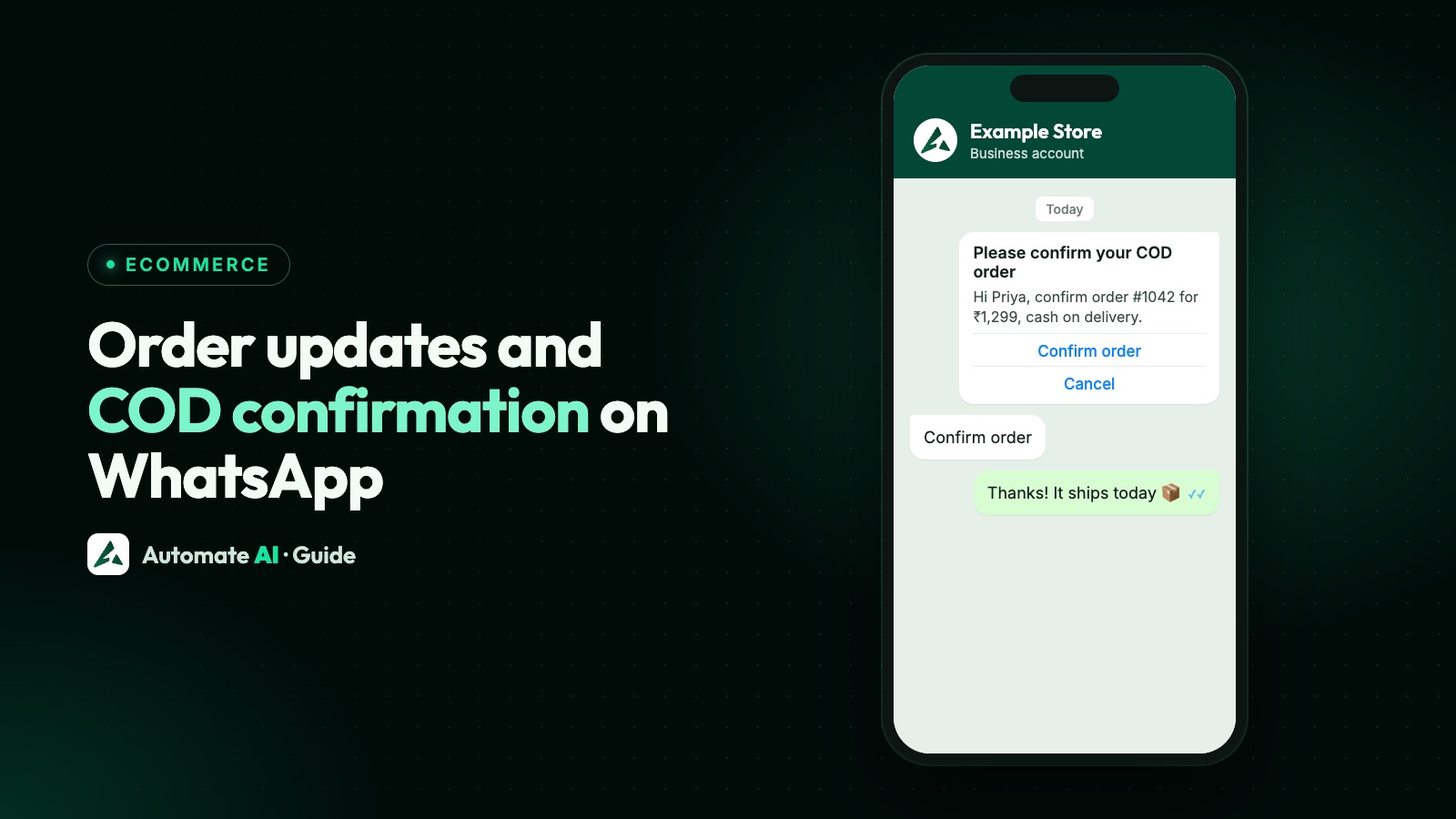
For ecommerce, WhatsApp works best as the post-purchase channel: an order confirmation customers actually read, a cash-on-delivery confirmation that asks “Confirm” or “Cancel” before you ship, shipping and delivery updates, and a support chat when something goes wrong. Most of these are utility templates, which cost far less than marketing.
This guide walks through each message in the order journey, how COD confirmation works, what to automate, and the rules to follow. Shopify specifics (events, cart recovery) are in our Shopify WhatsApp guide.
Key takeaways
- Order, payment, shipping and delivery updates are usually utility templates; offers and cart reminders are marketing.
- COD confirmation: a template with Confirm and Cancel buttons before dispatch, so you ship only to buyers who mean it.
- Use a URL button with the order ID for tracking, and keep card numbers out of chat.
- Route delivery problems and returns to a shared inbox with a chatbot for “where is my order?”.
- Collect WhatsApp opt-in at checkout, separately for order updates and for offers.
The order journey on WhatsApp
| Moment | Message | Category |
|---|---|---|
| Order placed | Order confirmation with items, total and payment method | Utility |
| COD order placed | Please confirm your cash-on-delivery order [Confirm] [Cancel] | Utility |
| Payment received | Payment confirmed | Utility |
| Shipped | Shipped, with a tracking link | Utility |
| Out for delivery / delivered | Keep cash ready, or delivered | Utility |
| Delivery failed | We missed you; choose a new slot | Utility |
| Return or refund | Return picked up; refund processed | Utility |
| Cart left | Reminder, optionally with a discount | Marketing |
| After delivery | Review request or new arrivals | Usually marketing |
Meta decides the final category. A utility message that slips in an offer (“and get 10% off your next order”) is treated as marketing. Rules in WhatsApp template messages.
COD confirmation on WhatsApp
Cash on delivery is popular in India, but unconfirmed COD orders lead to refused deliveries and return shipping. A WhatsApp confirmation before dispatch filters them out:
- When a COD order is placed, send a utility template: “Hi {{name}}, please confirm your cash-on-delivery order {{order_id}} for ₹{{amount}}.” with [Confirm order] and [Cancel] quick-reply buttons.
- When the customer taps a button, the reply arrives in your inbox with the button’s payload.
- Confirmed orders go to packing; cancelled ones are cancelled before you pay for shipping.
- No reply after a set time? Send one reminder, then call or hold the order, as your policy says.
- Mark the order’s status in your store so your team doesn’t ship unconfirmed orders.
Template examples
Sample templates for an example store; adapt them to yours.
- Order confirmed: “Thanks, {{name}}! Order {{order_id}} is confirmed: {{items}}, total ₹{{amount}}. We’ll message you when it ships.”
- Shipped: “Good news, {{name}}! Order {{order_id}} has shipped and should arrive by {{date}}.” [Track order] (URL button ending in the order ID)
- Out for delivery (COD): “Your order {{order_id}} is out for delivery today. Please keep ₹{{amount}} ready.”
- Delivery failed: “We couldn’t deliver order {{order_id}} today. Reply with a convenient time, or tap below.” [Reschedule]
- Refund: “Your refund of ₹{{amount}} for order {{order_id}} has been processed. It may take a few working days to reach your account.”
Support that scales
- “Where is my order?”: a chatbot asks for the order number and replies, or hands over to a person.
- Returns and exchanges: collect the reason and photos in the chat, then assign to the returns team.
- AI answers for sizing, delivery times and policies, trained on your own pages.
- Assignment and notes so the right person handles each case, with history in one place.
More on running support in the WhatsApp customer service playbook.
Opt-in and costs
Add an unticked checkbox at checkout for order updates on WhatsApp, and a separate one for offers; see WhatsApp opt-in. Utility templates to Indian numbers cost about ₹0.115 each at Meta’s list rate (plus GST and your provider’s margin), so updating a customer across a whole order costs a few rupees at most. Marketing messages such as cart reminders cost more. Details in WhatsApp API pricing in India.
Ecommerce on WhatsApp with Automate AI
- Shopify: messages on order placed, paid, fulfilled and cancelled, each with its own template, plus abandoned-cart reminders (Shopify integration).
- Online Store: your own store page with Razorpay or cash on delivery and WhatsApp order updates (Online Store).
- Button replies to your confirmation template arrive in the inbox, and Button Clicks lists who tapped what, so your team can confirm or cancel COD orders in your store.
- Chatbots, AI and a shared inbox for support, plus campaigns for opted-in offers.
Updating the order status in Shopify or your own store after a COD confirmation is done by your team (or your developers through our REST API and webhooks); Automate AI doesn’t change Shopify orders on its own.
Frequently asked questions
How do I confirm COD orders on WhatsApp?
Send a utility template when the COD order is placed, with Confirm and Cancel quick-reply buttons. Ship confirmed orders, cancel the rest, and send one reminder if there’s no reply.
Are order updates on WhatsApp utility or marketing messages?
Order, payment, shipping and delivery updates are normally utility. Cart reminders, offers and review requests with promotions are marketing. Meta decides the final category.
How much does a WhatsApp order update cost in India?
A utility template to an Indian number is about ₹0.115 at Meta’s list rate from 1 October 2026, plus GST and your provider’s margin.
Can customers track orders on WhatsApp?
Yes. Add a URL button with the order ID at the end of the link, or let a chatbot answer “where is my order?”.
Do I need Shopify to use WhatsApp for ecommerce?
No. Any store can send templates through the API; Automate AI also has its own Online Store with cash on delivery.
Sources
- Meta: Template categorization guidelines
- Meta: Template components (buttons)
- Meta: Pricing on the WhatsApp Business Platform
- WhatsApp Business Messaging Policy
WhatsApp rules and prices change. We check these guides against Meta’s documentation, but always confirm current terms with Meta before you rely on them. Questions? Message us on WhatsApp at +91 836 977 8812.