WhatsApp API Phone Number Status: Pending, Connected, Flagged, Restricted…
What each WhatsApp Business API phone number status means in WhatsApp Manager and the API (Connected, Pending, Disconnected, the retired Flagged state, restrictions, quality and display name status), the fix for each, how many numbers a portfolio can add, and what to do when a number is already registered on WhatsApp.
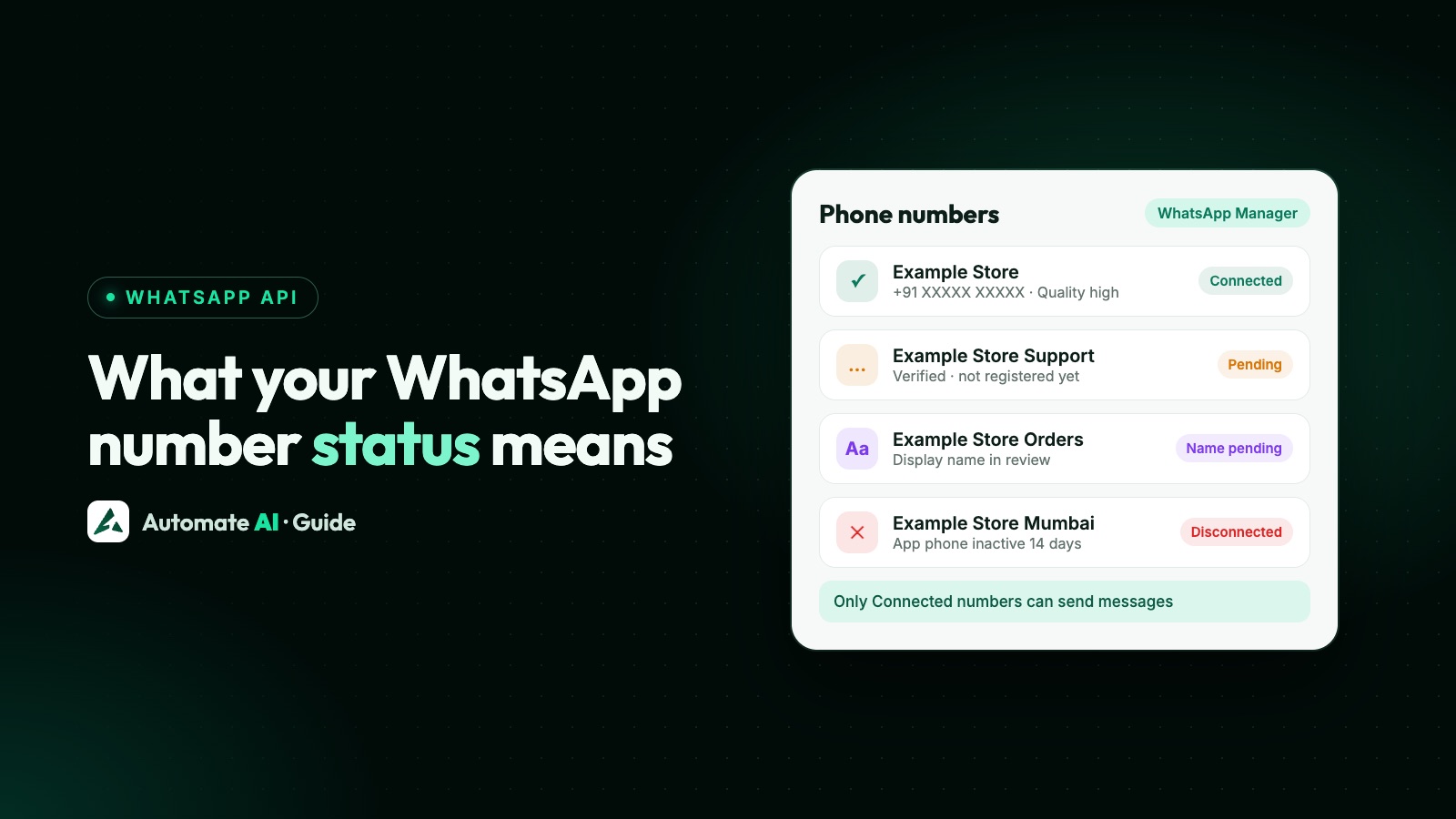
Only a phone number with the status Connected can send and receive messages through the WhatsApp Cloud API; if yours shows anything else, the usual causes are an unfinished verification or registration, a disconnection, or a display name, limit or policy issue. You see the status in WhatsApp Manager › Account tools › Phone numbers, next to the number’s quality rating and messaging limit.
Some statuses have changed: Meta retired the Flagged quality state on 7 October 2025, when messaging limits moved to the business portfolio. This guide explains each status and related state you can meet in 2026, what causes it and how to fix it, plus number limits and the “already registered” error.
Key takeaways
- Connected is the only status that can send and receive messages through the API.
- A new number must be added, verified with a code and registered through the API; WhatsApp Manager can’t register it.
- Flagged no longer happens since October 2025, and a quality drop no longer lowers your limit.
- Display name status (Pending review, Approved, Declined) is separate from the number’s status, but an unapproved name keeps the messaging limit lower.
- New portfolios can register 2 numbers; verification or the 2,000 messaging limit raises that to 20.
- A number already on WhatsApp must be deleted from the app first, or connected with coexistence.
Phone number statuses at a glance
| What you see | What it means | What to do |
|---|---|---|
| Connected | The number is registered and can send and receive messages | Nothing; watch quality and limits |
| Pending, or not connected after setup | Meta doesn’t define Pending; check whether the number is verified and registered | Verify the code, then register through the API |
| Disconnected | The number isn’t connected to the API right now; Meta’s documented causes are listed below | Find the reason and reconnect or re-register |
| Flagged | Retired: Meta says this state is no longer possible since 7 October 2025 | Check quality rating and Business Support Home instead |
| Restricted, or sends to new people stop | Check two things: the messaging limit, and any policy restriction on the account | Messaging limits panel and Business Support Home |
| Display name Pending review / Declined | Meta is reviewing, or rejected, the display name | Wait, or edit the name to meet the rules |
| “Phone number has been blocked” | WhatsApp blocked the number; it can’t be added to an account | Read the alert in WhatsApp Manager Overview or Business Support Home |
Meta says a number’s status reflects its quality rating and current messaging limit, and that a number must be Connected to send and receive messages through the API.
Where to check status: WhatsApp Manager and the API
- WhatsApp Manager › Account tools › Phone numbers: the Status column, the Name column (display name), quality rating and messaging limits.
- API, number status:
GET /<PHONE_NUMBER_ID>?fields=statusreturns, for example,CONNECTED. - API, the full picture:
GET /<PHONE_NUMBER_ID>?fields=health_statusreturnsAVAILABLE,LIMITEDorBLOCKEDfor the number, its WhatsApp Business Account, the business portfolio and the app.LIMITEDcomes with a reason;BLOCKEDcomes with an error code and a possible solution. - Other fields:
quality_rating(GREEN, YELLOW, RED or NA),name_statusfor the display name, andcode_verification_status(VERIFIED or UNVERIFIED), which Meta says to check before requesting a verification code.
Pending or not connected: finish verification and registration
Meta’s API reference lists PENDING among the possible number statuses without defining it. If a newly added number can’t send, check the three setup steps below. Meta’s docs stress that adding a number through WhatsApp Manager, the App Dashboard or Embedded Signup doesn’t register it:
- Add the number to your WhatsApp account (WhatsApp Manager, App Dashboard or your provider’s Embedded Signup).
- Verify ownership with the 6-digit code sent by SMS or voice call.
code_verification_statusshould read VERIFIED. - Register it with
POST /<PHONE_NUMBER_ID>/register,messaging_product: "whatsapp"and a 6-digitpin. This can only be done through the API.
| Error | Meaning | Fix |
|---|---|---|
| 133006 | The number must be verified before registering | Request and enter a verification code |
| 133010 | The number isn’t registered on the platform | Call the register endpoint |
| 136024 | You requested a code for a number that’s already verified | Skip to registration |
| 133005 | Wrong two-step verification PIN | See two-step verification PIN |
| 133016 | More than 10 register or deregister attempts in 72 hours | Wait until the block lifts |
| 133015 | The number was recently deleted and deletion hasn’t finished | Wait 5 minutes and retry |
Flagged and Restricted in 2026
Flagged: retired
Before 7 October 2025, a number whose quality dropped to low was marked Flagged, and if it stayed Flagged for 7 days its messaging limit fell a level. Meta’s documentation now says the Flagged state is no longer possible and that a quality drop doesn’t downgrade the limit. Low quality still matters: you won’t move up a messaging limit without high-quality messages. See WhatsApp quality rating.
If sending stops or you see “Restricted”
Check two different things, because the fixes are different:
- Your messaging limit. Limits now belong to the business portfolio and count unique people you message outside a customer service window in a moving 24 hours, shared by all your numbers. Replies to customers who messaged you in the last 24 hours don’t count. See how to increase your messaging limit.
- A policy restriction. After repeated policy violations Meta can block templates for 1 or 3 days, block all messages for 5, 7 or 30 days, block adding numbers, or lock the account. Developers receive an
account_updatewebhook with the restriction type, such asRESTRICTED_BIZ_INITIATED_MESSAGING(can’t start conversations) orRESTRICTED_ADD_PHONE_NUMBER_ACTION, and its expiry. Details and the Request review button are in Business Support Home; see WhatsApp account restricted or banned.
Error 131064 is a third case: Meta limited messaging because of template classification violations. It lifts automatically after the enforcement period; categorise templates honestly from then on.
Display name status: pending, approved or declined
| name_status | Meaning |
|---|---|
| PENDING_REVIEW | Meta is reviewing the name |
| APPROVED | The name is approved |
| DECLINED | The name wasn’t approved |
| AVAILABLE_WITHOUT_REVIEW | The name can be used without review |
| EXPIRED | The certificate expired and can’t be used to register the number |
| NONE | No certificate, so it can’t be used to register the number |
You can message before the name is reviewed. Meta reviews it automatically when your business reaches a higher messaging limit, but until it is approved the number can show as LIMITED in health status, with Meta’s note that the message limit will increase after approval. If it’s declined, edit the name to follow the guidelines or appeal through Meta’s developer support. After a name change is approved you must re-register the number within 14 days. Rules and examples: WhatsApp display name.
Disconnected and blocked numbers
A number that was working can drop off the API for a few documented reasons. Meta’s account_update webhook reports ACCOUNT_OFFBOARDED when a WhatsApp account is offboarded because of a device change or phone number re-registration, and ACCOUNT_RECONNECTED when it comes back. For numbers using coexistence (the WhatsApp Business app and the API together), Meta lists these disconnection reasons:
| Reason | What happened |
|---|---|
| PRIMARY_INACTIVITY | The phone with the WhatsApp Business app was inactive for about 14 days |
| COMPANION_INACTIVITY | A linked companion device was inactive for about 30 days |
| CHANGE_NUMBER | The business changed its phone number |
| USER_RE_REGISTERED | The business re-registered on a new device |
| BUSINESS_DOWNGRADE | The number was registered on the consumer WhatsApp app |
| ACCOUNT_DISCONNECTED | Enforcement, or the business deleted its WhatsApp account |
Keep the phone with the WhatsApp Business app active, and if a disconnection happens, ask your provider how to reconnect. More fixes are in coexistence not working.
If you see “Phone Number has been blocked” when adding a number, WhatsApp has blocked it and it can’t be added to an account. Meta says to check the alert in WhatsApp Manager › Overview or follow the instructions in Business Support Home, and to contact support if you think it’s a mistake. A number banned on WhatsApp must be unbanned through WhatsApp’s appeal process before it can be registered.
How many numbers can you add?
| Situation | Registered numbers |
|---|---|
| New business portfolio | 2 |
| Business verified, or messaging limit of 2,000 reached | Up to 20, raised automatically |
| More than 20 across all your accounts | Ask Meta’s support (Meta says to contact direct support) |
When the cap rises, Meta sends a Meta Business Suite notification and a business_capability_update webhook. A business portfolio also starts with a limit of 20 WhatsApp account hierarchies. A policy restriction can block adding numbers altogether: in Embedded Signup this shows as “To add a phone number, you’ll need to address any restrictions on this account”. Remember that extra numbers don’t add messaging capacity, because all numbers share the portfolio’s limit.
“This number is already registered on WhatsApp”
A number in use on WhatsApp or the WhatsApp Business app can’t be registered on the API until it is deleted there. Embedded Signup says it can take up to 3 minutes for the number to become available after you disconnect it. You have two choices:
- Keep the app with coexistence: connect your existing WhatsApp Business app number to the API and keep using the app. See WhatsApp coexistence.
- Move fully to the API: delete the account in the app (its chat history isn’t moved), then add, verify and register the number. Compare both in coexistence vs migration.
If the number is already connected to another provider through the app, Meta’s error 3441049 asks you to disconnect it in the WhatsApp Business app (Settings › Account › Business Platform), then wait 15 minutes before retrying. Under Meta’s new account model, numbers can no longer be migrated between providers; the business shares its WhatsApp account with the new provider instead. More on setup in WhatsApp Cloud API phone numbers.
Connecting your number with Automate AI
In Automate AI, the Connect WhatsApp window opens Meta’s embedded sign-up, where you verify your own number by SMS or call and choose or create your business portfolio. Once it’s connected, your team handles chats in the shared inbox with assignment, internal notes, quick replies and business hours with an away message, and you can send approved templates from Campaigns. If a number won’t connect, call us on +91 836 977 8812 for remote support, or contact us.
Frequently asked questions
What does Connected mean for a WhatsApp API number?
The number is registered and can send and receive messages through the Cloud API. Meta says a number must be Connected to do this.
Why is my WhatsApp Business API number pending?
Usually because it was added but not verified with the SMS or voice code, or verified but not registered through the API’s register endpoint. Adding a number in WhatsApp Manager doesn’t register it.
Does WhatsApp still flag phone numbers?
No. Meta says the Flagged state is no longer possible since 7 October 2025, and a quality drop no longer lowers the messaging limit. You still need high quality to move up.
Why is my display name pending?
Meta reviews display names automatically when your business reaches a higher messaging limit. Until it’s approved, health status can show the number as limited, and Meta says the limit increases after approval.
How many phone numbers can I add to the WhatsApp Business API?
Two for a new business portfolio. Meta raises it to 20 automatically after business verification or when you reach the 2,000 messaging limit; beyond that, contact Meta’s support.
How do I use a number that’s already registered on WhatsApp?
Either connect it with coexistence and keep the WhatsApp Business app, or delete the account in the app (losing its chat history) and register the number on the API. It can take a few minutes to become available.
Sources
- Meta: Business phone numbers
- Meta: Register a business phone number
- Meta: WhatsApp Business Phone Number API reference
- Meta: Messaging and calling health status
- Meta: Changes to messaging limits (October 2025)
- Meta Business Help: Your WhatsApp Business phone number’s quality rating
- Meta: Display names
- Meta: account_update webhook
- Meta: Policy enforcement
- Meta: Error codes
- Meta: Embedded Signup errors
- Meta: WhatsApp accounts and Messaging accounts
- Meta: Account model evolution (number migration)
WhatsApp rules and prices change. We check these guides against Meta’s documentation, but always confirm current terms with Meta before you rely on them. Questions? Message us on WhatsApp at +91 836 977 8812.