Retarget WhatsApp Campaign Non-Readers and Non-Clickers Without Spamming
How to follow up a WhatsApp campaign by result: who didn’t get it, who didn’t read it, who read but didn’t tap, and who did. The WhatsApp limits that apply, second-message templates, honest click tracking, and how to resend or retarget in Automate AI.
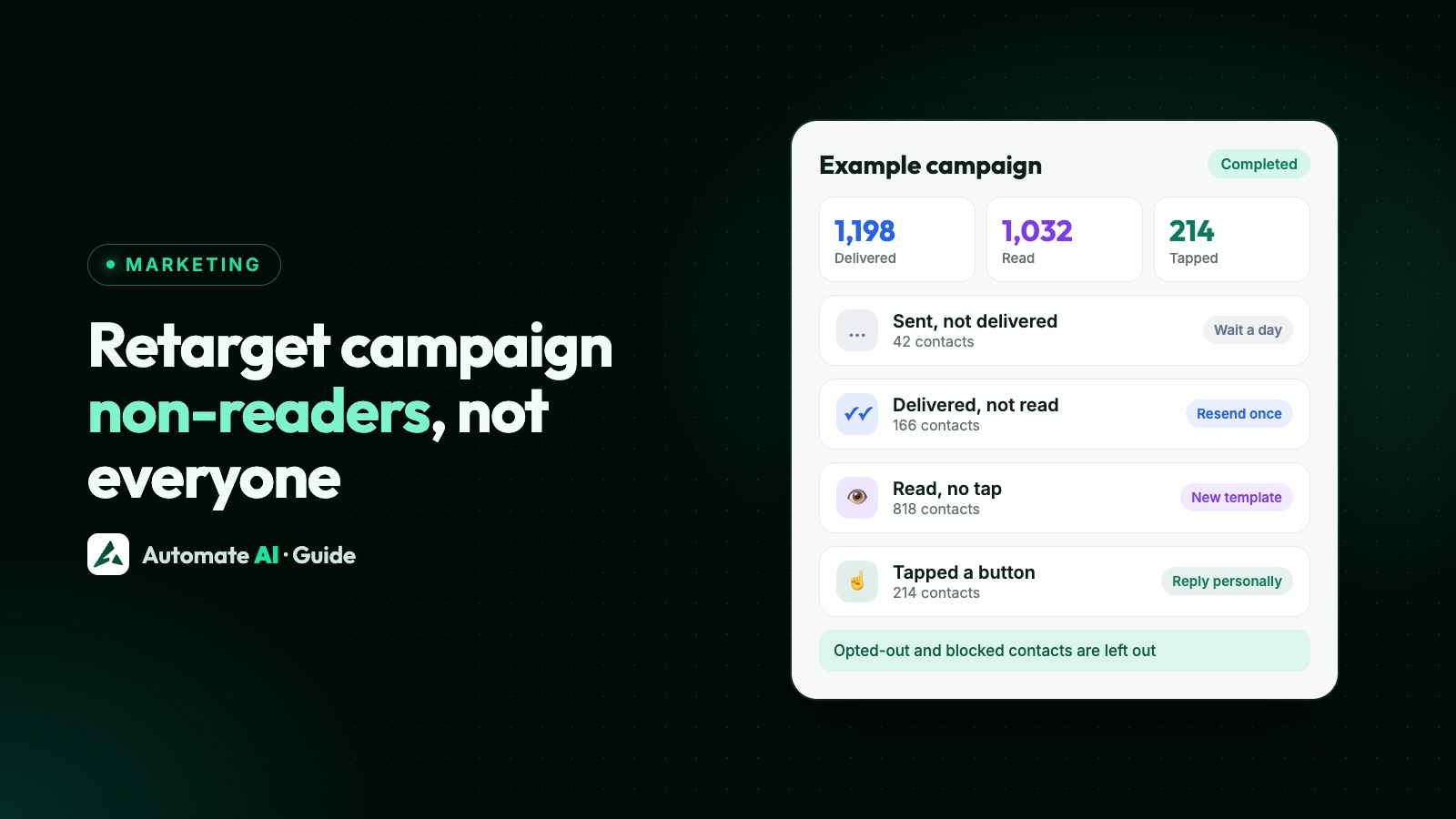
Retargeting a WhatsApp campaign means splitting recipients by what happened (not delivered, delivered but not read, read without a tap, tapped) and sending each group one better message, once, instead of blasting the same message again. Done this way it recovers people who simply missed you; done badly it wastes money, annoys customers and drags down your template quality.
This guide explains what each result tells you, the WhatsApp limits that make “just resend it” risky, what to send each group, how to track button taps honestly, and how to resend or retarget a finished campaign in Automate AI. Planning the first send? Start with WhatsApp marketing and scheduling messages.
Key takeaways
- Treat each result as its own audience: not delivered, not read, read without a tap, tapped.
- Follow up once, with a better message, and only to people who opted in and haven’t opted out.
- WhatsApp may hold back marketing to people who rarely engage (error 131049); wait at least 24 hours before trying them again.
- Low read rates can get a template marked low quality or paused, so a fresh template often beats resending the old one.
- Quick-reply taps are tracked automatically; website buttons only through a tracked link; call and copy-code taps can’t be tracked.
- Every resent message is charged again when it’s delivered.
What each campaign result tells you
| Result | What it means | Sensible next step |
|---|---|---|
| Sent, not delivered | WhatsApp accepted the message but hasn’t confirmed it reached the phone. | Wait a day; try once more or leave it. |
| Delivered, not read | It reached the phone but no read was reported. | One follow-up with a clearer first line, at a different time of day. |
| Read, no tap | They saw it and didn’t act. | A different angle in a new template, or nothing. |
| Tapped a button | They showed interest; a quick-reply tap also opens a 24-hour window. | A personal reply or chatbot answer, not another campaign. |
| Replied | A conversation has started. | Your team or AI takes it from here. |
| Failed | It didn’t go out: an opt-out, an invalid number, a paused template or a per-user limit. | Fix the cause first. Never retry an opt-out. |
The groups behave differently, so a single “resend to everyone who didn’t convert” treats your warmest and coldest contacts the same way. Split first, then decide.
The limits that make “just resend it” risky
- Per-user marketing limits. WhatsApp may cap how many marketing templates a person receives from businesses, based on their recent read rate and how many messages they already have. Messages held back fail with error 131049. Meta says to wait at least 24 hours before resending, and repeated attempts within 24 hours can block further attempts to that person for up to 24 hours.
- Template quality. Meta can mark a template “Active - Low Quality” after negative feedback or low read rates, and pause it after recurring problems. Sending the same template again to people who already ignored it is a quick way to collect low read rates.
- Opt-outs and blocks. WhatsApp’s policy requires you to respect every request to stop, on or off WhatsApp, and people can stop a business’s marketing messages or block and report it.
- Messaging limits. Your business can only message a set number of unique people outside an open window in a moving 24-hour period, starting at 250 for new accounts. A retarget uses that allowance too. See WhatsApp broadcast limits.
- Cost. Meta charges for each delivered template, so every resend is paid for again: in India, ₹0.8631 per delivered marketing message (Meta’s rate from 1 October 2026).
What to send each group
Not delivered
This can happen when a phone is switched off or offline for a while. Give it a day; if it still hasn’t delivered, one more try is reasonable. If a number never delivers across several campaigns, stop sending to it.
Delivered, not read
The message reached them and lost the inbox battle. Resending the identical template is the quickest option; a new template with a sharper first line and a different send time tells you more about what went wrong.
Read, no tap
They saw the offer and passed. Sending it again rarely changes that. Either try a genuinely different angle (another product, a real deadline, a useful tip) or leave them until your next campaign.
Tapped a button
These are your warmest contacts, and a quick-reply tap opens a 24-hour window, so you can answer with normal messages. Reply personally or with a chatbot, and keep them out of “didn’t act” follow-ups.
Failed
Read the error before doing anything. Opted-out contacts must never be retried, invalid numbers should be cleaned out, and 131049 means wait at least 24 hours. If the template was paused, fix the template instead of resending. See why WhatsApp messages aren’t delivered.
Second-message templates (sample data)
Short, specific and honest. Each of these is a marketing template that needs Meta’s approval, and each tells people how to stop.
- For non-readers: “Hi {{1}}, quick one from Example Store: the festive collection is 20% off until Sunday. Tap to see this week’s picks. Reply STOP to opt out.”
- For readers who didn’t tap: “Hi {{1}}, not into sarees this time? Our new cotton kurtas start at ₹799. Tap to browse. Reply STOP to opt out.”
- For a real deadline: “Hi {{1}}, the Example Academy weekend batch has 6 seats left and admissions close on Friday. Reply YES for a call back. Reply STOP to opt out.”
- For a service business: “Hi {{1}}, Example Cooling has AC service slots free this weekend. Tap a day to book. Reply STOP to opt out.” [Saturday] [Sunday]
Avoid “You didn’t read our message”, invented countdowns and the same text with a new emoji. If you can’t say something new, don’t send. More wording ideas in WhatsApp follow-up message templates.
Track clicks honestly
You can only follow up on actions you can see, and WhatsApp reports some button taps but not others:
| Button type | Can taps be tracked? |
|---|---|
| Quick reply (for example “Interested”) | Yes. The tap arrives as a message, so it is recorded automatically. |
| Visit website | Only if the button uses a tracked redirect link; in Automate AI that is a Smart Link. |
| Call now | No. The call starts on the customer’s phone and WhatsApp doesn’t report it. |
| Copy code | No, for the same reason. |
In Automate AI, Campaigns › Button Clicks shows total clicks, customers who clicked and the most-clicked button, filtered by campaign, button type and dates, with an export. Inside a campaign, the Clicked card and the taps filter (Tapped, 0 taps, 1, 2, 3+) show exactly who acted, and the CSV export lists each recipient’s clicked button and number of clicks.
Resend or retarget in Automate AI, step by step
A finished campaign gives you two options. Resend sends the same message again to the group you pick. Retarget creates a new campaign, usually with a different template, for recipients with the results you choose.
Resend the same message
- Open Campaigns and click the finished campaign.
- Click Resend and choose who gets it: Resend to All, Resend Failed Only, or one result group: Sent, not delivered, Delivered, not read or Read. The failed and result options show how many people each one reaches.
- Confirm. The dialog reminds you that each message is charged again. Only that group gets the message, and the campaign’s counts are recalculated.
Retarget with a new message
- In the campaign, click Retarget.
- Under Latest status, tick one or more of Sent, Delivered, Read and Failed. The count shows how many can be messaged: contacts who opted out, are blocked or deleted, or whose number WhatsApp reported as undeliverable are left out automatically.
- Choose an approved Template (the original is selected by default if it’s still approved) and fill its variables with text or a contact field. A live preview shows what customers will see.
- Optionally rename it, then click Review & Send to see the cost against your wallet balance.
- Click Send Now, or close the window to keep it as a draft and start it later from Campaigns. Nothing is sent before you choose Send Now.
Was it worth it?
Judge the follow-up as a campaign of its own. Each campaign page shows sent, delivered, read and failed counts, a performance-over-time chart with replies and clicks, button clicks, and Cost & Efficiency: total spend and the cost per delivered message, per reply and per click. Compare the follow-up’s cost per reply with the original’s.
Then watch your quality rating and the template’s status over the next few days. If either slips after a follow-up, send fewer and better ones next time, and make opting out easy: see WhatsApp opt-out and unsubscribe.
Frequently asked questions
Can I resend a WhatsApp campaign to people who didn’t read it?
Yes, if they opted in and haven’t opted out. In Automate AI, open the finished campaign and choose Resend › Delivered, not read. Each resent message is charged again, and one follow-up is usually enough.
Why did my resend fail with error 131049?
WhatsApp limited how many marketing messages that person receives, based on their engagement. Meta advises waiting at least 24 hours before trying again; repeated attempts can block further sends to that person for up to 24 hours.
Is resending a WhatsApp campaign spam?
Not if it goes once, to opted-in people, with something worth reading. Resending the same promotion again and again to people who ignore it leads to blocks, low read rates and paused templates.
Can I see who clicked the buttons in my WhatsApp campaign?
Quick-reply taps, yes. Website buttons only through a tracked link such as an Automate AI Smart Link. Call and copy-code taps happen on the phone and WhatsApp doesn’t report them.
Should I follow up people who read the message?
Rarely with the same message. If they read it and didn’t act, try a different offer or angle in a new template, or wait for your next campaign.
Does resending a campaign cost money?
Yes. Meta charges for every delivered template, so each resent message is paid for again. In India Meta’s marketing rate from 1 October 2026 is ₹0.8631 per delivered message, plus your provider’s charge.
Sources
- Meta: Per-user marketing template limits
- Meta: Template fundamentals (quality and pausing)
- Meta: Messaging limits
- Meta: Pricing on the WhatsApp Business Platform
- Meta: Send messages (customer service window)
- Meta: Get opt-in for WhatsApp
- WhatsApp Business Messaging Policy
- Automate AI: WhatsApp Marketing
WhatsApp rules and prices change. We check these guides against Meta’s documentation, but always confirm current terms with Meta before you rely on them. Questions? Message us on WhatsApp at +91 836 977 8812.