Click-to-WhatsApp Ad Examples: Ad Copy and Opening Messages by Industry
Ten Click-to-WhatsApp ad examples by industry: primary text, headline, pre-filled message, greeting and first reply, written to fit Meta’s advertising rules.
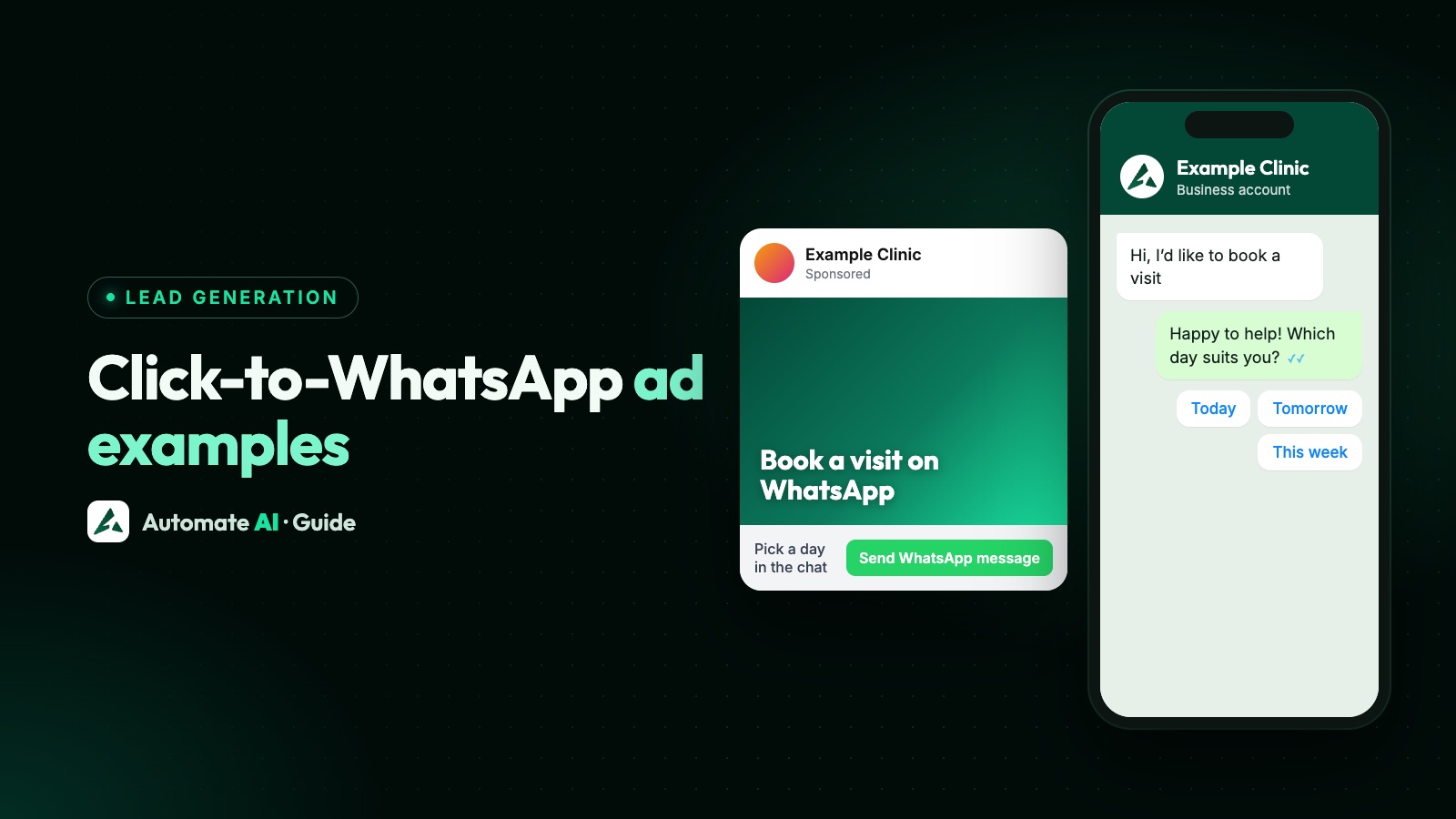
A good Click-to-WhatsApp ad has five parts that agree with each other: primary text with a clear offer, a short headline, a Send message button, a pre-filled message that names what the customer wants, and a greeting that asks one easy question. Below are ten complete samples, one per business type, that you can adapt today.
Every business, name and price here is made up, and none of these samples is a promise of results. They’re written with Meta’s Advertising Standards in mind, because an ad that asks “Do you have…?” about someone’s health or money is likely to be rejected. If you’re new to these ads, start with our Click-to-WhatsApp ads guide.
Key takeaways
- Put the offer, price or area in the primary text, so the people who tap are the right ones.
- Keep headlines to about 27 characters, the length Meta recommends for Facebook Feed.
- Write your own pre-filled message and greeting; Meta’s default greeting, “Hello! Can I get more info on this?”, names no product.
- The greeting asks one question your team needs answered first, and the first reply offers buttons.
- Never imply you know someone’s health, finances or other personal attributes, and keep those details out of the chat.
The five parts of a Click-to-WhatsApp ad
| Part | Where people see it | What to write |
|---|---|---|
| Primary text | Above the image or video | The offer, a price or area, and that tapping opens WhatsApp |
| Headline | Below the image, next to the button | The offer in a few words |
| Button | On the ad | Send message, which opens a chat with your number |
| Pre-filled message | Typed in the customer’s WhatsApp, ready to send | What they want, in their words |
| Greeting | In WhatsApp, from your business | Thanks and one easy question |
In Ads Manager, the pre-filled message and greeting live in the message template of the ad. Meta also lets you add suggested questions (ice breakers) people can tap instead of typing. After that, your first reply is up to you, your team or a chatbot.
Length matters more than people expect. Meta recommends 50 to 150 characters of primary text and a 27-character headline in Facebook Feed, and only 44 characters of primary text in Instagram Reels. The samples below keep headlines short and put the offer in the first few words. Image sizes are in WhatsApp ad sizes.
Write within Meta’s advertising rules
Meta reviews every ad. These rules from its Advertising Standards catch out a lot of messaging ads:
- No personal attributes. Ads can’t assert or imply someone’s race, religion, age, sexual orientation, gender identity, disability, physical or mental health, vulnerable financial status, criminal record or name. Describe your service, not the viewer.
- Health and wellness. Ads for weight loss, dietary supplements and cosmetic procedures must target people aged 18 or older, can’t attack how people look, and can’t claim to cure diseases such as diabetes or cancer.
- Financial products. Ads for credit cards, loans or insurance must target people aged 18 or older, can’t ask for bank or card details, and may need proof that you’re authorised where the law requires a licence.
- Special Ad Categories. Every campaign says whether it’s about housing, employment, financial products and services, or politics. The first three limit the targeting you can use, and for financial ads shown in the United States the category is required.
| Likely to be rejected | Write this instead |
|---|---|
| “Do you have sensitive teeth?” | “Sensitivity check-ups at our Baner clinic” |
| “Behind on your EMIs?” | “Personal loans from a licensed lender: check eligibility” |
| “Struggling with your weight?” | “Coached fitness classes, mornings and evenings” |
| “Priya, your size is back!” | “Sizes 6 to 11 back in stock” |
The same care applies once the chat opens. Ask what you need to book or quote, and never ask for health details, card numbers, account numbers or ID numbers on WhatsApp. Meta’s best practices also suggest making clear in the ad that tapping opens a chat with your business.
Examples for shops, food and beauty
1. Online shoe shop (sample: Stride Lane)
- Primary text: Running shoes from ₹1,899, sizes 6 to 11. Tap to chat on WhatsApp and we’ll send photos in your size.
- Headline: Running shoes from ₹1,899
- Pre-filled message: Hi, please show me the running shoes from ₹1,899.
- Greeting: Hi! Which size do you wear? We’ll send the colours in stock.
- First reply: buttons for Size 6 to 8, Size 9 to 11 and Talk to us, then photos for that size range.
2. Office catering (sample: Saffron Bowl)
- Primary text: Office lunch catering for 20 to 200 people in Pune. Message us your date and headcount for a menu and quote.
- Headline: Catering for 20 to 200
- Pre-filled message: Hi, I need a quote for an office lunch.
- Greeting: Happy to help! What’s the date, and about how many people?
- First reply: buttons for Veg only and Veg and non-veg, then the area, then a person sends the quote.
3. Salon (sample: Glow Studio)
- Primary text: Bridal makeup trials on weekdays in Indiranagar. Message us to see our looks and book a slot.
- Headline: Book a bridal trial
- Pre-filled message: Hi, I’d like to book a bridal makeup trial.
- Greeting: Congratulations! When’s the wedding, and which weekday suits you for a trial?
- First reply: a short look book as photos, then a list of free slots this week.
Examples for appointments and visits
4. Dental clinic (sample: Brightsmile Dental)
- Primary text: Teeth whitening consultations at our Baner clinic, Monday to Saturday. Message us to pick a time.
- Headline: Whitening consultations
- Pre-filled message: Hi, I’d like to book a whitening consultation.
- Greeting: Thanks for messaging Brightsmile. Which day and time suit you?
- First reply: a list of slots, plus “Please don’t send medical details here. The dentist will go through them at your visit.”
5. New homes (sample: Greenfield Homes)
- Primary text: 2 BHK homes in Kharadi from ₹78 lakh. Site visits every weekend. Message us for the floor plan.
- Headline: 2 BHK from ₹78 lakh
- Pre-filled message: Hi, please send the Kharadi 2 BHK floor plan.
- Greeting: Here’s the floor plan. Would you like to visit this weekend?
- First reply: the floor plan as a PDF, then buttons for Saturday, Sunday and Later.
6. Car service centre (sample: TorqueCare)
- Primary text: Car servicing with pickup and drop in Whitefield. Message us your car model for a price.
- Headline: Car service with pickup
- Pre-filled message: Hi, I’d like a service price for my car.
- Greeting: Sure! Which car do you drive, and what year is it?
- First reply: a person sends the price, then a list of pickup slots.
7. Weekend classes (sample: Northstar Classes)
- Primary text: Spoken English weekend batch starts 6 December. Small groups, online or in Kothrud. Message us for timings and fees.
- Headline: Weekend English batch
- Pre-filled message: Hi, please share the weekend batch timings and fees.
- Greeting: Thanks! Would you prefer Saturday mornings or Sunday evenings?
- First reply: the timetable and fees as a PDF, then buttons for Online and In person.
Examples for B2B, travel and insurance
8. Billing software (sample: LedgerLite)
- Primary text: GST billing software for shops: invoices, stock and reports in one app. Message us to book a 20-minute demo.
- Headline: Book a 20-minute demo
- Pre-filled message: Hi, I’d like a demo of the billing software.
- Greeting: Great! How many outlets do you run, and which day suits you?
- First reply: buttons for 1 outlet, 2 to 5 and More than 5, then a booking link.
9. Holiday packages (sample: Bluepine Holidays)
- Primary text: 5-day Kerala trip with hotels and transfers, from ₹24,500 per person. Message us for dates.
- Headline: Kerala, 5 days
- Pre-filled message: Hi, please send dates for the 5-day Kerala trip.
- Greeting: Lovely choice! Which month, and how many adults and children?
- First reply: the itinerary as a PDF, then a person checks dates and sends the price.
10. Insurance adviser (sample: Shieldwise Advisers)
- Primary text: Compare family health insurance plans with a licensed adviser. Message us to book a 15-minute review.
- Headline: Compare insurance plans
- Pre-filled message: Hi, I’d like to compare family health insurance plans.
- Greeting: Thanks! How many people should the plan cover, and in which city?
- First reply: a list of review times, plus “Please don’t send medical history, policy numbers or ID here. We’ll cover that securely in your review.”
The welcome flow after the first message
The ad’s job ends when the customer taps send. What happens in the next minute decides whether the chat goes anywhere. A simple flow:
- Start a chatbot on the message. In Automate AI a chatbot can start on a keyword or when a new contact is added. Keywords work word by word, so add one distinct word to each pre-filled message (for example “Hi, please send the KHARADI floor plan”) if you want each ad to start its own flow.
- Answer the question the ad raised, with the photo, price list or floor plan, before asking anything.
- Ask one question at a time with buttons. A chatbot’s Update Contact step saves the customer’s next typed reply; to record a button choice, use Add to group.
- Hand over to a person in the shared inbox once you know what they need, or let the AI Assistant answer common questions.
- Follow up within the rules. You can reply freely for 24 hours after their last message. If you reply within 24 hours to a chat that started from the ad on the WhatsApp phone app, Meta’s free entry point window can keep your messages free for up to 7 days.
Someone who asked about one product hasn’t agreed to regular offers, so ask before adding them to campaigns (WhatsApp opt-in). A later marketing template for the travel sample, sent only to people who opted in, could read:
In Automate AI, a typed STOP opts the contact out automatically. More scripts for the rest of the conversation are in WhatsApp sales scripts.
How to create a WhatsApp ad
Meta’s Business Help Centre gives these steps for the Traffic or Engagement objective in Ads Manager:
- Go to Ads Manager, click + Create, choose Traffic or Engagement and click Continue.
- Name the campaign and click Next.
- In the Conversion section, choose Message destinations.
- Under Facebook Page, choose your Page. The WhatsApp number connected to that Page is the one the ad uses.
- Under Message destinations, tick WhatsApp. If it’s greyed out, click Connect account and verify your number.
- Set the budget, schedule and audience, then build the ad with your primary text, headline and media.
- In Message template, create a Start conversation template with your greeting and pre-filled message or suggested questions, then publish.
Meta recommends running these campaigns for 7 days or more for stable results, so change one thing at a time, such as the headline or the greeting, and compare chats started and the quality of the leads.
You can also create them in Automate AI under Meta Ads, on every plan: describe your offer in a line, check the headline, text, audience and greeting that AI drafts, add a photo and publish. Meta bills the ad spend to your own ad account. See Click-to-WhatsApp Ads, and for sharper targeting and qualifying, how to get quality leads from WhatsApp ads.
Frequently asked questions
What is a good example of a WhatsApp ad?
One where every part agrees: an ad that says “2 BHK homes in Kharadi from ₹78 lakh”, a pre-filled message asking for that floor plan, and a greeting that sends it and asks about a visit. The customer gets what the ad promised in the first reply.
What should the pre-filled message say?
What the customer wants, in their words, such as “Hi, please send the floor plan”. Set it yourself, along with the greeting: Meta’s default greeting message, “Hello! Can I get more info on this?”, doesn’t tell your team which ad or product the chat is about.
How do I create a WhatsApp ad?
In Ads Manager, choose an objective such as Engagement, set Message destinations, pick the Facebook Page connected to your number, tick WhatsApp and set up the message template. In Automate AI, open Meta Ads, describe your offer, check the draft and publish.
Can an ad ask “Do you have diabetes?”
No. Meta’s rule on personal attributes doesn’t allow ads that assert or imply someone’s health, finances, religion, age and other attributes. Describe your service instead, such as “Diabetes care clinic in Baner”.
Can I ask for ID or card numbers in the WhatsApp chat?
Don’t. Keep health details, card numbers, account numbers and ID numbers out of WhatsApp, and collect anything sensitive through a secure process your business already uses.
Will these samples get more leads?
They’re starting points, not a promise. Results depend on your offer, audience and how fast you reply. Run each version for about a week and compare chats started and qualified leads.
Sources
- Meta Advertising Standards: Privacy violations and personal attributes
- Meta Advertising Standards: Health and wellness
- Meta Advertising Standards: Financial and insurance products and services
- Meta for Developers: Special Ad Categories
- Meta for Developers: Ads that click to WhatsApp
- Meta Business Help Centre: Create ads that click to WhatsApp in Ads Manager
- Meta Business Help Centre: Best practices for ads that click to message
WhatsApp rules and prices change. We check these guides against Meta’s documentation, but always confirm current terms with Meta before you rely on them. Questions? Message us on WhatsApp at +91 836 977 8812.