Reply to a Message and Send Reactions With the WhatsApp API
How to quote a customer’s message with a contextual reply and react with an emoji in the WhatsApp Cloud API, the 30-day limits, and how reactions arrive.
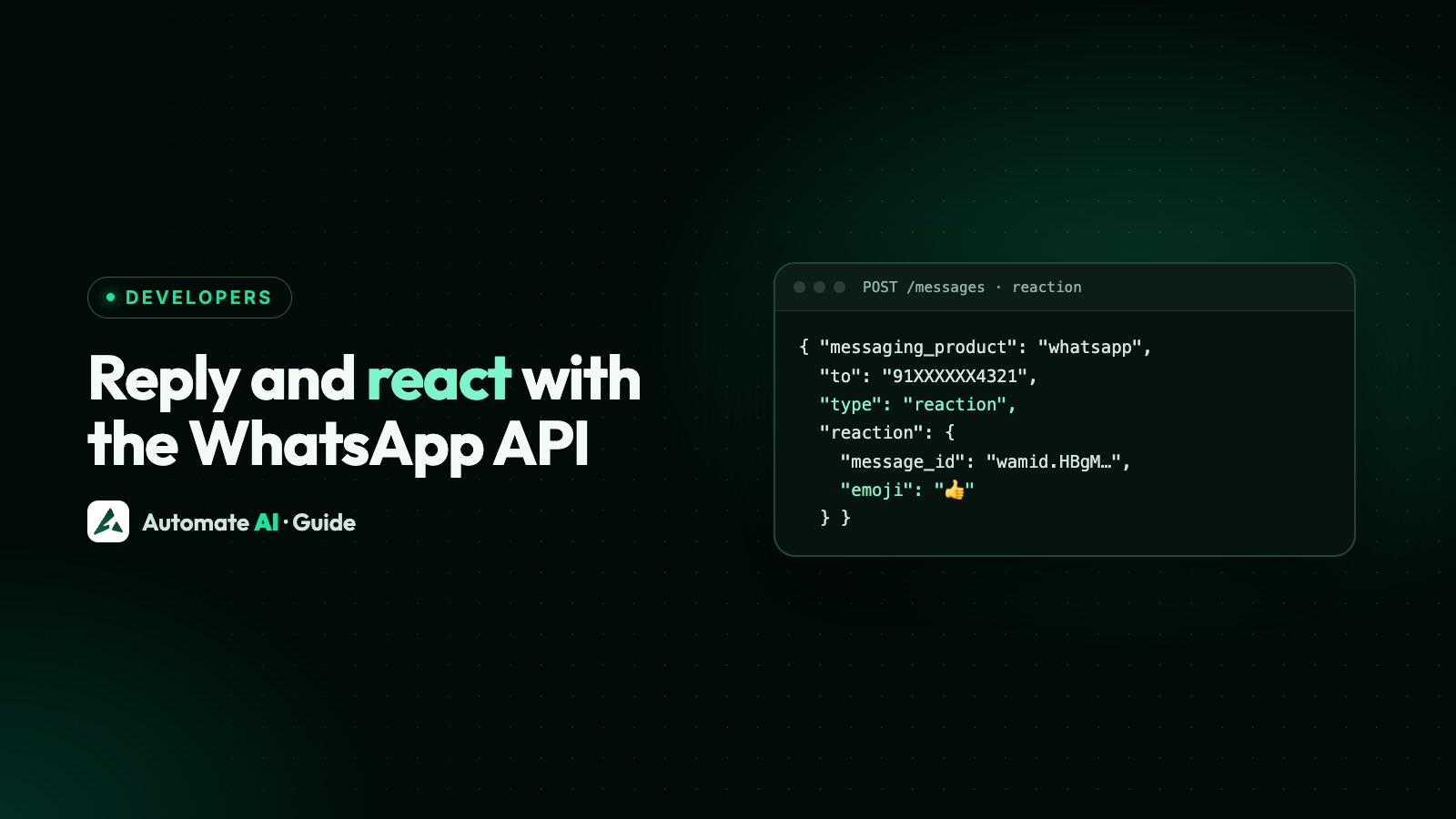
To reply to a specific message with the WhatsApp Cloud API, add a context object with the customer’s message_id to a normal send request; to react, send a message of type: "reaction" with that message_id and an emoji. The reply shows the customer’s message quoted in a bubble above yours, and the reaction appears on their message.
Both go to the same endpoint you already use for sending, and both are free-form messages, so they need an open 24-hour window. This guide gives each request, Meta’s limits, how customers’ own replies and reactions reach your webhook, when to use which, and what Automate AI does with them.
Key takeaways
- A contextual reply is any message with
context: { "message_id": "<wamid>" }added. The quote bubble doesn’t show for template replies. - A reaction is
type: "reaction"withreaction.message_idandreaction.emoji. You can only react to a message the customer sent you, up to 30 days old. - A failed reaction comes back as a webhook with error 131009, and reactions only ever get a
sentstatus. - Customer reactions arrive as
type: "reaction"webhooks. When they remove one, the payload has noemoji. - In Automate AI’s shared inbox you can reply to a specific message, and customers’ reactions show on the message they reacted to.
Two ways to answer one message
In a busy chat, a customer might ask three things in a row. A plain reply lands at the bottom and leaves them guessing which question you answered. WhatsApp gives you two tools to point at a single message:
| Contextual reply | Reaction | |
|---|---|---|
| What the customer sees | Their message quoted above your reply | An emoji on their message |
| Request | Any message type plus context.message_id | type: "reaction" with message_id and emoji |
| Which messages | The message you’re answering | Only messages the customer sent you, up to 30 days old |
| Status webhooks | Sent, delivered and read, as usual | sent only |
| Needs an open window? | Yes, unless it’s a template | Yes, it’s a free-form message |
Both use POST https://graph.facebook.com/<API_VERSION>/<PHONE_NUMBER_ID>/messages with a system or business access token. The message_id you need is the customer message’s wamid, which you get from the incoming message webhook in messages[].id.
How to send a contextual reply
A contextual reply isn’t a separate message type. You take the message you were going to send and add one object:
{ "messaging_product": "whatsapp", "recipient_type": "individual", "to": "<CUSTOMER_NUMBER>", "context": { "message_id": "<WAMID_TO_REPLY_TO>" }, "type": "text", "text": { "body": "Yes, the blue one is in stock in size M." } }
The response is the same as any send: a new wamid for your reply, which your status webhooks will refer to. Meta’s documentation shows a text reply, but context goes alongside any message type.
When the quote bubble doesn’t appear
Meta lists the cases where your message is delivered but without the quote at the top:
- The original was deleted, or moved to long-term storage. Meta says messages are typically moved after 30 days, unless you’ve enabled local storage.
- You reply with a template. Templates never show the quote bubble.
- You send audio, an image or a video and the customer is on KaiOS.
And one hard rule: you can’t send a reaction as a contextual reply. A reaction already points at a message through its own message_id.
How to send a reaction
A reaction is its own message type. Put the customer’s message ID and the emoji in a reaction object:
{ "messaging_product": "whatsapp", "recipient_type": "individual", "to": "<CUSTOMER_NUMBER>", "type": "reaction", "reaction": { "message_id": "<WAMID_OF_CUSTOMER_MESSAGE>", "emoji": "👍" } }
The emoji can be the character itself or its Unicode escape sequence, such as \uD83D\uDE00 for 😀. The response returns a wamid like any other send.
Meta’s limits on reactions
The reaction isn’t delivered if the message you’re reacting to:
- is more than 30 days old,
- doesn’t match any message in the chat thread,
- has been deleted, or
- is itself a reaction.
Meta’s reference describes reactions as applying to a message you received from a WhatsApp user, so use the customer’s message ID, not one of yours. A failed reaction doesn’t fail the API call: you get a messages webhook with error code 131009 instead. More on that code in WhatsApp API error codes.
When customers reply or react to your messages
The same two features work in the other direction, and both arrive on your messages webhook.
Customer reactions
When a customer reacts to a message you sent in the last 30 days, you get a message with type: "reaction". Its reaction object holds message_id, the wamid of your message, and emoji, the emoji they chose. If they remove the reaction, another webhook arrives with the same message_id and no emoji property. Treat a missing emoji as “remove this person’s reaction”, not as an error.
Store reactions against the original message rather than as new chat messages, or a thumbs-up on last week’s offer will look like a fresh conversation.
Customer replies and button taps
When a customer’s message refers to an earlier one, it carries a messages[].context object, and context.id is the wamid of that earlier message. That’s how you know which offer a “Shop now” button tap belongs to. The full payload and the other fields are in our guide to WhatsApp Cloud API webhooks.
- Save every
wamidyou send and receive, with the chat it belongs to. - On each incoming message, check for
context.id(a reply or tap) ortype: "reaction". - Look up the original by its
wamid, and attach the reply or reaction to it. - If you can’t find it, keep the message anyway and show it without the quote.
When to quote, react or just reply
Each tool sends a different signal. Here’s a simple rule of thumb, with sample chats:
| Situation | Best choice | Example |
|---|---|---|
| The customer asked several things | Contextual reply to each question | Quote “Do you deliver to Pune?” and reply “Yes, in 2 to 3 days.” |
| They sent a photo, receipt or document | React, then reply if needed | 👍 on the photo, then “Got it, we’ll check and update you today.” |
| They said thanks or confirmed | React | 🙏 on “Thanks, received!” |
| They sent something you can’t act on yet | Reply in words | “Thanks, Priya. Our team will reply by 6pm.” |
| A complaint or problem | Reply in words, never only a reaction | An emoji alone can look dismissive |
| The 24-hour window has closed | An approved template | No quote bubble shows on templates |
A reaction says “seen and fine” without starting a new message, which keeps chats short. But it isn’t an answer. If the customer asked something, they still need words. While you write those words, a typing indicator tells them a reply is on its way.
The 24-hour window and cost
Contextual replies and reactions are free-form messages, so they follow the customer service window: you can send them within 24 hours of the customer’s last message. Outside it, only an approved template goes through, and Meta says the quote bubble doesn’t appear on templates anyway.
A contextual reply is billed like any other reply in the window. Service messages are free for the first 1,000 per number each month and charged after that, since 1 October 2026; the details are in is the WhatsApp API free?
Common mistakes
- Using your own message ID for a reaction. Meta’s rules are about messages you received from the customer. Use the
wamidfrom the incoming webhook. - Reacting to old messages. Anything over 30 days fails with error 131009.
- Putting
contexton a reaction. Meta doesn’t allow a reaction as a contextual reply. - Expecting the quote on a template. It won’t appear. Write the template so it makes sense on its own.
- Treating a removed reaction as a new message. A reaction webhook without
emojimeans the customer took it back. - Waiting for delivered or read on a reaction. Only
sentever arrives.
Replies and reactions in Automate AI
In Automate AI’s shared team inbox you don’t need to build any of this:
- Reply to a specific message. Hover over a message and click Reply. Your text goes out as a WhatsApp contextual reply, so the customer sees their message quoted above yours, and the inbox shows the quote too.
- See customer reactions. When a customer reacts to one of your messages, the emoji appears on that message, with their number on hover, and the inbox plays a sound. If they remove it, it disappears.
- See what a tap answered. When a customer taps a button or picks from a list, the inbox shows which message they were answering.
The inbox doesn’t send emoji reactions, so answer a message with a short reply instead. All of this sits within the normal window rules: once the 24 hours are up, the inbox asks you to send a template.
Building your own system on top? The WhatsApp Business API page covers the REST API and developer webhooks.
Frequently asked questions
How do I reply to a specific message with the WhatsApp API?
Add "context": { "message_id": "<wamid>" } to your send request, using the wamid of the message you’re answering. The customer sees that message quoted above your reply.
How do I send a reaction with the WhatsApp Cloud API?
Send a POST to /<PHONE_NUMBER_ID>/messages with type "reaction" and a reaction object holding the customer message’s message_id and the emoji.
Why wasn’t my WhatsApp reaction delivered?
The message may be over 30 days old, deleted, not in that chat, or itself a reaction. In those cases Meta sends a messages webhook with error code 131009.
Can I reply to a message with a template?
You can send the template, but Meta says the quote bubble doesn’t appear when you reply with a template message.
How do I know when a customer removes a reaction?
You get another reaction webhook for the same message_id, but without the emoji property.
Do reactions get delivered and read receipts?
No. Meta only sends a sent status webhook for reaction messages.
Can I reply to a specific message in Automate AI?
Yes. In the shared inbox, hover over a message and click Reply. Your reply goes to WhatsApp as a contextual reply with the message quoted.
Sources
- Meta: Contextual replies
- Meta: Reaction messages
- Meta: Reaction messages webhook reference
- Meta: Text messages webhook reference
- Meta: Button messages webhook reference
- Meta: Send messages (customer service window)
WhatsApp rules and prices change. We check these guides against Meta’s documentation, but always confirm current terms with Meta before you rely on them. Questions? Message us on WhatsApp at +91 836 977 8812.