Is the WhatsApp Business API End-to-End Encrypted?
Not strictly. Messages are Signal-encrypted to Meta’s Cloud API, which decrypts them for the business. What that means, who can read chats and how to stay safe.
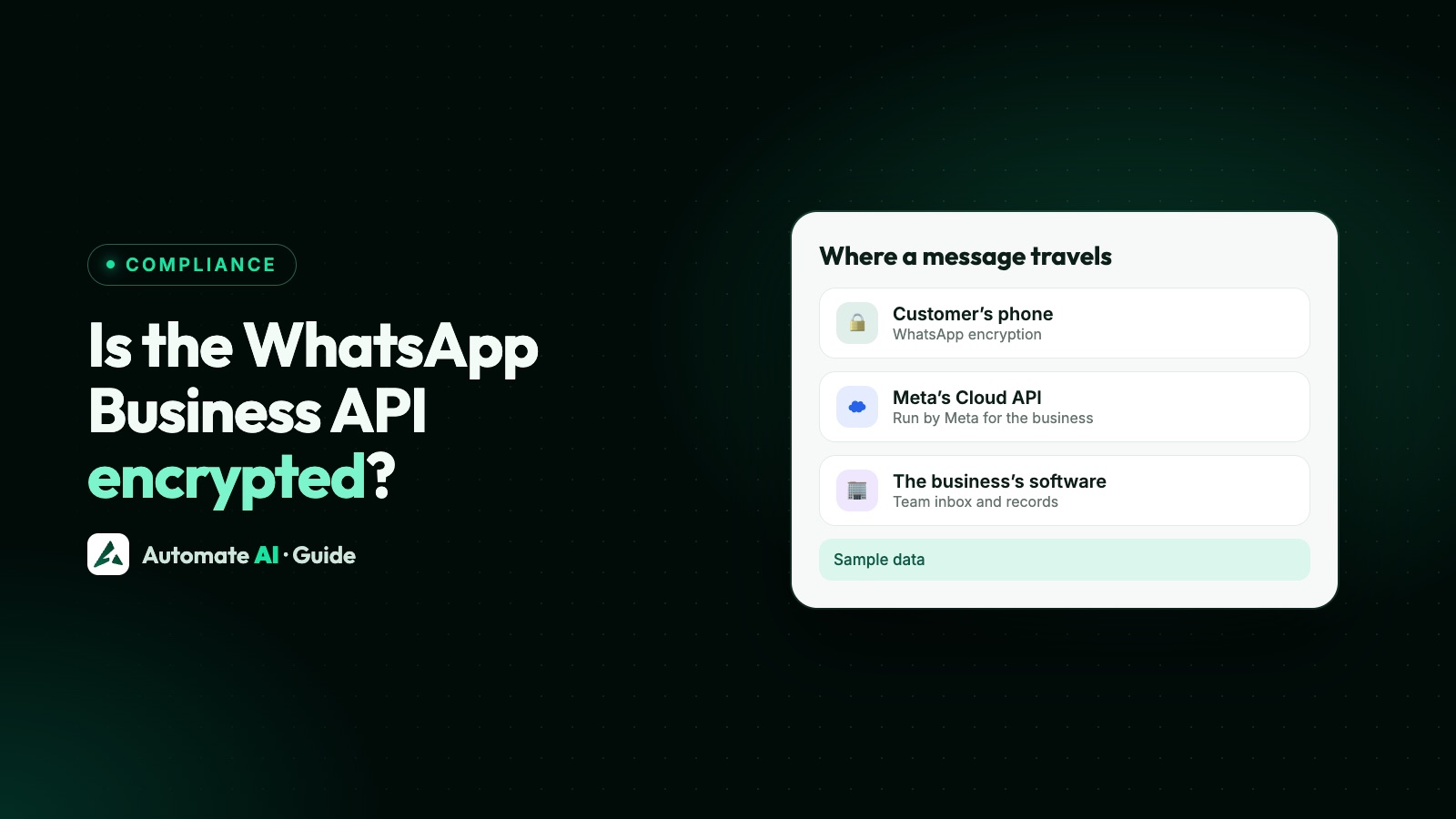
The WhatsApp Business API is encrypted, but WhatsApp doesn’t count it as end-to-end encrypted. Messages travel between the customer’s phone and Meta’s Cloud API with the same Signal protocol as personal chats, then Cloud API decrypts them and passes them to the business, usually through a provider. Only chats with businesses on the WhatsApp Business app, or that store messages themselves, count as end-to-end encrypted.
That isn’t a security flaw. It’s how a business inbox works: a team can only read and answer a message once it has been decrypted somewhere outside the customer’s phone. This guide explains where encryption starts and stops, what customers see, what Meta and Automate AI store, and how to keep your WhatsApp setup safe.
Key takeaways
- Between the customer and Cloud API, messages use Signal protocol encryption, with keys managed by Meta for the business.
- Cloud API decrypts each message and sends it to the business over HTTPS with TLS.
- WhatsApp’s Help Center says chats with businesses that use Meta’s optional services, such as the Meta-hosted Cloud API, aren’t considered end-to-end encrypted, and labels those chats.
- Meta keeps Cloud API message data for up to 30 days; your provider keeps its own copy for your inbox.
- Your own security matters most: two-step login, the right staff roles, and no card, ID or health details in chats.
The short answer: app vs API
End-to-end encryption means only the two ends of a chat hold the keys. On the API, one “end” is Meta’s Cloud API acting for your business, so the message is readable there and in the tools your business uses.
| WhatsApp Business app | WhatsApp Business API (Cloud API) | |
|---|---|---|
| Encryption to the business | Signal protocol, phone to phone | Signal protocol, customer’s phone to Cloud API |
| Who holds the keys | The business’s own phone | Cloud API, on the business’s behalf |
| Where messages are decrypted | On the business’s phone | At Cloud API, then sent to the business |
| End-to-end encrypted, per WhatsApp | Yes, by default | No, when Meta stores and answers messages for the business |
| Copies of the chat | Phones, linked devices and backups | Meta for up to 30 days, plus your provider and any tools you connect |
WhatsApp says an end-to-end encrypted chat can’t change its encryption status without the customer seeing it.
How a message travels on the Cloud API
Meta’s data privacy and security page describes the route. Following one message from a customer and the reply back:
- The customer sends a message. It’s encrypted on their phone with the Signal protocol and travels through WhatsApp to Cloud API.
- Cloud API decrypts it. The customer’s phone and Cloud API agree encryption keys, and Cloud API manages those keys for the business.
- Cloud API sends it on to the business’s webhook. Meta’s About the platform page says sending messages through the Graph API and receiving events through webhooks both run over HTTPS protected by TLS.
- Your provider stores it so your team can read it in the inbox. That’s where Automate AI comes in.
- An agent replies. The reply goes to Cloud API over HTTPS.
- Cloud API encrypts the reply with the Signal protocol before sending it to the customer.
Meta also says Cloud API messages at rest are encrypted, and that Cloud API only uses the messages it processes on behalf of, and at the instruction of, the business. More on the webhook side in WhatsApp Cloud API webhooks.
What your customers see in the chat
WhatsApp labels chats with businesses so customers know who handles their messages. Its Help Center describes these labels:
| Label in the chat | What it means |
|---|---|
| This business uses a secure service from Meta to manage this chat | The business uses the WhatsApp Business Platform Cloud API, hosted by Meta |
| This business works with other companies to manage this chat | The business uses partner companies to manage its messages |
| Messages and calls are end-to-end encrypted | The business uses the WhatsApp Business app or manages and stores messages itself |
| Uses AI from Meta (under the business name) | The business uses Meta’s AI to reply |
WhatsApp also points out that once a business receives a message, the business’s own privacy practices apply, and businesses may use chats they receive for their own marketing, including advertising on Meta. So your privacy policy should say you use WhatsApp, who processes the data and how long you keep it.
What Meta stores, and for how long
Meta’s data privacy page (also used in our WhatsApp GDPR guide) sets these limits for Cloud API:
- Messages: a maximum retention period of 30 days, to provide features such as retransmission.
- User identifiers: deleted within 30 days of a message’s last status update (sent, delivered or read), unless otherwise directed.
- Location: messages are processed in Meta data centres. With local storage, message content at rest is kept in a chosen country, though Meta says it may still be processed in its data centres elsewhere for up to an hour.
- No Storage: a local storage setting that holds message content and media only in transit, for up to one hour, with nothing kept at rest. The trade-off: message retries and webhook retries are limited to one hour (instead of up to 7 days for webhooks), and incoming media can be downloaded for one hour only.
No Storage and local storage are Meta options set on the phone number when it’s registered, and they cover only Meta’s copy. Automate AI’s Connect WhatsApp doesn’t set either, so if you need one, ask your provider whether it supports it before you connect. Your provider’s copy, and any tools you connect, sit wherever those companies store them.
What Automate AI stores
To show your team the full conversation, Automate AI keeps each message’s text, media and delivery status (sent, delivered, read or failed) on its servers, linked to the contact. That’s what makes the shared team inbox, search, reports and campaign results work.
- Some settings are stored encrypted, such as your number’s two-step PIN, the codes behind two-step login and Razorpay keys.
- Deleting a contact removes it together with its chats, campaign history and follow-ups (checked for our GDPR guide).
- Retention: Automate AI’s privacy policy says customer data is kept while the business’s account is active, then deleted on request.
- Other copies you create: exports, webhooks to your own systems, and any AI tool you connect through AI Connections. What an AI tool reads goes to that AI company.
Like every Cloud API provider, Automate AI can’t make API chats end-to-end encrypted, because the inbox needs to read the messages. What it can do is limit who sees them.
Control who on your team can read chats
Once messages are decrypted for your business, your own access settings decide who sees them. In Automate AI:
| Setting | Where | What it does |
|---|---|---|
| Two-step login | Settings › Security | Asks for a code from an authenticator app or by email when you log in, with backup codes for the authenticator method |
| Roles | Team | Owner, manager and agent roles |
| Department view | Settings › Auto Assignment | Managers see only their department’s chats and contacts, plus unassigned chats |
| Hide customer numbers | Settings › Auto Assignment (owners and managers switch it on) | Staff see masked numbers like +91 98••••••45 and can’t export contacts |
| Staff activity | Team › Staff activity | Shows what each person sent and did, down to the messages |
| Branch PIN | Branch button in the menu | Each branch has its own PIN, asked every time someone switches into it |
Remove people the day they leave, and don’t share one login across a team. One account per person is what makes the activity log useful. See WhatsApp Business for multiple users.
What never to send or ask for in a chat
Encryption doesn’t make every kind of data suitable for WhatsApp. The WhatsApp Business Messaging Policy says not to share, or ask people to share, full payment card numbers, financial account numbers, personal ID card numbers or other sensitive identifiers (as covered in our WhatsApp forms guide).
- Payments: send a link to a secure payment page instead of asking for card details.
- Logins: never ask for passwords or one-time codes. Send official codes only with authentication templates.
- Health: clinics can confirm a date and time without asking what’s wrong.
- Documents: if you must collect an ID document for a legal reason, use a secure upload page, not the chat.
A security checklist for your WhatsApp API setup
- Ask everyone with access to turn on two-step login in their own Settings › Security, and to keep their backup codes somewhere safe.
- Keep your number’s two-step PIN private. See the WhatsApp two-step verification PIN.
- Give each person the smallest role they need, and hide customer numbers from agents who don’t need them.
- Check your business portfolio admins in Meta Business Suite, and remove anyone who has left.
- Protect access tokens and API keys. Never paste them into screenshots, chats or front-end code.
- Decide where chats may be copied: exports, webhooks, spreadsheets and AI tools, and write it in your privacy policy.
- Set a retention period and delete old contacts and chats on schedule.
- Check data location before connecting if a regulator or customer requires data to stay in one country: Meta’s local storage covers only Meta’s copy, so ask your provider whether it supports it and where it keeps its own copy.
Frequently asked questions
Is the WhatsApp Business API end-to-end encrypted?
Not in the strict sense. Messages are encrypted with the Signal protocol between the customer and Meta’s Cloud API, which then decrypts them for the business. WhatsApp doesn’t consider chats with businesses that use Meta’s optional services, such as the Cloud API, to be end-to-end encrypted.
Is the WhatsApp Business app end-to-end encrypted?
Yes. WhatsApp considers chats with businesses that use the WhatsApp Business app to be end-to-end encrypted by default, as long as the business doesn’t use Meta’s optional services to manage its chats.
Can Meta read my WhatsApp Business API messages?
Cloud API decrypts messages to deliver them to your business, keeps message data for up to 30 days, and says it only uses those messages on behalf of, and at the instruction of, the business. WhatsApp also says automated systems check for policy violations when businesses use Meta’s optional services.
Can my API provider read the messages?
Your provider stores the decrypted messages so your team can read them in its inbox. Automate AI keeps message text, media and delivery status on its servers, and you control which staff can see them.
What does “This business uses a secure service from Meta to manage this chat” mean?
It’s a label WhatsApp shows when a business uses the WhatsApp Business Platform Cloud API, hosted by Meta. Those chats aren’t considered end-to-end encrypted, though messages are still encrypted on the way to Meta.
Can I keep WhatsApp API data in one country?
Partly. Meta’s local storage option keeps message content at rest in a chosen country (it may still be processed elsewhere for up to an hour), and its No Storage setting holds messages only in transit for up to one hour. Both cover only Meta’s copy and are set when the number is registered. Automate AI’s Connect WhatsApp doesn’t set them, and your provider keeps its own copy wherever it stores data.
Is it safe to send customer data over the WhatsApp API?
For everyday messages such as order updates and bookings, yes. WhatsApp’s policy forbids card, account and ID numbers, and you should never ask for passwords either.
Sources
- Meta: Cloud API data privacy and security
- Meta: About the WhatsApp Business Platform
- Meta: No Storage
- WhatsApp Help Center: About end-to-end encryption
- WhatsApp Help Center: About connecting with businesses
- WhatsApp Business Messaging Policy
- Automate AI Privacy Policy
WhatsApp rules and prices change. We check these guides against Meta’s documentation, but always confirm current terms with Meta before you rely on them. Questions? Message us on WhatsApp at +91 836 977 8812.