How to Export WhatsApp Contacts to Excel
WhatsApp has no contact export button. Here’s how to download your WhatsApp contact list to Excel from Google Contacts, iCloud or a WhatsApp API platform.
WhatsApp has no button to download your contact list, so to get it into Excel you export it from where the contacts are actually stored: Google Contacts on Android, iCloud on iPhone, or your WhatsApp API platform. Google gives you a CSV file that opens in Excel. iCloud gives you a vCard, which you can turn into a CSV in a couple of minutes.
There’s one catch people miss. WhatsApp can now save contacts only inside WhatsApp, and those don’t appear in your phone’s address book, so they won’t be in any export until you move them there. This guide covers each route, the API route for business teams, and how to open the file without Excel breaking your phone numbers.
Key takeaways
- WhatsApp’s apps have no contact export. Your list lives in your phone’s address book, plus any contacts saved only to WhatsApp.
- On Android, export from Google Contacts as Google CSV and open it in Excel.
- On iPhone, export a vCard from iCloud.com, import it into Google Contacts, then export a CSV.
- In Automate AI, open Contacts › ⋯ › Export all contacts to download a CSV with names, numbers, groups, status, agent and your custom fields.
- When you open the file, set the phone column to Text, or Excel may turn long numbers into scientific notation.
Where your WhatsApp contacts are stored
WhatsApp’s help pages describe two places a contact can be saved, and your route to Excel depends on which one holds the numbers you want:
| Where the contact is | Who it applies to | How to get it into Excel |
|---|---|---|
| Your phone’s address book, backed up to Google | Most Android phones | Export from Google Contacts as a CSV |
| Your phone’s address book, backed up to iCloud | Most iPhones | Export a vCard from iCloud.com, then convert it |
| Saved only to your WhatsApp account | Contacts added in WhatsApp with sync to phone off | Save them to your phone first, then export as above |
| A WhatsApp API platform’s contact list | Businesses on the WhatsApp Business Platform | Use the platform’s export, such as Contacts › ⋯ in Automate AI |
The free WhatsApp and WhatsApp Business apps read your phone’s address book, so there’s nothing to export inside them. That’s also why the export happens in Google Contacts or iCloud, not in WhatsApp.
First, move WhatsApp-only contacts to your phone
According to WhatsApp’s “About contact upload” page, when you save a new contact you choose whether it’s saved only to WhatsApp or also to your device, and syncing to the device is off by default. Contacts saved only to WhatsApp are restored when you change phones, but they don’t show up in Google Contacts or iCloud.
- When you add someone in WhatsApp, turn on Sync contact to phone before you save.
- For contacts you already saved only to WhatsApp, save them to your phone’s address book. WhatsApp’s own advice is to do this for any contact you want to keep outside your WhatsApp account.
- Check one or two of them in Google Contacts or iCloud before you export, so you know they came across.
Birthdays you add in WhatsApp are saved to the contact in WhatsApp only, even with sync on, so they won’t be in your export either.
Android: download your contact list from Google Contacts
If your Android contacts are saved to your Google account, this gives you a file Excel opens directly. Do it on a computer:
- Open contacts.google.com and sign in with the Google account your phone uses.
- Tick the contacts you want. For everyone, tick any contact, then use the selection menu at the top left to choose all contacts.
- At the top right, open More actions and choose Export.
- Choose Google CSV and click Export. The file downloads to your computer.
- Open it in Excel using the steps in the last section, so the phone numbers stay intact.
Google’s file has many columns (several phone and email fields, labels and notes). For a WhatsApp list you usually only need the name and the mobile number, so delete the rest once it’s open.
iPhone: export from iCloud, then convert to a spreadsheet
If your iPhone contacts are saved to iCloud, Apple lets you export them as a single vCard (.vcf) file. Excel doesn’t read vCards well, so the simplest free route is to pass it through Google Contacts:
- On a computer, open icloud.com/contacts and sign in with your Apple Account.
- Open the Select menu and choose Select All Contacts.
- Open the Actions menu and choose Export vCard. You get one file with every selected contact.
- Go to contacts.google.com, click Import, then Select file, and choose the vCard.
- Export from Google Contacts as Google CSV, as in the Android steps.
Google warns that imports of more than 3,000 contacts at a time can cause problems, and an account holds up to 25,000 contacts. If you’re close to either, export from iCloud in smaller batches.
Can you download a WhatsApp group’s contact list?
Not as a file. WhatsApp has no option to export a group’s members, and we don’t recommend browser extensions or scrapers that claim to: they aren’t WhatsApp’s own tools, and you’d be handing them your customers’ numbers.
What WhatsApp does offer is Add members to contacts in the group’s info screen. You pick the members and save them, and with Sync contact to phone on they reach your address book and any export you make afterwards.
Export contacts from Automate AI to Excel
On a WhatsApp API platform, customers who message you, contacts you import and leads from integrations all land in the platform’s own contact list, so that’s where you export from. In Automate AI:
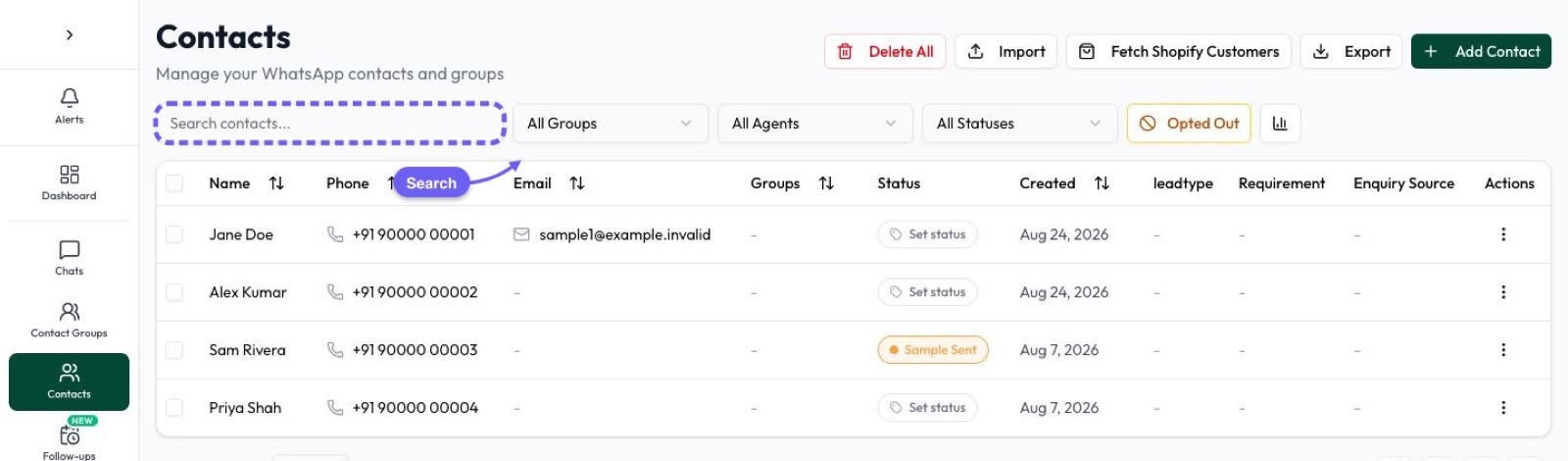
- Open Contacts.
- Narrow the list if you want part of it: search, or filter by group, status, tags, opted out or the Created date. People allowed to filter by agent can also narrow it to one team member’s contacts.
- Click ⋯ next to Import and choose Export all contacts. With a filter on, it reads Export filtered contacts and the file matches what’s on screen.
- To export only some people, tick them first and choose Export selected.
- Open the CSV in Excel, setting the Phone column to Text.
| Column in the file | What it holds |
|---|---|
| ID | Automate AI’s number for the contact |
| First Name, Last Name, Phone, Email | The contact’s main details |
| Groups | Every group the contact is in, separated by commas |
| Status | The contact’s status, such as a lead stage |
| Agent | The team member the contact is assigned to |
| Your custom fields | Each custom field you show as a column in the contacts table |
| Opted Out | Yes if the contact opted out of WhatsApp messages |
| Street, City, State, Zip Code, Country | Address fields |
| Favorite, Created At | Whether it’s starred, and when it was added |
Who can export: owners and managers export the contacts they can see. An agent’s export only includes contacts they created or whose chats are assigned to them. If Hide customer numbers is on in Settings › Auto Assignment, the agents it covers see masked numbers and can’t export contacts at all. Owners always see full numbers.
Because the Groups column uses the same shape the importer reads, you can edit the file in Excel and bring it back in. That’s covered in how to import WhatsApp contacts from Excel.
Keep a copy in Google Sheets or Google Drive automatically
A one-off export goes out of date the next day. If you want a spreadsheet that stays current, Automate AI has two options under Settings › Google Drive, using the same Google connection:
- Google Sheets: link one of your own sheets and contacts are kept in step with it every 1, 6, 12 or 24 hours. Edits in the sheet update the matching contact, and new rows with a phone number become contacts. Details in WhatsApp and Google Sheets.
- Google Drive backup: saves a dated Excel file (contacts_YYYY-MM-DD.xlsx) to a Drive folder on a schedule. A second backup on the same day replaces that day’s file.
Switched from the WhatsApp Business app with coexistence? Ask our team when you connect: we can bring in your WhatsApp Business app contacts and up to 6 months of one-to-one chats, within 24 hours of connecting, if you allowed chat sharing in Meta’s window. After that, they’re in Contacts and export like everyone else. See WhatsApp coexistence.
Open the file in Excel without breaking the numbers
Double-clicking a CSV lets Excel guess each column’s type, and phone numbers are where it guesses wrong. Microsoft says Excel keeps a maximum of 15 significant digits, drops leading zeros and can show large numbers in scientific notation. To keep numbers exactly as exported:
- Open a blank workbook and go to Data › From Text/CSV, then choose your file.
- In the preview, choose Edit to open the Query Editor.
- Click the phone column’s header and set Home › Transform › Data Type to Text. Choose Replace Current if asked.
- Click Close & Load.
- Check a few numbers still have their country code, such as 91 for India or 44 for the UK.
Then tidy up: remove duplicates, delete columns you don’t need, and keep the file somewhere with limited access. It holds customers’ personal details, so treat it like any other customer record.
Frequently asked questions
Can I export my WhatsApp contact list to Excel directly from WhatsApp?
No. WhatsApp and the WhatsApp Business app have no contact export. Export from where the contacts are stored instead: Google Contacts on Android, iCloud on iPhone, or your WhatsApp API platform.
Why are some WhatsApp contacts missing from my export?
They were probably saved only to WhatsApp. WhatsApp’s sync to phone is off by default for new contacts, so those never reached your address book. Save them to your phone, then export again.
How do I download WhatsApp contacts on iPhone?
Export a vCard from icloud.com/contacts (Select All Contacts, then Export vCard). To get a spreadsheet, import that vCard into Google Contacts and export it as Google CSV.
Can I download the contact list of a WhatsApp group?
There’s no file export for group members. In the group’s info you can use Add members to contacts to save them, and then they’ll be in your next address book export. Being in a group isn’t consent to business messages.
How do I export contacts from Automate AI?
Open Contacts, click ⋯ and choose Export all contacts, or filter or tick contacts first to export only those. You get a CSV with names, numbers, groups, status, agent, custom fields and opt-out status.
Why does Excel show my phone numbers like 9.19877E+11?
Excel treated the column as a number. Import the CSV with Data › From Text/CSV and set the phone column to Text, and the full numbers stay as they are.
Sources
- WhatsApp Help Center: How to add, edit, or delete a contact
- WhatsApp Help Center: About contact upload
- Google Contacts Help: Export or back up contacts
- Google Contacts Help: Import your contacts
- Apple iCloud User Guide: Export contacts as vCards
- Microsoft Support: Keeping leading zeros and large numbers
- Meta: Get opt-in for WhatsApp
WhatsApp rules and prices change. We check these guides against Meta’s documentation, but always confirm current terms with Meta before you rely on them. Questions? Message us on WhatsApp at +91 836 977 8812.