Meta Ads for Schools: Admission Enquiries on WhatsApp
Meta ads for schools that bring admission enquiries to WhatsApp: target parents, Meta’s rules on under-18s, campus visit ads, lead form questions and replies.
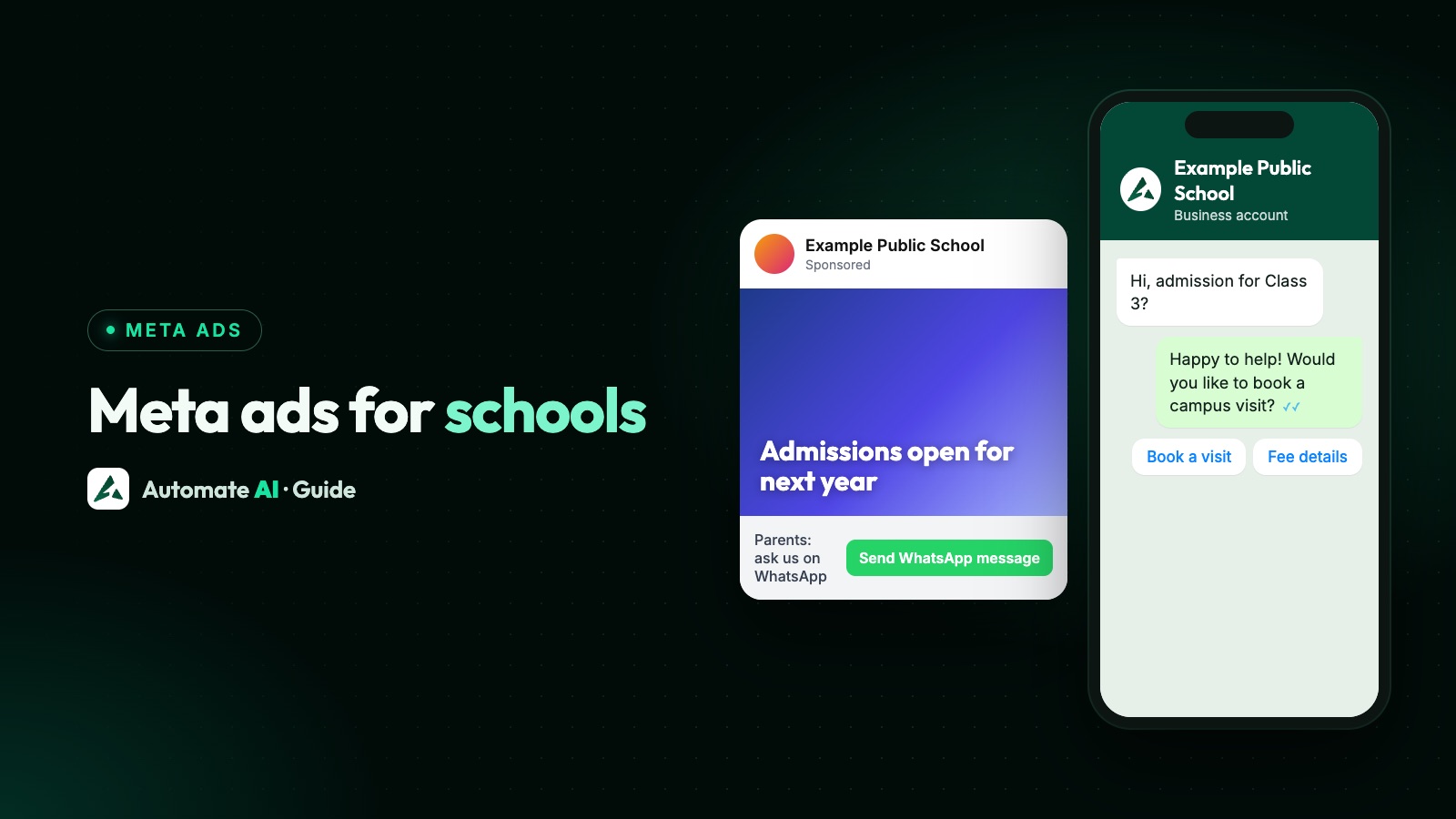
The Meta ad that works best for most schools is one aimed at parents within commuting distance of the campus, inviting them to book a campus visit or ask about admissions on WhatsApp. Parents make the decision, Meta limits how you can reach anyone under 18, and a chat lets a parent ask about fees, transport and seats before they visit.
This guide is for schools, pre-schools and boarding schools planning an admissions season. It covers Meta’s rules on minors, who to target, the ads to run at each stage of admissions, lead form questions Meta allows, sample ads and the first replies that turn an enquiry into a visit. Coaching classes and tuition centres have their own guide in Meta ads for coaching classes, and what to do with enquiries once they arrive (AI answers, visit booking, reminders) is on our WhatsApp for education page.
Key takeaways
- Advertise to parents, not pupils. Ads that include under-18s can’t use chat or lead goals, radius targeting, interests or custom audiences.
- Draw the area around how far families will travel, often your bus routes, and widen it for boarding schools.
- Run ads in stages: open admissions, campus visits, last seats, each with one clear next step.
- Lead forms must not ask for a child’s date of birth, religion or health details. Ask for the grade and academic year instead.
- Use photos of pupils only with written parental consent, and never promise results you can’t prove.
- Count visits and admissions, not chats, and tag each ad’s enquiries.
Meta’s rules on minors, and why school ads go to parents
Meta’s help page on advertising to teens says some audience and campaign options aren’t available when your audience includes people under 18 (older in some countries). The minimum age on Facebook and Instagram is 13, and Meta says it can be higher in some places, giving Australia’s 16 as an example. Here’s what changes when an ad includes teens:
| Option | Ads that include under-18s | Ads to adults only (such as parents) |
|---|---|---|
| Location | Cities or larger only: no postcode, radius or pin drop | Radius, pin, postcode and city all allowed |
| Interests, behaviours, demographics | Not available | Available, with limits for some ad types |
| Gender and language | Not available | Available |
| Custom and lookalike audiences | Not available (including lead form and Page engagement audiences) | Available |
| Optimise for leads or conversations | Not available | Available, so chat and lead form ads work |
| EU, EEA and Switzerland | Ads there don’t reach under-18s at all | Ads reach people 18 and over |
Reach and link clicks are still allowed for teen audiences, so a school could show a general awareness ad to older pupils at city level. But an admissions enquiry ad that opens WhatsApp or a lead form can’t be optimised for teens. In practice, schools speak to the people who choose and pay: parents and guardians.
Who to target: parents within reach of your gate
A school’s audience is local and specific. Start with distance, then age, then the message:
- Distance first. Draw the area around where families will realistically travel from each day. If you run school buses, use the areas your routes cover. A pre-school’s area is usually smaller than a secondary school’s.
- Several small areas beat one big circle. In Automate AI’s Meta Ads menu you can add a radius around an address or a map pin (1 to 80 km), cities, and PIN or ZIP codes, and leave out places you don’t serve.
- Choose “Living there”. Under People in these places, pick Living there so the ad reaches families who live nearby, not people passing through.
- A sensible parent age range. For pre-primary admissions, an age range typical of young parents in your area; for senior school, a wider one. Leave gender open: both parents decide.
Interests such as “parenting” are tempting, but a broad audience inside the right area often does better than a stack of interests, and Meta limits detailed targeting for ads that click to WhatsApp. More in Meta ads targeting.
Plan ads around the admissions calendar
Admissions have stages, and each needs a different ad and a different next step. A plan most schools can adapt:
| Stage | Ad message | Ad type | Next step for the parent |
|---|---|---|---|
| Before admissions open | “Admissions for 2027–28 open on 5 January” | Reach, or a chat ad to register interest | Ask to be told when forms open |
| Admissions open | “Nursery to Grade 9 admissions are open” | WhatsApp chat | Ask about fees, transport and seats |
| Campus visits and open days | “Visit our campus on Saturday, 10am to 1pm” | WhatsApp chat or a lead form | Book a visit slot |
| Last seats in a grade | “A few Grade 3 seats left for 2027–28” | WhatsApp chat | Ask if a seat is still open |
| Mid-year transfers | “Moving to the city? Ask about mid-year admission” | WhatsApp chat | Share the grade and moving date |
Only say “a few seats left” if it’s true: Meta’s Advertising Standards prohibit deceptive practices, and parents will ask. Start each stage a few weeks before parents decide, and give an ad about a week before judging it, because frequent edits restart Meta’s learning phase. For budget basics, see Meta ads budget per day.
Sample school ads and pre-filled messages
A Click-to-WhatsApp ad has the ad text, a greeting your school shows when the chat opens, and a pre-filled message the parent sends with one tap. Name the grade or event in the pre-filled message, so you know what the parent wants. Made-up examples for sample schools:
| School | Headline | Greeting | Pre-filled message |
|---|---|---|---|
| Example Little Steps Pre-School | Playgroup and nursery admissions open | Hi! Which year is your child joining, and which area do you live in? | Hi, I’d like to know about nursery admission |
| Example Public School | Visit our campus this Saturday | Hi! Which grade are you looking at? We’ll suggest a visit time. | Hi, I’d like to book a campus visit |
| Example International School | Moving to the city? Mid-year places | Hi! Which grade, and when do you arrive? | Hi, I’m asking about mid-year admission |
In Automate AI the greeting can be up to 300 characters and the pre-filled message up to 120. For pictures, use your real campus, classrooms, library or bus, and show pupils only where you have written consent from their parents. Don’t invent results, rankings or quotes from parents; quote only real, permitted ones.
Lead forms for campus visits: what you can and can’t ask
A lead form suits open days and schools whose admissions team calls every enquiry back. Keep it to questions you’ll use:
- Grade or class applying for, as a choice question.
- Academic year, such as 2027–28.
- Preferred visit day or time, as a choice, or Meta’s appointment request question in Ads Manager.
- Area they live in: use Meta’s prefilled City question rather than writing your own, because Meta bans custom questions that repeat its prefill questions.
- Opt-in wording, such as “Example Public School will contact you on WhatsApp about admissions.” Add it in Ads Manager’s form editor.
Meta’s list of prohibited instant form questions matters for schools. You must not ask for the date of birth for a child, religious or philosophical beliefs, race or ethnicity, health information (including disabilities), financial information such as income, or government ID numbers. Ask the grade instead of the birth date, and discuss learning support, scholarships or fee concessions in person or through your official admission form, not on a Meta form. If a form breaks these rules, Meta says the ad won’t run.
A form lead hasn’t messaged you yet, so your first WhatsApp message must be an approved template. With Facebook Leads (Integrations, included in the AI + Automation Plan and Series 4), each lead becomes a contact and gets your template straight away. A sample:
“Hi {{1}}, thank you for your interest in admission at Example Public School. Reply with a day that suits you this week and we’ll confirm a campus visit time. Reply STOP to opt out”
Steps are in Facebook Lead Ads to WhatsApp.
First replies that turn an enquiry into a visit
Parents compare several schools at once. A quick, clear reply makes the visit happen:
- Confirm the grade and year: “Thanks! Is this for Grade 1 in 2027–28?”
- Answer the top three questions in one message: fee range, transport areas and school timings, or a link to the fee page.
- Offer two visit slots: “We can show you around Thursday 4pm or Saturday 11am. Which suits you?”
- Say what to bring: “Please bring your child’s last report card, if they’re in school.” Collect birth certificates and ID through your official admission process, not in the chat.
- Confirm and remind: confirm the slot, and send a reminder the day before.
Reply while the parent is still on their phone. When someone messages you from a Click-to-WhatsApp ad in the WhatsApp Android or iOS app and you reply within the 24-hour window, Meta doesn’t charge for your messages in a free entry point window that can stay open for up to 7 days. Automate AI still charges its normal rates for those messages.
Out of office hours, the AI Assistant (AI + Automation Plan and Series 4) can answer fee and timing questions from your own prospectus and hand serious enquiries to the admissions team, and a chatbot (same plans) can offer visit slots as buttons. The full enquiry-to-admission journey is on the education page.
Run school ads from Automate AI’s Meta Ads menu
You can make these ads in Ads Manager, or from Meta Ads in Automate AI’s main menu, on every plan, for account owners and managers. Meta bills the ad spend to your school’s own ad account.
- Connect the ad account with Continue with Facebook, and pick the ad account and the school’s Page. Chat ads open a chat with your connected WhatsApp number.
- Choose WhatsApp chats (or Lead form for open days) and describe the offer in a line, such as “Nursery to Grade 9 admissions for 2027–28, campus visits on Saturdays, Baner, Pune”. AI drafts the headline, text, audience, greeting and pre-filled message with your own AI key added in Settings; without one, write it yourself. Edit anything.
- Set the area: a radius around the school’s address or a map pin, the PIN codes your buses cover, or whole cities for a boarding school, with Living there chosen.
- Add a real campus photo, set a daily budget and an end date matching the admissions stage, check the preview and publish. Nothing is spent until you publish, and Meta reviews the ad first.
More on the builder in Click-to-WhatsApp ads and on our Meta ads hub.
Measure visits and admissions, not chats
Nobody can promise a number of admissions from ads: it depends on your area, fees, seats and how fast the team replies. Measure what matters:
- Cost per chat for every ad, next to spend, clicks and new contacts, in Automate AI’s Meta Ads (including ads made in Ads Manager).
- Tag each ad in Settings › Lead Sources with a phrase from its pre-filled message, such as “campus visit” or “nursery admission”.
- Set contact statuses such as “Visit booked”, “Applied” and “Admitted”, and compare ads on cost per admission. Track which ads bring WhatsApp customers shows how.
Frequently asked questions
Can schools run Facebook and Instagram ads to students under 18?
Only with limits. Meta allows ads that include teens to be targeted by age and city-level or wider location only, with no interests, gender, language, radius or custom audiences, and they can’t be optimised for leads or conversations. In the EU, EEA and Switzerland they don’t reach under-18s at all. Most schools advertise to parents.
What is the best Meta ad for school admissions?
For most schools, a Click-to-WhatsApp ad aimed at parents who live within travelling distance, offering one clear step such as booking a campus visit. A lead form works well for open days if your team calls every enquiry back.
Can I ask for the child’s date of birth on a lead form?
No. Meta prohibits instant form questions asking for a child’s date of birth. Ask for the grade and academic year instead, and collect the birth certificate through your official admission process.
Are school ads a Special Ad Category on Meta?
Admissions ads aren’t. Meta’s special categories cover housing, employment, financial products and services, and social issues, elections or politics. An ad arguing about education policy can count as a social issue ad in countries where Meta lists education as a topic.
Can I use photos of our students in ads?
Only with written consent from their parents, and preferably photos where pupils aren’t the focus, such as classrooms, labs, sports fields and buses. Check your own school’s policy and local rules too.
Sources
- Meta Business Help Centre: About advertising to teens
- Meta Business Help Centre: Questions prohibited on your instant form
- Meta Business Help Centre: How to choose a Special Ad Category
- Meta Business Help Centre: About social issues
- Meta Advertising Standards: Privacy violations and personal attributes
- Meta Advertising Standards: Prohibited commercial practices
- Meta: Pricing on the WhatsApp Business Platform (free entry point window)
WhatsApp rules and prices change. We check these guides against Meta’s documentation, but always confirm current terms with Meta before you rely on them. Questions? Message us on WhatsApp at +91 836 977 8812.