WhatsApp Status Ad Examples: 8 Ideas With Ad Copy by Business Type
WhatsApp Status ad examples for shops, restaurants, coaching classes and more: the picture, the words, the button and the first reply for each.
A good WhatsApp Status ad is one tall picture or short video with one offer, a few words people can read in a second, and a button that opens a chat or your website. Below are eight examples by business type, each with the picture idea, the words on it, the ad text, where the tap goes and the first reply to send.
They’re written for ads you pay Meta to show between Status updates in WhatsApp’s Updates tab, not for the Status you post to your own contacts. Use them as starting points: swap in your own product, price and city. Every business, offer and number below is sample data.
Key takeaways
- A Status ad sits between people’s Status updates, full screen and upright, labelled “Ad” with your business name.
- Make the picture tall (9:16), put one offer on it in a few big words, and keep text away from the edges.
- Send the tap to a WhatsApp chat when people need to ask before buying, and to your website when they can buy straight away.
- Write the first reply before the ad goes live, so every chat gets a fast, useful answer.
- Ads about jobs, housing, finance (such as loans) or politics can’t run in Status, and Meta doesn’t show Status ads in the EU, the UK and a few other countries for now.
- In Automate AI, turn on WhatsApp Status under Placements when you make an ad in Meta Ads; it runs together with Instagram Stories.
What a WhatsApp Status ad looks like
People tap through their contacts’ Status updates in the Updates tab, and every so often an ad appears between them. WhatsApp’s Help Center says ads in Status are labelled “Ad” and show the advertiser’s name. Viewers can hide an ad they’re not interested in or report it, so an ad that feels like spam is quickly skipped.
| Part | What it is | What to aim for |
|---|---|---|
| Picture or video | Fills the phone screen, upright | 9:16. Automate AI suggests a 1080 × 1920 picture; Meta recommends 720 × 1,280 or larger |
| Label and name | “Ad” and your business name | A name people recognise, the same as on your shop or Page |
| Words on the picture | Your offer, in big type | Five or six words, readable in a second |
| Ad text and button | A line of text and a button | The button should say what happens next: chat or visit the site |
| Destination | A WhatsApp chat or a website (Ads Manager also allows instant forms and apps) | Chat for questions and local services, website for online orders |
For sizes, formats and setup in Meta Ads Manager, see how to run WhatsApp Status ads. This post is about what to put in them.
What makes a Status ad work
- One offer per ad. “20% off silk sarees” beats a collage of ten products. If you have three offers, make three ads.
- Big words, few of them. People move through Status quickly, so the offer has to land before they tap away. Meta also notes captions aren’t supported on Status videos, so put key words in the video itself.
- Tall and edge-safe. Design for an upright phone screen and keep text and logos away from the edges of the picture, so nothing important is covered or cut off.
- Local and specific. A city, an area or a delivery promise (“Same-day delivery in Pune”) tells people the ad is for them.
- A button that matches the next step. If the tap opens WhatsApp, say so in the ad: “Message us for sizes” sets the right expectation.
- A first message ready to send. For chat ads, you choose the message the customer sends and your greeting when the chat opens. Make the customer’s message specific (“Hi, I’d like the Diwali saree offer”) so you know which ad they came from.
8 WhatsApp Status ad examples by business type
Each example lists the picture, the words on it, the ad text, where the tap goes and the first reply. The businesses, prices and cities are made up.
1. Clothing store: a festive sale
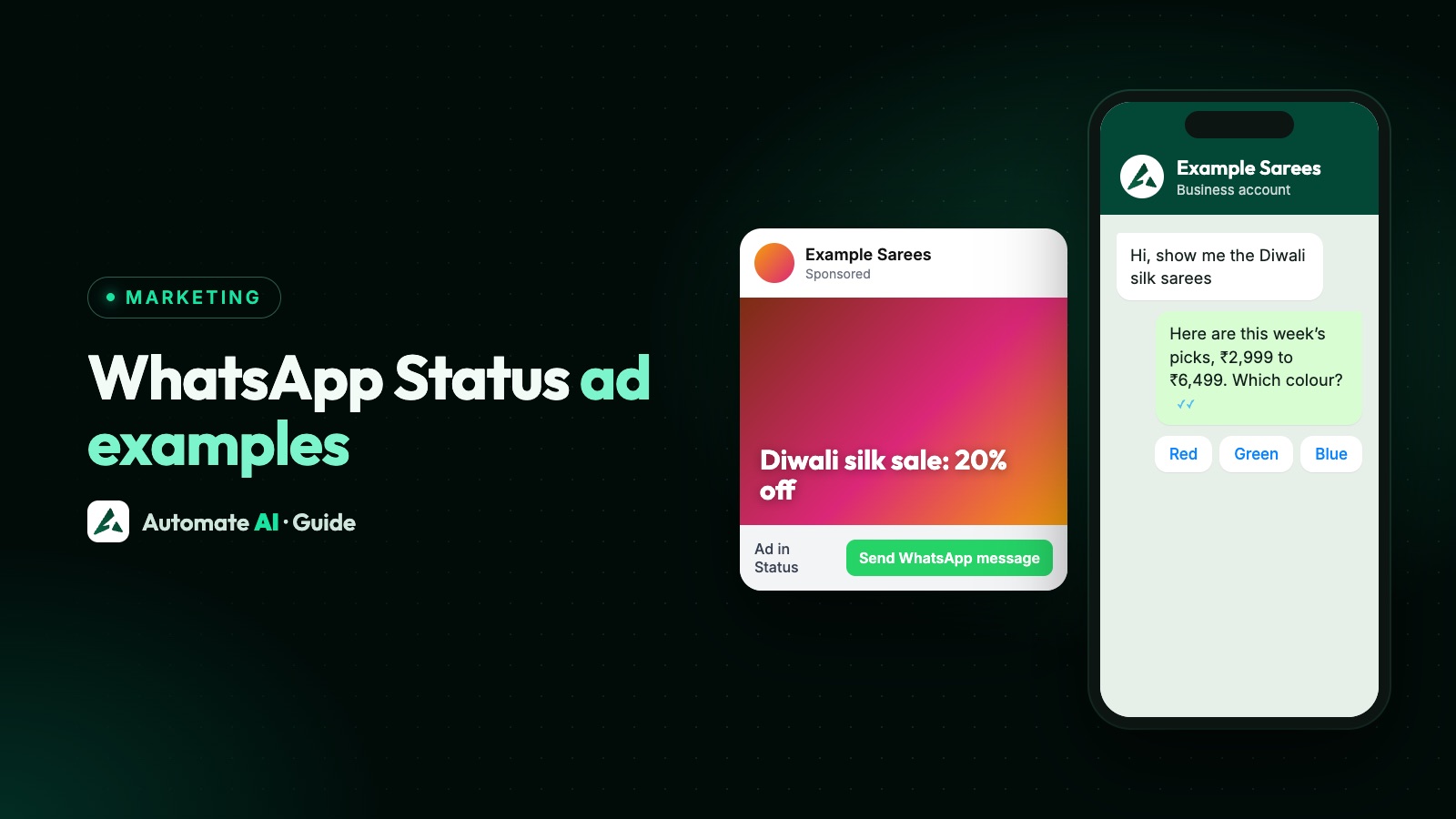
- Picture: a model in a bright silk saree, full length, on a plain background.
- On the picture: “Diwali silk sale: 20% off”.
- Ad text: “New colours in store and online. Message us for prices and sizes.”
- Tap goes to: a WhatsApp chat. Customer’s message: “Hi, show me the Diwali silk sarees.”
- First reply: “Hi! Here are this week’s silk sarees, ₹2,999 to ₹6,499 after the discount. Which colour do you like: red, green or blue?”
2. Restaurant or cloud kitchen: weekend orders
- Picture: a top-down photo of one full thali, steam visible.
- On the picture: “Sunday thali, delivered by 1 pm”.
- Ad text: “Order on WhatsApp before 11 am. Veg and non-veg.”
- Tap goes to: a WhatsApp chat. Customer’s message: “Hi, I want to order the Sunday thali.”
- First reply: “Thanks for ordering with Example Kitchen! Veg (₹249) or non-veg (₹329)? Send your area and we’ll confirm the delivery time.”
3. Coaching class: a new batch
- Picture: a teacher at a whiteboard with three students, faces turned to the board.
- On the picture: “Class 10 maths: new batch 1 Dec”.
- Ad text: “Small groups, weekend and evening times. Ask us for the timetable.”
- Tap goes to: a WhatsApp chat. Customer’s message: “Hi, please send the Class 10 maths batch details.”
- First reply: “Hi! The new batch starts on 1 December. Evening (Mon, Wed, Fri 6 pm) or weekend (Sat, Sun 10 am)? Reply with your child’s name and school, and we’ll book a demo class.”
4. Salon: bridal bookings
- Picture: a finished bridal look from the side, with the salon’s name on a small sign.
- On the picture: “Bridal packages for the wedding season”.
- Ad text: “Trial sessions available. Message us to check dates.”
- Tap goes to: a WhatsApp chat. Customer’s message: “Hi, I want to check bridal package dates.”
- First reply: “Congratulations! Please share your wedding date and city, and we’ll send the packages and the dates open for a trial session.”
5. Bakery: custom cakes
- Picture: one decorated birthday cake, close up, with a name piped on it.
- On the picture: “Custom cakes in 24 hours”.
- Ad text: “Any theme, eggless options. Send us your idea on WhatsApp.”
- Tap goes to: a WhatsApp chat. Customer’s message: “Hi, I want to order a custom cake.”
- First reply: “Lovely! Send a photo or idea, the weight and the date. We’ll reply with the price and pickup or delivery time.”
6. Home services: AC servicing
- Picture: a technician in uniform cleaning a split AC indoor unit.
- On the picture: “AC service at home from ₹499”.
- Ad text: “Slots free today and tomorrow in Example City. Message us to book.”
- Tap goes to: a WhatsApp chat. Customer’s message: “Hi, I want to book an AC service.”
- First reply: “Hi! Split or window AC, and how many units? Share your area and a time that suits you: morning, afternoon or evening.”
7. Online store: a new collection
- Picture: a short video of three pairs of sneakers on a turntable.
- On the picture: “New drop: 3 colours, sizes 6 to 11”.
- Ad text: “Free returns within 7 days. Shop the collection.”
- Tap goes to: your website’s collection page, because people can choose a size and pay there.
- First reply: not needed for a website ad, but add a “Questions? Chat on WhatsApp” link on the page for people who want to ask first.
8. Travel agency: weekend trips
- Picture: one wide, upright landscape shot of the destination, with no people’s faces in focus.
- On the picture: “2-night hill trip from ₹7,999”.
- Ad text: “Travel, stay and breakfast included. Message us for dates.”
- Tap goes to: a WhatsApp chat. Customer’s message: “Hi, send me the weekend trip dates.”
- First reply: “Hi! The next trips leave on 5 and 12 December. How many people are travelling, and from which city?”
Fill-in-the-blank Status ad lines
When you’re stuck for words on the picture, start from one of these patterns:
| Pattern | Example |
|---|---|
| [Offer] on [product], [time limit] | 20% off silk sarees this week |
| [Product], delivered by [time] | Sunday thali, delivered by 1 pm |
| [Service] at home from [price] | AC service at home from ₹499 |
| New [batch/collection] from [date] | New Class 10 batch from 1 Dec |
| [Product] in [hours/days] | Custom cakes in 24 hours |
| Ask us about [thing people wonder] | Ask us for sizes and colours |
Only use a time limit that’s real. If the offer ends on Sunday, say Sunday; if it doesn’t end, leave the deadline out.
Chat or website: where should the tap go?
| Send people to | Best when | Examples above |
|---|---|---|
| A WhatsApp chat | People ask about price, size, dates or availability before buying, or you book appointments | Clothing, restaurant, coaching, salon, bakery, home services, travel |
| Your website | People can pick and pay without help, and the page shows everything they need | Online store |
A chat ad also gives you the customer’s number, so you can follow up later with approved templates. When they message you from the ad on the WhatsApp phone app and you reply within 24 hours, Meta doesn’t charge for the messages that follow for a while; Automate AI still charges its normal message rates for them. More on choosing a destination: chat, form or website.
What to leave out of a Status ad
- Restricted subjects. Meta’s developer documentation says ads in the employment, housing, finance and social issues, elections or politics categories aren’t eligible for WhatsApp Status, and that sensitive areas such as pharmaceuticals and healthcare are left out of Status delivery. Use other placements for them.
- Personal attributes. Don’t say or imply you know something about the viewer (“Are you diabetic?”, “Struggling with debt?”). Meta’s Advertising Standards cover this, and it’s a common reason ads are rejected.
- Promises you can’t keep. Prices, discounts and delivery times on the ad must match what the customer gets in the chat.
- Adult-only products shown to everyone. Meta includes WhatsApp users whose age is unknown by default and says ads shown to them must suit all ages; change the minimum age setting if your product is for adults only.
- Tiny text and busy collages. If the offer can’t be read in a second, people tap past it.
If an ad is rejected, the reason and the fix are usually in Ads Manager: see Click-to-WhatsApp ad rejected or account restricted.
Make a Status ad in Automate AI
Automate AI’s Meta Ads menu, for owners and managers on every plan, can show an ad in WhatsApp Status as well as Facebook and Instagram:
- Open Meta Ads, start a new ad and, under What do you want to advertise?, describe your offer in a line or two. AI writes the ad and suggests the audience.
- Choose What should the ad do?: WhatsApp Status works for ads that open a WhatsApp chat or your website, and for sales and awareness ads.
- On the review step, upload a tall picture (JPG or PNG under 8 MB; 1080 × 1920 fills Status) and check the main text, headline, your greeting and the message the customer sends.
- Under Placements, turn on WhatsApp Status. It’s off for every ad until you turn it on, and Instagram Stories is added with it, because Meta only runs Status ads together with Stories.
- Check the 9:16 preview, set the budget and Publish ad.
Automate AI tells you before publishing if Status can’t be used: for a jobs, housing, loans or politics ad, an ad type that doesn’t fit, or when every country you chose is one where Meta doesn’t show Status ads (the EU, the UK and a few others). Chats from the ad arrive in the shared inbox, where your team replies; on the AI + Automation Plan and Series 4, a chatbot or the AI Assistant can answer too. Ad spend is billed by Meta to your own ad account.
Status ads vs posting your own Status
A Status you post from the WhatsApp Business app is free but only reaches people who have your number saved. A Status ad reaches new people, chosen by the audience you set, and costs whatever budget you give it. Many businesses do both: Status posts for existing customers, ads to find new ones. For ideas and a weekly plan for your own Status, see WhatsApp Status for business.
Frequently asked questions
What is a WhatsApp Status ad?
An ad that appears between Status updates in WhatsApp’s Updates tab, labelled “Ad” with the advertiser’s name. A tap can open a chat with the business or its website. Advertisers create them with Meta’s ad tools, such as Ads Manager.
What should I write on a WhatsApp Status ad?
One offer in five or six big words, such as “Custom cakes in 24 hours”, a short line of ad text, and a button that says what happens next. Keep text away from the top and bottom of the picture.
What size should a WhatsApp Status ad picture be?
Tall, in a 9:16 ratio. Automate AI suggests 1080 × 1920 pixels, and Meta recommends 720 × 1,280 pixels for Status images and videos.
How do I advertise clothes on WhatsApp Status?
Use one full-length photo of one outfit or saree, put the offer on it (“Diwali silk sale: 20% off”), and send the tap to a WhatsApp chat so people can ask for prices, colours and sizes. Have the first reply ready with prices and options.
Can every business run WhatsApp Status ads?
Not everywhere. Meta’s developer documentation says ads in Status are available everywhere except the EU, the UK, Iran, Cuba, Syria, Russia and North Korea for now, WhatsApp says they’re still rolling out gradually, and ads about jobs, housing, finance or politics can’t use the Status placement.
Can I make WhatsApp Status ads in Automate AI?
Yes. In Meta Ads, turn on WhatsApp Status under Placements when you make an ad that opens a chat or your website, or a sales or awareness ad. It runs together with Instagram Stories.
Sources
- Meta Business Help: About ads in WhatsApp Status
- Meta Business Help: Create ads in WhatsApp Status in Meta Ads Manager
- WhatsApp Help Center: About seeing ads on WhatsApp Status
- WhatsApp Help Center: How to hide or report an ad in WhatsApp Status or Channels
- WhatsApp Help Center: How to create ads in Status on the WhatsApp Business app
- Meta for Developers: Ads in WhatsApp Status (Marketing API)
- Meta Transparency Centre: Advertising Standards
WhatsApp rules and prices change. We check these guides against Meta’s documentation, but always confirm current terms with Meta before you rely on them. Questions? Message us on WhatsApp at +91 836 977 8812.