WhatsApp Status Ads: How to Run Them, Cost and Sizes
How to run WhatsApp Status ads in Meta Ads Manager: what you need, objectives, step-by-step setup, image and video sizes, how Meta charges, and channel ads.
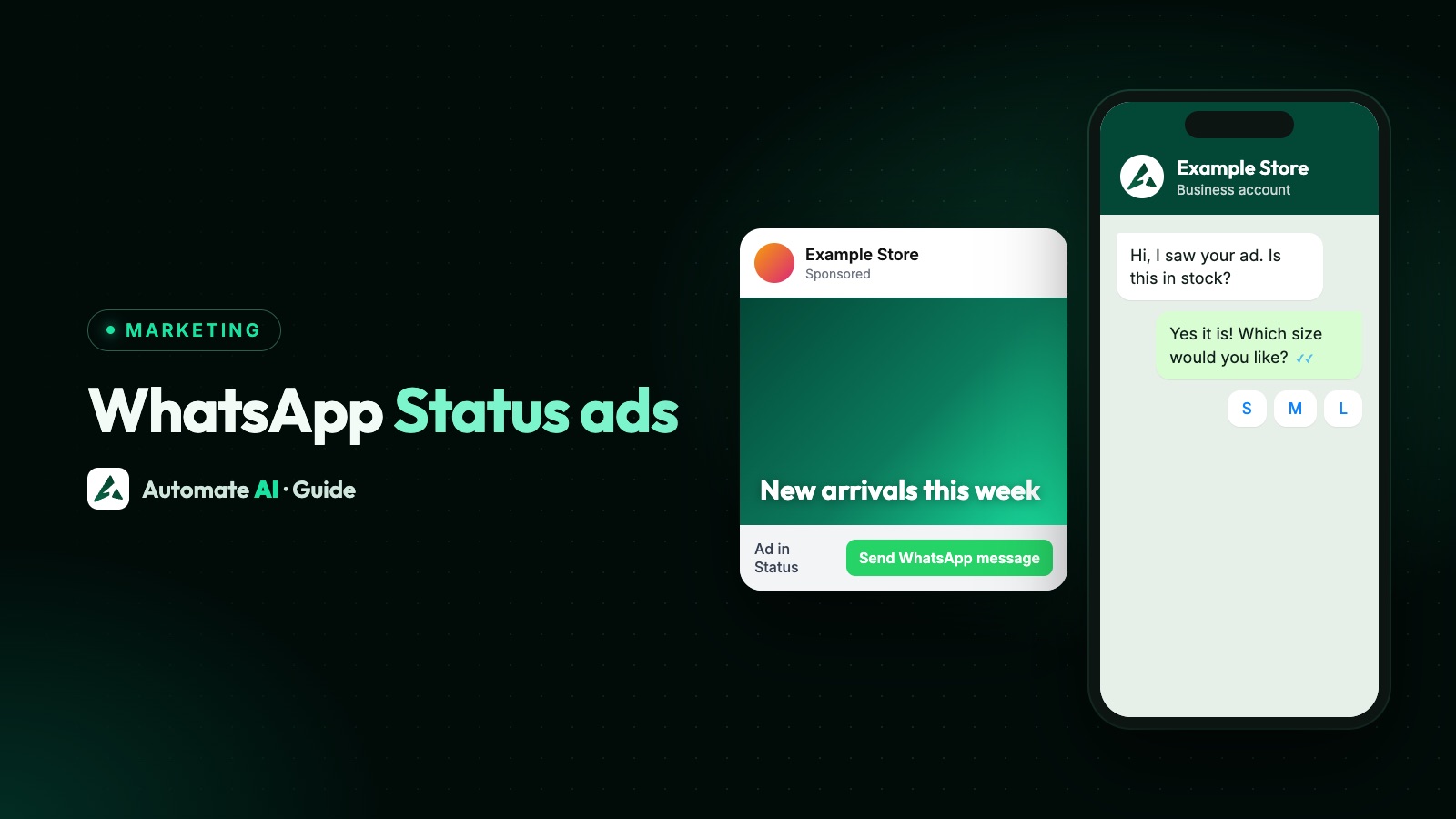
To run WhatsApp Status ads, create a campaign in Meta Ads Manager, keep Advantage+ placements on (or tick WhatsApp Status together with Instagram Stories in manual placements), and send people to a WhatsApp chat or your website. You can’t buy the Status placement in the WhatsApp Business app, and Meta is introducing it gradually, so it may not be offered in your country yet.
This is the advertiser’s guide: what you need before you start, which objectives work, the setup steps, image and video sizes, what stops an ad showing in Status, and how Meta charges for it. If you want to know what Status ads look like to viewers, or how to post your own free Status, see WhatsApp Status for business.
Key takeaways
- Status ads are made only in Meta Ads Manager, not in the WhatsApp Business app.
- You need a Facebook Page, and for chat ads a WhatsApp Business account connected to it. The Instagram Stories placement must be included too.
- Use a vertical image or video: Meta recommends 720 × 1,280 pixels, and Status itself is 9:16.
- There is no fixed price. Ads are sold by auction, and you’re usually charged for impressions unless you choose otherwise.
- Some features, such as A/B tests, phone call ads and Messenger-only destinations, stop an ad from showing in Status.
- Chats from a Status ad land in your WhatsApp inbox like any other ad chat, so plan who answers.
What you need before you start
Meta’s Business Help Centre lists these requirements for the WhatsApp Status placement:
- A Facebook Page for your business. This is enough for ads that send people to your website.
- A WhatsApp Business account for ads that open a chat. It can be on the WhatsApp Business app or on the WhatsApp Business API, and it must be connected to your Facebook Page or Meta Business Suite, or WhatsApp can’t be chosen as the destination.
- The Instagram Stories placement. Meta says you must include it to use WhatsApp Status, and if you opt out of Instagram Stories, WhatsApp Status is opted out too.
- The placement must be available to you. Meta is rolling it out gradually and says it may not be available in your country yet.
Connecting the number is the step that most often goes wrong. If WhatsApp is greyed out in the ad set, see why Meta asks for a WhatsApp number.
Choose an objective and where people go
Status ads work with all six objectives, but only some destinations and performance goals are supported. These are the main ones from Meta’s list:
| Objective | Where people go | Performance goals Meta supports in Status |
|---|---|---|
| Awareness | Website, app or messaging apps (including WhatsApp) | Reach, impressions, ThruPlay views |
| Traffic | Website, messaging apps or app | Link clicks, reach, impressions; also conversations or landing page views for some destinations |
| Engagement | Website, messaging apps, app or on your ad | Link clicks, reach, conversations, impressions, and more |
| Leads | Website, WhatsApp, app or instant forms | Conversations for WhatsApp; leads for instant forms; clicks or conversions for websites |
| Sales | Website, app, both, or message destinations | Conversions, clicks, reach, impressions, conversations |
| App promotion | App | Installs, app events, link clicks (still in testing, Meta says) |
For most small businesses selling on WhatsApp, the simplest choice is Engagement or Leads with WhatsApp as the destination and conversations as the goal. The ad’s button then opens a chat with your business. Meta says sending people to an app may not be available to you yet.
How to set up a Status ad in Ads Manager
These steps follow Meta’s guide for a chat ad with the Engagement or Leads objective. Meta is rolling out a new recommended setup, so your screens may differ slightly.
- In Ads Manager, click + Create, choose Engagement or Leads and click Continue. Name the campaign and click Next.
- At the ad set level, pick Messaging apps (Engagement may call it Message destinations) or WhatsApp (Leads) as the conversion location.
- Choose your Facebook Page, then tick WhatsApp and select the number. If it’s missing, click Connect account.
- Pick a performance goal, such as maximise number of conversations.
- Set the audience: location, age and language are supported. Meta recommends Advantage+ audience, because narrow targeting can mean low delivery in Status.
- In Placements, Advantage+ placements already includes WhatsApp Status. To control it, choose Manual placements (for Leads: Show more settings › Placement controls) and tick WhatsApp Status and Instagram Stories.
- At the ad level, check the identity shows your Page and WhatsApp number, upload a single image or video, and write the text.
- Fill in the message template: the greeting and the message people send when the chat opens.
- Click Publish. Once the ad is reviewed and approved, it can start showing in Status.
For an awareness campaign, Meta adds one more step: Dynamic Creative must be off, or WhatsApp Status won’t appear as a placement. Afterwards, Ads Manager reporting shows impressions, clicks and messaging conversations started.
Sample chat greeting (sample data)
Greeting: “Hi! Thanks for tapping our Status ad. Example Sweets here. Which box would you like to know about?” Message the customer sends: “Hi, I’d like the price of the festive gift box.”
Write the prefilled message so it names the offer. When it arrives, your team knows straight away which ad it came from. More ideas in Click-to-WhatsApp ad examples.
WhatsApp Status ad sizes and formats
Status updates are single vertical images or videos in a 9:16 ratio. Meta’s creative guidance for the Status placement:
| Format | File types | Aspect ratio | Resolution |
|---|---|---|---|
| Image | JPG or PNG recommended | Any ratio narrower than 1.91:1 | 720 × 1,280 px recommended, at least 500 × 320 px |
| Video | MP4, MOV or GIF | Any ratio narrower than 1.91:1 | 720 × 1,280 px recommended, at least 120 × 120 px |
| Carousel | JPG or PNG (no video yet) | 9:16 recommended | 720 × 1,280 px recommended, at least 500 × 320 px; 2 to 10 cards |
- Design for 9:16. Other ratios are accepted, but the space is a phone screen held upright.
- Captions aren’t supported on video, so put key words in the video itself.
- Keep text away from the edges, and make the offer readable in a second or two, because people tap through Status quickly.
- Meta asks that video files don’t include lists or special boxes within the file containers. Export a plain MP4 if an upload fails.
These sizes are for ads. Images you send inside WhatsApp template messages follow different limits: see WhatsApp template image size.
What stops an ad from showing in Status
Meta lists features that mean an ad won’t be delivered to WhatsApp Status at all. The main ones:
- Ad types and tests: shops ads, creative testing and Meta experiments such as A/B tests and lift studies.
- Formats and destinations: collection ads, Instant Experience, Facebook events, phone calls, and messaging apps without WhatsApp (for example Messenger only).
- Lead forms: the higher intent and rich creative form types, SMS verification, conditional logic, date of birth questions, appointment requests and the view file ending. Only the more volume form type works.
Other settings don’t block the placement but can shrink delivery a lot: ad account audience controls, custom and lookalike audiences without Advantage+ custom audience, excluding people of unknown age, and detailed targeting without Advantage+.
How much WhatsApp Status ads cost
Meta doesn’t publish a price for Status ads, in India or anywhere else. Like other Meta ads, they’re sold by auction: for each impression, Meta picks ads based on bids and expected performance. You decide the spend with a daily or lifetime budget, and Meta aims to spend it evenly.
- What you’re charged for: Meta says you’re usually charged for impressions unless you choose otherwise when creating the ad. Some objectives let you pick another charge, such as link clicks.
- New ad accounts: Meta says a new account must spend at least USD 10 on impression charges before it can switch to another charge type.
- When you pay: with automatic billing, your card is charged when you reach your payment threshold and again on your monthly bill date. With prepaid funds, Meta deducts from your balance up to once a day.
- Taxes: in India, when the receipt is from Facebook India, Meta adds GST and TDS at the local rate. Other countries have their own rules, and some regions now carry location fees.
- Spending limits: set a campaign or account spending limit so a test can’t overspend.
The ad isn’t the only cost. When someone messages you from a Status ad, your replies follow normal WhatsApp rules. Meta describes these as ads that click to WhatsApp, and its pricing page says that when someone messages you from such an ad on the Android or iOS app and you reply within the customer service window, a free entry point window opens and your messages to them are free for up to 7 days. That covers WhatsApp message charges only; the ad spend is separate. The details are in Click-to-WhatsApp ads.
The only way to know your own cost is a small test: one ad set with a modest budget and a spending limit for a week, then look at amount spent and messaging conversations started in Ads Manager reporting.
WhatsApp channel ads (promoted channels)
If you run a WhatsApp Channel, Meta announced in June 2025 that channel admins would be able to pay to promote their channel in the Channels directory on the Updates tab, alongside ads in Status. Like Status ads, Meta said this would roll out slowly, and the WhatsApp Help Center says the Status and Channels placements are only available in Meta Ads Manager.
Meta’s help pages we checked don’t yet give step-by-step setup for promoting a channel, so look for it in Ads Manager and expect it to depend on your country. Free ways to grow a channel still matter more for most businesses: see how to grow WhatsApp channel followers.
Running Status ads with Automate AI
Automate AI’s Meta Ads menu creates Click-to-WhatsApp and other ads, but WhatsApp Status isn’t in its list of placements. If you pick placements yourself, an ad that opens WhatsApp can only use Facebook and Instagram ones. If you leave placements on automatic, Automate AI sends Meta no placement choice and Meta decides where the ad runs, which can include Status where Meta offers it. Automate AI doesn’t control or report that. To make sure an ad can run in Status, or to check its placements, open it in Meta Ads Manager.
- See every ad in one list: Automate AI shows the ads in your connected ad account, including ones made in Ads Manager, with spend, chats started, cost per chat and new contacts.
- Answer the chats as a team: if the ad opens a chat with the number connected to Automate AI, every chat from it arrives in the shared inbox, where your team replies. On the AI + Automation Plan and Series 4, a chatbot or the AI Assistant can answer too.
- Follow up later: people who chat become contacts, so you can follow up with approved templates, or with a drip campaign on the AI + Automation Plan and Series 4, if they go quiet.
Ad spend is billed by Meta to your own ad account. To see which ads bring paying customers rather than just chats, read track which ads bring WhatsApp customers.
Frequently asked questions
How do I run WhatsApp Status ads?
Create a campaign in Meta Ads Manager, choose WhatsApp or your website as the destination, and keep Advantage+ placements on, or tick WhatsApp Status and Instagram Stories in manual placements. Then upload a vertical image or video and publish.
Can I create Status ads in the WhatsApp Business app?
No. The app can create Facebook and Instagram ads that open a chat, but WhatsApp says the Status and Channels placements are only available in Meta Ads Manager.
How much do WhatsApp Status ads cost?
There’s no fixed price. Meta sells ads by auction, you set the budget, and you’re usually charged for impressions. In India, GST and TDS are added when the receipt is from Facebook India.
What size should a WhatsApp Status ad be?
Vertical. Meta recommends 720 × 1,280 pixels for images and videos, and Status itself is 9:16. Images need at least 500 × 320 pixels; JPG or PNG for images and MP4, MOV or GIF for video.
Why can’t I see the WhatsApp Status placement?
Meta is rolling it out gradually, so it may not be in your country yet. Also check that Instagram Stories is included, Dynamic Creative is off for awareness campaigns, and brand safety controls haven’t opted you out.
Do I need the WhatsApp Business API for Status ads?
No. Meta accepts a WhatsApp Business account on the Business app or on the API. The API helps when several people need to answer the chats or you want automation.
Sources
- Meta Business Help: About ads in WhatsApp Status
- Meta Business Help: Create ads in WhatsApp Status in Meta Ads Manager
- WhatsApp Help Center: About creating ads on the WhatsApp Business app
- Meta Newsroom: Helping you find more channels and businesses on WhatsApp (June 2025)
- Meta Business Help: How Meta charges for ads
- Meta Business Help: About getting charged
- Meta Business Help: Taxes on Meta ads placement
- Meta: Pricing on the WhatsApp Business Platform (free entry point window)
WhatsApp rules and prices change. We check these guides against Meta’s documentation, but always confirm current terms with Meta before you rely on them. Questions? Message us on WhatsApp at +91 836 977 8812.