Facebook Ads for Pest Control: Urgent Calls, Quotes and WhatsApp
Facebook ads for pest control: identify the pest from a photo on WhatsApp, take urgent calls, plan seasonal promotions and renew annual contracts.
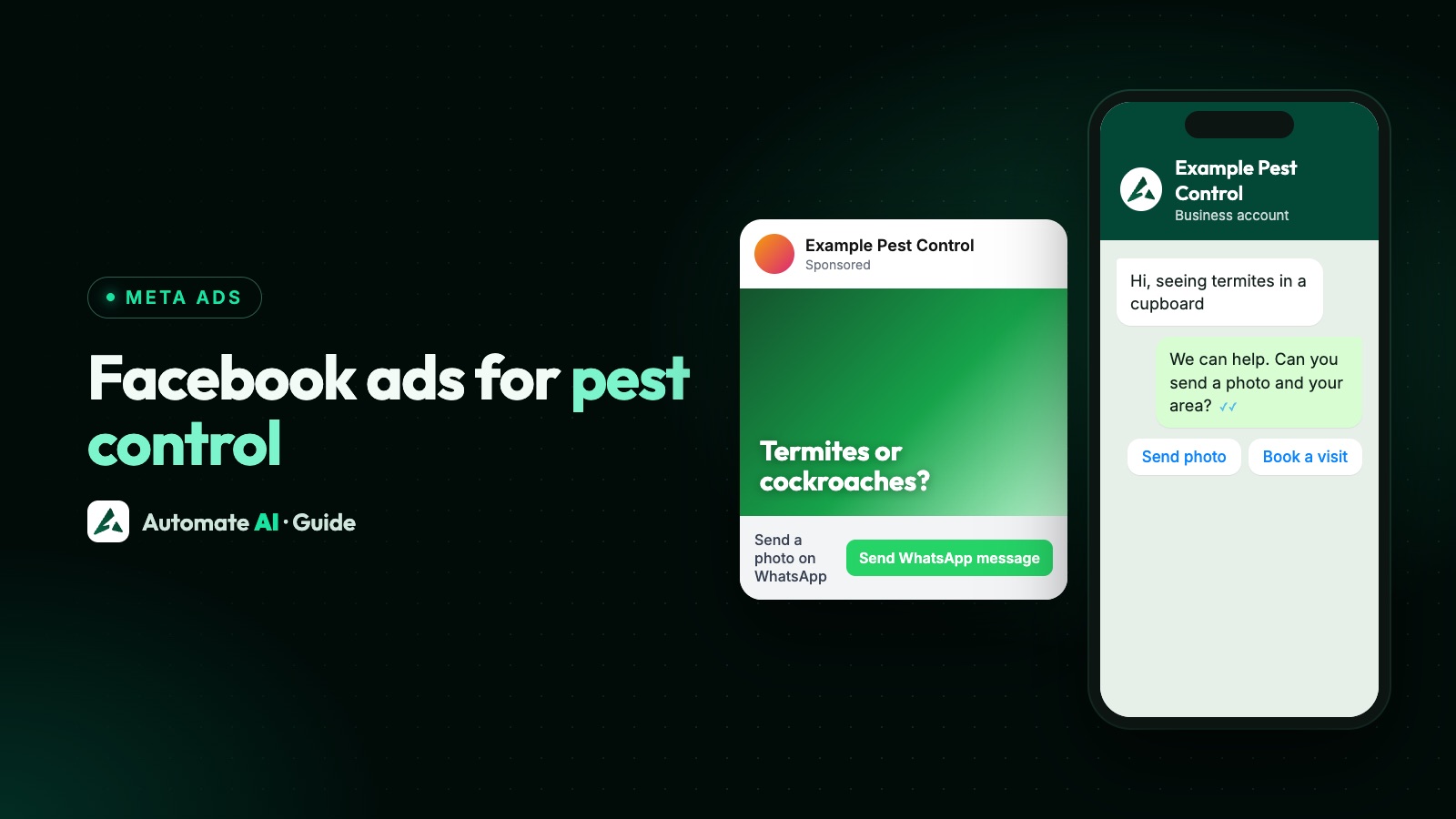
Facebook ads for pest control work best when each ad is about one pest and one next step: a chat where the customer sends a photo of what they’ve found, a WhatsApp call for the urgent cases, and an annual contract offered once the first treatment is done. The photo tells you the pest, the products and the price before anyone drives out.
Pest control is different: you identify the problem first, demand moves with the seasons, and the real business is the yearly contract. Samples below use a made-up company. For the call-versus-chat question in general, see Facebook call ads vs WhatsApp ads.
Key takeaways
- Run one ad per pest or job (termites, cockroaches, mosquitoes, rodents, commercial contracts), with a matching pre-filled message.
- Ask for a photo of the pest or the signs in the first reply. It tells you what you’re dealing with and what to bring.
- Let urgent customers call you on WhatsApp in your call hours. To call them back, they must allow calls first.
- Plan seasonal ads with start and end dates, and keep pictures clean: Meta bars shocking images, including injured animals and visible blood.
- Save each contract date and send a renewal reminder 7 days before, every year. A renewal asks for a sale, so it’s a marketing template with an opt-out.
What works in Facebook ads for pest control
People don’t browse for pest control. They search for it, or notice an ad, the day they find something. That gives you four kinds of enquiry, and each needs its own ad and first reply:
| Enquiry | Example | What the customer wants | Best next step |
|---|---|---|---|
| Urgent | Cockroaches in the kitchen, a rat seen at night | Someone today or tomorrow | Chat with a photo, or a WhatsApp call |
| Seasonal | Mosquitoes or ants as the weather changes | A treatment before it gets worse | Chat, then a booked slot |
| Inspection | Termite signs on a door frame, before buying a home | Someone to check and explain | Chat with photos, then an inspection visit |
| Commercial | A restaurant, warehouse or school | A contract, records, regular visits | Lead form, then WhatsApp |
Identify the pest from a photo first
Customers often don’t know what they’re looking at. A photo in the chat saves a wasted visit and lets you quote with confidence. Ask for the photo that answers your question:
| They say | Ask for | Why |
|---|---|---|
| “Little insects in the kitchen” | A close photo of one insect, and where they gather | Cockroaches, ants and beetles need different treatments |
| “Something in the roof at night” | Photos of droppings or gnaw marks, with a coin for scale | Rats, mice and other animals leave different signs |
| “Wood looks hollow” | The damaged spot and any mud tubes on walls | Signs of termites, and how far they’ve spread |
| “Bites at night” | The mattress seams and headboard | Signs of bed bugs, without asking about the bites themselves |
Then ask four short questions: the area, the type of property (flat, house, shop), roughly how big it is, and whether there are pets or small children at home, so you can plan which treatment to use. Keep it to that. Don’t ask customers to send photos of bites or describe health problems in chat.
A chatbot can do the asking. In Automate AI’s chatbot builder (Automation › Flows, AI + Automation Plan and Series 4), buttons sort the chat by pest, a Collect Media step asks for and saves the photo, and the next question asks for the area. Your team picks up in the shared inbox with the photo and answers already there.
Urgent enquiries: chats, calls and callbacks
Someone who has just seen a rat in the kitchen often wants to talk. You don’t need a separate call ad to allow that. With WhatsApp Calling in Automate AI (every plan, Settings › WhatsApp Calling), customers who are chatting with you from your ad can call you over WhatsApp, free for you, and your team answers in the browser.
- Call hours: outside them, customers are asked to message instead of calling, so nobody rings an empty office.
- Callback requests: turn this on and, after a call, WhatsApp asks the customer if you may call them back. To call a customer, they must have allowed calls first.
- Cost: calls customers make to you are free; calls you make are charged per minute from your wallet, in 6-second steps.
If your urgent ad should only run when someone can go out, use an ad schedule. Meta’s help centre says ad scheduling works only with a lifetime budget, and the ad shows in the audience’s time zone. In Automate AI choose Total for the whole run and turn on Show only on some days and hours. The full version of this setup, with after-hours replies, is in Facebook ads for plumbers, and Meta’s calling rules are in our WhatsApp calling guide.
Sample urgent ad (made-up business)
- Primary text: Cockroaches or rats at home in Example City? Send us a photo on WhatsApp and we’ll tell you what it is and when we can come. Same-day visits in most areas.
- Headline: Send a photo, get a same-day visit
- Pre-filled message: Hi, I need pest control today
- Greeting: Hi, Example Pest Care here. What have you seen, and where? A photo helps us bring the right treatment.
Pest control advertising ideas and promotions by season
Demand moves with the weather, and the pattern differs by region. Look back at your own bookings to see which pests peak in which months, then run each seasonal ad a little before its peak, with a start and end date on the ad set.
| Idea | Headline (sample) | Pre-filled message |
|---|---|---|
| Before the mosquito season | Mosquito treatment before the rains | Hi, I’d like a mosquito treatment |
| Termite inspection | Hollow wood or mud tubes? Book an inspection | Hi, I think I have termites |
| Moving in | Moving into a new home? Treat it before you unpack | Hi, I’m moving in and want a treatment |
| Annual plan | Four visits a year, one price | Hi, tell me about your yearly plan |
Promotions that suit pest control are real, simple and dated: a set price for a 2-bedroom treatment this month, a free inspection with a booked treatment, or a discount for signing an annual plan. Put the end date in the ad and in the chat, and only claim what you can back up. If you say a treatment is suitable for homes with pets, be ready to explain why.
Before and after the treatment
Many treatments go better when the customer prepares the home, and many jobs include a check-up visit. WhatsApp is the natural place for both. While the 24-hour window is open you can write freely; after that you need templates. Messages about a booked job, with no selling, are usually utility under Meta’s rules.
| When | Sample (Example Pest Care) | Likely category |
|---|---|---|
| Booking confirmed | “Hi {{1}}, your {{2}} treatment is booked for {{3}}. Reply 1 to confirm or 2 to change the time.” | Utility |
| The day before | “Hi {{1}}, for tomorrow’s visit please clear the kitchen counters and keep pets in another room. Reply if you have questions.” | Utility |
| Follow-up visit due | “Hi {{1}}, your included follow-up visit is due. Reply with a day that suits you.” | Utility |
| Asking for a review or referral | “Hi {{1}}, glad the treatment worked! Know someone with the same problem? Reply SHARE and we’ll send a link. Reply STOP to opt out” | Marketing |
To send the follow-up automatically, a drip in Campaigns › Drip Campaigns with Sequence of steps does it: include a status such as Treated, let step 1 (a thank-you with aftercare tips) go out when the customer joins, and set step 2, the follow-up reminder, a set number of days later. Turn Stop on reply off, or a reply to the thank-you ends the drip before the reminder. See WhatsApp appointment reminders for wording.
Annual contracts: renew them on WhatsApp
A yearly plan is where pest control becomes steady income, and renewals are easy to forget. Let Automate AI remember them:
- Add a date field such as
renewal_datein Settings › Contact Fields, and fill it in when a contract starts. Any date format works, with or without the year. - Open Campaigns › Drip Campaigns, start a new drip and choose Date-based message, then Event Based and Custom Date Field, and pick the field.
- Send it 7 days before (or 3, or on the day), at a set time, to a contact group of contract customers.
- Use an approved template. Meta lists attempts to renew subscriptions as marketing, so expect a marketing template and end it with an opt-out.
A sample renewal: “Hi {{1}}, your Example Pest Care yearly plan ends on {{2}}. Renew this week and we’ll book your first visit of the new year. Reply RENEW or call us here. Reply STOP to opt out”
Automate AI matches the day and month every year, so the reminder comes round again next year without new work. Drips and date-based messages are in the AI + Automation Plan and Series 4.
Commercial pest control with lead form ads
A restaurant owner or facilities manager wants a proposal, not a chat about one cockroach. A lead form collects what you need to price a contract. Meta’s instant forms allow up to 15 questions, with multiple choice, short answers, conditional answers and an appointment request. Keep it to a few:
- Type of site: restaurant or kitchen, warehouse, office, school, hotel.
- Size or number of sites: ranges, not exact figures.
- Main concern: rodents, cockroaches, flies, termites, general prevention.
- A visit time: the appointment request question.
- Opt-in wording: “Example Pest Care will contact you on WhatsApp about your inspection.” Add it in Ads Manager’s form editor.
Meta advises capturing leads immediately and running lead ads during the hours you can follow up. With Facebook Lead Ads in Automate AI’s Integrations (AI + Automation Plan and Series 4), each lead becomes a contact, or updates an existing one, and gets an approved template straight away, a default one or one per ad:
“Hi {{1}}, thanks for asking Example Pest Care about your {{2}}. Could you send a few photos of the kitchen or storage area? We’ll then suggest a time for a free site inspection. Reply STOP to opt out”
Set-up is in Facebook Lead Ads to WhatsApp and on the Facebook Lead Ads integration page.
Set it all up in Automate AI
Meta Ads is in Automate AI’s main menu on every plan, for account owners and managers. Meta bills the ad spend to your own ad account, and nothing is spent until you publish.
- Connect your ad account with Continue with Facebook and pick the ad account and Page.
- Make the urgent ad with WhatsApp chats, a tight area around your base, and a schedule if you only go out at certain hours.
- Make one seasonal ad per pest, each with its own pre-filled message and an end date.
- Make the commercial ad with Lead form, and connect Facebook Lead Ads so every lead gets your template.
- Describe each ad in a line, such as “termite inspection for homes, book this week”. The greeting can be up to 300 characters and the pre-filled message up to 120. AI drafts the text, audience, greeting and pre-filled message with your own AI key from Settings; without one, write them yourself.
- Tag each ad. In Settings › Lead Sources, match a phrase from each pre-filled message, such as “termites” or “today”, to a source.
- Check the preview and publish. Meta reviews each ad before it runs.
Count inspections booked, treatments done and contracts signed per ad, not chats; track which ads bring WhatsApp customers shows how. More on the builder: Click-to-WhatsApp ads and the Meta ads hub.
Frequently asked questions
Do Facebook ads work for pest control?
They can, when each ad is about one pest and opens a chat or call, and you reply fast. Results depend on season, area and price, so test small and count inspections and treatments booked, not clicks.
What are good pest control advertising ideas?
Seasonal ads run just before each pest’s peak in your area, a free inspection with a booked treatment, a moving-in treatment, and a yearly plan. Each should open WhatsApp with a matching pre-filled message.
Should pest control ads bring calls or WhatsApp messages?
Both. A chat ad lets customers send a photo, and with WhatsApp Calling on they can call you from the same chat during your call hours. To call them back, they must allow calls first.
Can I show pests in my ads?
Be careful. Meta’s sensational content policy bars shocking images, including animals with visible blood and injured animals. Clean, calm images of your team or a treated home are safer.
How do I remind customers to renew an annual pest control contract?
Save the renewal date in a contact field and use a date-based drip message with a Custom Date Field trigger, sent 7 days before. Use an approved marketing template with an opt-out line.
Sources
- Meta Advertising Standards: Sensational content
- Meta Business Help Centre: About budget scheduling (and ad scheduling)
- Meta Business Help Centre: Schedule an ad set in Meta Ads Manager
- Meta Business Help Centre: Best practices to respond to leads from your lead ads
- Meta Business Help Centre: Add custom questions to your lead ads with instant form
- Meta for Developers: Template categorization
- WhatsApp Business Messaging Policy
WhatsApp rules and prices change. We check these guides against Meta’s documentation, but always confirm current terms with Meta before you rely on them. Questions? Message us on WhatsApp at +91 836 977 8812.