Facebook Ads for Plumbers: Urgent Jobs, Calls and WhatsApp
Facebook ads for plumbers: split urgent and planned jobs, handle after-hours enquiries, get a photo of the problem on WhatsApp and set an area you can reach.
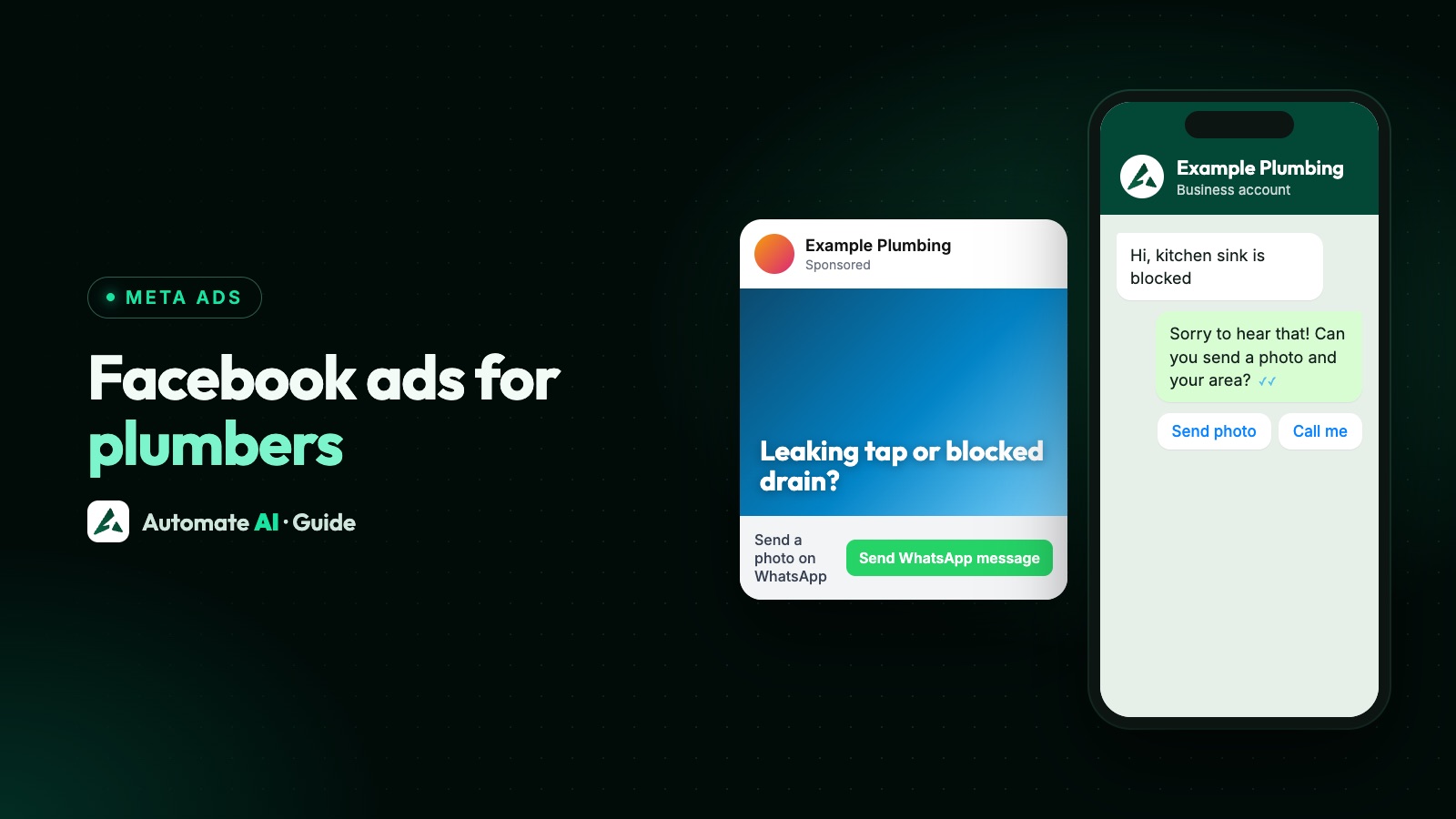
The Facebook ad setup that suits most plumbers is two ads, not one: an urgent-repair ad that runs only in the hours you can actually go out, and a planned-jobs ad that runs all day and opens a WhatsApp chat, so the customer can send a photo of the problem before you quote. Both are aimed at the area you can reach in a reasonable drive.
This guide is about what’s different for plumbing: urgent and planned jobs behave differently, enquiries arrive at night, a photo saves a wasted trip, and your service area is really a travel time. We cover each one with sample ads and messages for a made-up business, and show how to run it from Automate AI. The general trades setup is in Facebook ads for contractors and the call-versus-chat choice in Facebook call ads vs WhatsApp ads, so we only link to them here.
Key takeaways
- Split your ads: urgent repairs (leaks, blockages, no hot water) and planned jobs (bathroom fitting, water heater swaps, pipe replacement).
- Show the urgent ad only in the hours you can attend. In Automate AI that needs a total budget for the whole run, which is Meta’s rule for ad scheduling.
- Ask for a photo of the problem in the first reply: under the sink, the heater label, the meter. It tells you which parts to bring.
- Set up after-hours replies: an away message for planned jobs, and a clear on-call or “we’ll call you at 8am” answer for urgent ones.
- Draw the area by drive time, not by city. Plumbing repairs count as housing ads for US, Canadian and listed European audiences, which limits tight targeting.
Do Facebook ads work for plumbers?
They can, but plumbing has a timing problem most local trades don’t. Nobody scrolls Facebook looking for a plumber until something breaks, and when it breaks, they want someone today. So a plumbing ad does two different jobs:
| Urgent repairs | Planned jobs | |
|---|---|---|
| Examples | Burst pipe, blocked drain, leaking tap, no hot water | New bathroom fittings, water heater replacement, repiping, a water tank or pump |
| What the customer wants | Someone who can come soon, and a rough price | A quote, a time that suits them, and trust |
| Best first contact | A phone or WhatsApp call, or a chat answered in minutes | A WhatsApp chat with photos, at their own pace |
| When the ad should run | Only in the hours you can attend | All day: replies can wait until morning |
| What to measure | Jobs attended per day of ads | Quotes sent and jobs won |
Mixing the two in one ad brings emergency callers at 2am who get no answer, and planned-job customers who expect you within the hour. Nobody can promise a number of jobs from an ad, but separating them makes each easier to judge.
Ad 1: urgent repairs, only when you can go out
An urgent ad that runs at night when nobody answers pays for frustrated customers. Run it only in your real working or on-call hours.
Set an ad schedule
Meta’s help centre explains that ad scheduling, which sets the hours and days your ad is shown, only works with a lifetime budget, and that the ad appears in the audience’s time zone. In Automate AI’s Meta Ads, choose Total for the whole run as the budget, add a last day, and turn on Show only on some days and hours. You can add several time slots, in whole hours, such as Monday to Saturday 7am to 9pm and Sunday 9am to 1pm.
Chat or call?
An urgent customer may prefer to talk. You have two ways to allow that without running a separate call ad:
- WhatsApp Calling in Automate AI (every plan). Turn it on in Settings › WhatsApp Calling. Customers chatting with your number can call you over WhatsApp, free for them, and your team answers in the browser. Set Call hours, so outside them customers are asked to message instead. To call a customer back, they must allow calls first; calls you make are charged per minute from your wallet, in 6-second steps. Meta’s own requirements for calling are in our WhatsApp calling guide.
- A phone call ad, also in Automate AI’s Meta Ads (“People tap to call your number”). Compare the two properly in Facebook call ads vs WhatsApp ads.
Sample urgent ad (made-up business)
- Primary text: Leaking pipe or blocked drain in Example Town? Message us a photo and we’ll tell you when we can be there today. Same-day visits, 7am to 9pm.
- Headline: Same-day plumber, 7am to 9pm
- Pre-filled message: Hi, I need a plumber today
- Greeting: Hi, Example Plumbing here. What’s happening, and which area are you in? A photo helps us bring the right parts.
Ad 2: planned jobs, open all day
Planned work is where a WhatsApp chat shines. People think about a new bathroom or a water heater in the evening, send photos when it suits them, and compare quotes over a few days.
| Job | Headline | Pre-filled message | Greeting |
|---|---|---|---|
| Water heater | Old water heater? Get a fitted price on WhatsApp | Hi, I’d like a price for a new water heater | Hi! Could you send a photo of your current heater and its label? We’ll suggest a size and price. |
| Bathroom fittings | New taps, shower and basin, fitted in a day | Hi, I need a quote for bathroom fittings | Hi! Which fittings are you changing? A wide photo of the bathroom helps. |
| Pipe or tank work | Low pressure or old pipes? Free inspection visit | Hi, I’d like an inspection visit | Hi! Is it a house or a flat, and roughly how old are the pipes? |
Meta says the customer can edit or delete the pre-filled message before sending, so write it as the message they’d want to send anyway. In Automate AI the greeting can be up to 300 characters and the pre-filled message up to 120. More ideas are in Click-to-WhatsApp ad examples.
Get a photo of the problem before you drive out
A photo in the chat tells you whether the job is real, how urgent it is and which parts to load. Ask for the photo that answers your question:
| Problem | Ask for | Why |
|---|---|---|
| Leak under a sink | A photo under the sink with the cupboard open | Shows the joint, trap or hose that’s failing |
| No hot water | The heater’s label and any warning light | Brand, size and type, so you bring the right part |
| Blocked drain | Which drain, and whether others are slow too | One sink or the main line is a very different job |
| Low pressure | A short video of the tap running | Easier to judge than a description |
You can ask by hand, or let a chatbot do it. In Automate AI’s chatbot builder (Automation › Flows, AI + Automation Plan and Series 4), buttons can sort the chat into Urgent or Planned, a Collect Media step asks for and saves the photo, and the next question asks for the area. Your team then picks up the chat in the shared inbox with everything in one place.
Then reply with a price range for the visit and two time slots. For bookings, see WhatsApp appointment booking.
After-hours enquiries
Your planned-jobs ad runs all day, so some chats arrive at night. Decide what each kind of customer gets:
- Planned jobs at night: set an away message in Settings › Business Hours, for example “Thanks! We’re closed now and will reply by 8:30am with a price. Feel free to send photos meanwhile.” Automate AI sends it when a customer writes outside your hours and no chatbot or AI answers, at most once per chat every 12 hours, and never to contacts who opted out. It can be plain text or an approved template.
- Urgent jobs at night, if you do on-call: say so in the away message and give the on-call number, or let customers call over WhatsApp during your call hours only.
- Urgent jobs at night, if you don’t: say it plainly and suggest turning off the stopcock or the heater until morning. Don’t make promises you can’t keep.
Business hours in Automate AI also hold drip messages and follow-ups until you’re open, so nobody gets a reminder at midnight.
Draw your service area by drive time
A 20 km circle looks neat on a map, but a river, a ring road or rush hour can make half of it a 90-minute drive. Draw the area you can reach for an urgent job, and if you take planned work further away, give that its own wider ad.
| Option in Automate AI | Range | Good for |
|---|---|---|
| Around your address or a map pin | 1 to 80 km | Urgent ads: a tight circle around your base |
| A city | 17 to 80 km around it | Planned jobs across a whole city |
| PIN codes (India) | Single areas | Neighbourhoods you can reach quickly |
| Leave places out | Any of the above, except housing ads | Areas across a river or beyond a toll road |
The housing rule
Meta counts ads for housing repairs as housing ads. If you’re an advertiser in the US, or your audience is in the US, Canada or the European countries Meta lists (including the UK, Ireland, France, Germany, Spain and Italy), choose the Housing special ad category or the ad may be rejected. Meta then removes age, gender and postcode targeting, exclusions, lookalike and saved audiences, and city or pin-drop areas get an expanded radius. In Automate AI, answering Housing or property applies most of those limits for you, with at least 25 km around a place and no PIN or ZIP codes; don’t leave places out in a housing ad, because Meta doesn’t allow location exclusions there. Housing ads also can’t show in WhatsApp Status. Plumbers advertising in India to Indian customers aren’t on Meta’s list. Details are in Facebook ads for contractors.
Run both ads from Automate AI
Meta Ads is in Automate AI’s main menu on every plan, for account owners and managers. Meta bills the ad spend to your own ad account, and nothing is spent until you publish.
- Connect your ad account with Continue with Facebook and pick the ad account and Page.
- Make the urgent ad: a WhatsApp chat ad, a tight area around your base, a total budget with a last day, and Show only on some days and hours on.
- Make the planned-jobs ad: a WhatsApp chat ad, a wider area, a daily budget, no schedule.
- Describe each in a line, such as “water heater replacement, fitted same week”. AI drafts the text, audience, greeting and pre-filled message with your own AI key from Settings; without one, write them yourself.
- Tag each ad. In Settings › Lead Sources, match a phrase from each pre-filled message, such as “plumber today” and “water heater”, to a source, so you know which ad each chat came from.
- Check the preview and publish. Meta reviews each ad before it runs.
More on the builder on the Click-to-WhatsApp ads page and our Meta ads hub.
What to measure
Meta’s pricing page says that when someone messages you from a Click-to-WhatsApp ad on the WhatsApp Android or iOS app and you reply within the 24-hour customer service window, a free entry point window opens for up to 7 days, with no Meta charge for your marketing, utility, authentication or service messages. That covers the quote, the visit time and the reminder. Automate AI still charges its normal rates for those messages.
- Urgent ad: jobs attended per week, and how many chats you couldn’t take (too far, too late). If that number is high, shrink the area or the hours.
- Planned ad: quotes sent and jobs won, by marking contacts with a status such as “Quoted” or “Won”. Track which ads bring WhatsApp customers shows how.
- Cost per chat, shown for every ad in Automate AI’s Meta Ads, next to spend and new contacts.
- First reply time. For urgent jobs, minutes matter. See speed to lead.
Once a customer is happy, ask whether they’d like a yearly service reminder (see WhatsApp opt-in).
Frequently asked questions
Do Facebook ads work for plumbers?
They can, especially when you run separate ads for urgent repairs and planned jobs, aim them at the area you can reach, and answer fast. Results vary by area, season and price, so test with a small budget and count jobs, not clicks.
How do I stop plumbing ads running at night?
Use an ad schedule. Meta’s help centre says ad scheduling works with lifetime budgets. In Automate AI’s Meta Ads, pick a total budget for the whole run and turn on Show only on some days and hours.
Should plumbing ads get calls or WhatsApp messages?
Urgent jobs often suit a call, planned jobs a chat. A WhatsApp chat ad covers both if WhatsApp Calling is on, because customers in the chat can call you during your call hours.
Do plumbing ads count as housing ads?
Meta counts housing repairs as housing ads. If you advertise from the US or to the US, Canada or the listed European countries, choose the Housing category, which removes age, gender and postcode targeting.
What should I ask a customer before going out?
What the problem is, a photo of it, the area, and how urgent it is. The photo tells you which parts to bring and avoids a wasted trip.
What happens to WhatsApp messages that arrive after hours?
In Automate AI, an away message from Settings › Business Hours answers once, and your team replies when you open. Say clearly when they’ll hear back.
Sources
- Meta Business Help Centre: How to choose a Special Ad Category
- Meta Business Help Centre: About ads for housing
- Meta Business Help Centre: About budget scheduling (and ad scheduling)
- Meta Business Help Centre: Schedule an ad set in Meta Ads Manager
- Meta Business Help Centre: How to create pre-filled messages for ads that click to WhatsApp
- Meta Advertising Standards: Sensational content
- Meta: Pricing on the WhatsApp Business Platform (free entry point window)
WhatsApp rules and prices change. We check these guides against Meta’s documentation, but always confirm current terms with Meta before you rely on them. Questions? Message us on WhatsApp at +91 836 977 8812.