Facebook Ads for Contractors and Construction Companies: Quote Requests on WhatsApp
Facebook ads for contractors, painters, roofers and builders that send quote requests to WhatsApp: Meta’s rules, service areas, sample ads and first replies.
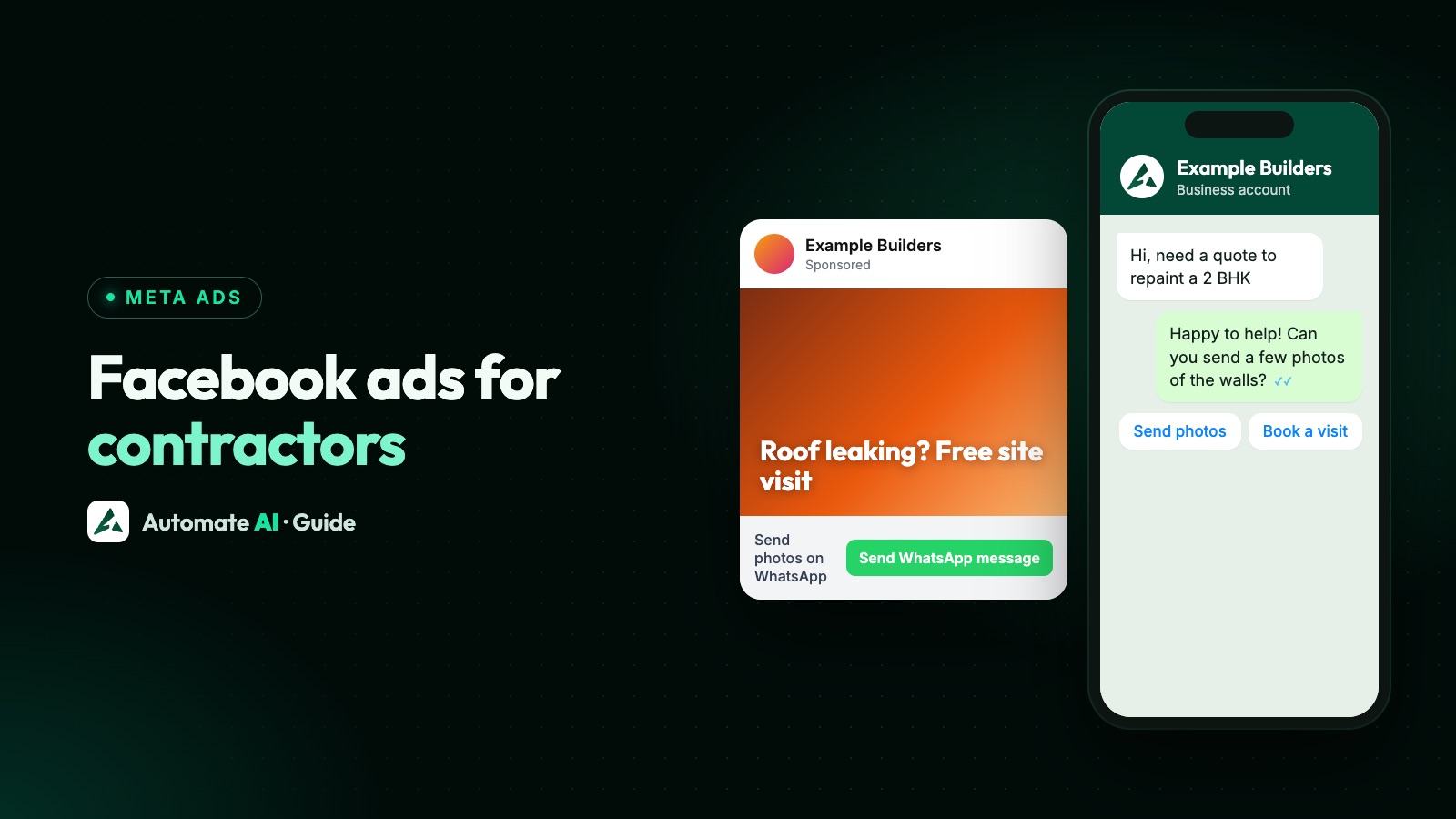
The simplest Facebook ad setup for a contractor is an ad that opens a WhatsApp chat, aimed at the area you actually work in, so a homeowner can send photos of the job and ask for a quote in one tap. For bigger or slower jobs, such as an extension or a new build, a lead form ad with an instant WhatsApp follow-up works well too.
This guide is for general contractors, painters, roofers and construction companies. It covers, with made-up sample businesses, the Meta rules that catch building trades out, how to set your service area, sample ads and WhatsApp messages for each trade, and how to run it all from Automate AI.
Key takeaways
- A Click-to-WhatsApp ad suits quick quotes: the customer sends photos, the address area and timing in the chat.
- A lead form ad suits bigger projects; send each lead a WhatsApp template straight away and ask for photos there.
- Meta counts housing repairs as housing ads. Advertisers in the US, or reaching the US, Canada or listed European countries, should expect the Housing category and lose tight targeting.
- Don’t ask for insurance policy numbers, income or credit scores on a lead form: Meta prohibits those questions.
- In Automate AI’s Meta Ads menu, set your area as cities (17 to 80 km), an address or a map pin (1 to 80 km), and Meta bills your own ad account.
- Judge ads by site visits booked and jobs won, not by the cheapest chat.
Why WhatsApp works for contractor quote requests
In a WhatsApp chat, a homeowner can send three photos of the damp wall or the cracked tiles in a few seconds, and you can price the visit before you drive out.
There are two ways to get those chats from Facebook and Instagram ads:
| Click-to-WhatsApp ad | Lead form ad with WhatsApp follow-up | |
|---|---|---|
| What the customer does | Taps the ad and sends a message | Fills in a short form without leaving Facebook or Instagram |
| Good for | Repairs, painting, roofing checks, small jobs | Extensions, renovations, new builds, commercial work |
| What you get first | A chat, often with photos | Name, phone number and your answers |
| Your first message | A normal reply in the open chat | An approved WhatsApp template |
| Watch out for | Chats that just say “hi”: a good pre-filled message helps | People who don’t remember filling it in: reply fast |
If you also want phone calls, compare the options in Facebook call ads vs WhatsApp ads. For the general local setup, see Facebook ads for local businesses.
Meta’s rules that catch building trades out
Does your ad count as housing?
Usually, yes. Meta’s page on choosing a Special Ad Category defines housing ads as ads that promote a housing opportunity or related service, including listings, homeowners and mortgage insurance, mortgage loans, housing repairs and home equity or appraisal services. Its housing examples also include financing options and real estate and house hunting services. So repair, roofing, painting and renovation ads should be treated as housing ads. Meta says its examples aren’t comprehensive and aren’t legal advice.
You must choose it if you’re an advertiser in the US, or your audience is in the US, Canada or certain parts of Europe (Meta’s list includes the UK, Ireland, France, Germany, Spain and Italy). If you don’t, Meta says the ad may be rejected. India isn’t on that list. Ads that offer payment plans or finance for the work may also need the Financial products and services category: Meta’s examples include long-term financing and, in the US, in-house instalment payments. In Automate AI that option is called Loans, credit or insurance.
With the category on, Meta limits age, gender, postcode targeting, exclusions, lookalike and saved audiences and some interests, and city or pin-drop areas get an expanded radius.
The ad itself
- No personal attributes. Meta says you can use “you” or “your” as long as the ad doesn’t assert or imply a personal attribute, such as age, a health condition or a vulnerable financial status. “Need your roof checked?” is fine; “Struggling with debt? Fix your roof now” isn’t.
- No scare tactics. Meta’s sensational content policy bars shocking or scary tactics to grab attention. Skip the “your roof could collapse tonight” style.
The lead form
Meta prohibits lead form questions asking for insurance information (such as the insurance company name or policy numbers), financial information (such as income, credit score or bank details) and government ID numbers. That matters for roofers handling storm damage: ask for the damage and the address area, never the policy details. If a form breaks the rules, Meta says the ad won’t run. If an ad does get rejected, see Click-to-WhatsApp ad rejected.
Set your service area
Draw it around where you’ll actually travel, not the whole region. In Automate AI’s Meta Ads menu you can set it in several ways:
| Option | Range | Good for |
|---|---|---|
| A city | 17 to 80 km around it | Trades that cover a whole city |
| Around an address | 1 to 80 km | Working from a yard or office |
| Pick on a map (km circle) | 1 to 80 km around a pin you drag | A precise patch, named like “Main yard” |
| PIN codes (India) | Single areas | Neighbourhoods you know pay for your kind of work |
You can also leave places out. If you choose Housing or property (or another special category), the app applies Meta’s limits for you: all ages and genders, at least 25 km around a place, and no PIN or ZIP codes, behaviours or exclusions. So contractors in, or advertising to, the US, Canada or the listed European countries can’t use a tight radius or postcodes. Indian advertisers reaching India aren’t covered, so the PIN code option stays open. More in Meta ads targeting.
Sample ads and pre-filled messages by trade
A Click-to-WhatsApp ad has three bits of text: the ad, the greeting your business shows when the chat opens, and the pre-filled message the customer sends. The customer can change it before sending, so make it the message they’d want to send anyway. These are made-up examples for sample businesses:
| Trade | Headline | Greeting | Pre-filled message |
|---|---|---|---|
| General contractor | Kitchen or bathroom redo? Get a quote on WhatsApp | Hi, Example Build Co here. Send a few photos and the rough size, and we’ll suggest a visit time. | Hi, I’d like a quote for a renovation |
| Painting contractor | Interior and exterior painting across Pune | Hi! Which rooms or walls are we painting? Photos help us price it. | Hi, I need a painting quote |
| Roofing company | Leak or missing tiles? Free roof check this week | Hi, Example Roofing here. Where is the leak, and can you send a photo from inside? | Hi, I need my roof checked |
In Automate AI, the greeting can be up to 300 characters and the pre-filled message up to 120.
First WhatsApp replies that turn chats into site visits
Ask for what you need to price the job:
- Confirm the job: “Thanks! Is this for a house, flat or shop?”
- Ask for photos: “Could you send two or three photos of the area? Wide shots help.”
- Ask for the area: “Which part of town is it in?” You don’t need the full address yet.
- Ask for timing: “When would you like the work done: this month, next month, or later?”
- Offer two visit slots: “We can visit Thursday 10am or Saturday 4pm. Which suits you?”
In Automate AI’s chatbot builder (Automation › Flows, included in the AI + Automation Plan and Series 4), a Collect Media step asks for and saves the photos, and buttons can route people by job type so a roofing chat and a painting chat get different questions. Your team takes over in the shared inbox. For booking the visit itself, see WhatsApp appointment booking.
Lead form ads for bigger projects
For an extension, a new build or commercial work, a short form can filter out people who aren’t ready. Keep it to a few questions you’d really use:
- Type of project: extension, renovation, new build, repair.
- Area: add the City question that Meta fills in (or Meta’s own post code question in Ads Manager). Don’t write your own postcode question: Meta bans custom questions that repeat its prefill questions.
- When they want to start: within 3 months, 3 to 6 months, just planning.
- Best time to reach them: a choice question such as Morning / Afternoon / Evening. Ads Manager’s form editor also has an appointment request question.
- Opt-in wording: for example, “Example Build Co will contact you on WhatsApp about your project.” Add it in Ads Manager’s form editor, in the intro or as a custom disclaimer (which can carry a consent checkbox).
In Automate AI’s Meta Ads, Make a new form builds the form on your Facebook Page with questions Meta fills in (such as name, phone, email, city and state), up to 5 of your own (typed or choice answers) and your privacy policy link. It has no intro or consent field, so build forms that need opt-in wording in Ads Manager and pick them in Meta Ads.
Meta’s advice is to capture leads immediately and run lead ads when you can follow up.
The instant WhatsApp follow-up
Someone who filled in a form hasn’t messaged you yet, so the first message must be an approved template. With Facebook Leads (Integrations, included in the AI + Automation Plan and Series 4), each new lead becomes a contact, or updates the existing one, and gets your template straight away. You can set a default template or a different one for each ad. A sample marketing template:
“Hi {{1}}, thanks for asking Example Build Co about your {{2}} project. Could you reply with a few photos of the space? We’ll then suggest a time for a free site visit. Reply STOP to opt out”
Set-up details are in Facebook Lead Ads to WhatsApp and on the Facebook Lead Ads integration page.
Run it from Automate AI’s Meta Ads menu
You can make both kinds of ad in Ads Manager, or from Meta Ads in Automate AI’s main menu, on every plan, for account owners and managers:
- Connect your ad account with Continue with Facebook and pick the ad account and Page. Meta bills the ad spend to your own ad account.
- Choose the goal: a WhatsApp chat ad, or a lead form ad for bigger projects.
- Describe the offer in a line, such as “exterior house painting in Pune, free colour visit”. AI drafts the headline, text, audience, greeting and the customer’s first message. Edit any of it.
- Set your area as a city, an address, a map pin or PIN codes, and answer Is this ad about any of these? honestly.
- Add a photo or video of your own work, set a daily budget and an end date, check the preview and publish. Nothing is spent until you publish, and Meta reviews the ad before it runs.
Chats from the ad arrive on your connected WhatsApp number as new contacts. More on the builder in Click-to-WhatsApp ads and on our Meta ads hub.
Do Facebook ads work for roofing and other trades?
They can, but nobody can honestly promise a number of jobs. Run a small test, then judge it on what matters:
- Cost per chat is shown for every ad in Automate AI’s Meta Ads, including ads made in Ads Manager, next to spend and new contacts.
- Site visits booked and jobs won are what pay. Mark each contact with a status such as “Visit booked” or “Won” so you can see which ad brought paying work. Track which ads bring WhatsApp customers shows how.
- Follow up quotes. See WhatsApp lead follow-up.
Frequently asked questions
What are the best Facebook ads for contractors?
For repairs and smaller jobs, an ad that opens a WhatsApp chat so people can send photos. For bigger projects, a lead form ad with an instant WhatsApp template. Aim both at the area you really cover.
Do Facebook ads work for roofing companies?
They can, but results vary by area, season, price and reply speed, and nobody can promise jobs. Test with a small budget and measure inspections booked and jobs won, not just chats.
Do contractor ads need the housing Special Ad Category?
If you’re a US advertiser, or your ads reach the US, Canada or the European countries Meta lists, expect to: Meta counts housing repairs as housing ads. You then lose age, gender and postcode targeting, exclusions, lookalikes and saved audiences. Ads offering finance may need the Financial products and services category too.
Can I ask about insurance claims on a roofing lead form?
Don’t ask for insurance details. Meta prohibits lead form questions about insurance company names, plan details or policy numbers. Ask about the damage and the area instead, and discuss the claim with the customer directly.
Who pays for the ads if I make them in Automate AI?
Meta bills the ad spend to your own Meta ad account. Making ads in the Meta Ads menu is included on every plan, and nothing is spent until you publish.
Sources
- Meta Business Help Centre: How to choose a Special Ad Category
- Meta Business Help Centre: About ads for housing, employment or financial products and services
- Meta Business Help Centre: About the privacy violations and personal attributes advertising policy
- Meta Business Help Centre: About the sensational content advertising policy
- Meta Business Help Centre: Questions prohibited on your instant form
- Meta Business Help Centre: Add a custom disclaimer to your lead ads with instant form
- Meta Business Help Centre: Best practices to respond to leads from your lead ads
- Meta: Pricing on the WhatsApp Business Platform (free entry point window)
WhatsApp rules and prices change. We check these guides against Meta’s documentation, but always confirm current terms with Meta before you rely on them. Questions? Message us on WhatsApp at +91 836 977 8812.