Meta Ads for Hotels: Direct Booking Enquiries on WhatsApp
Meta ads for hotels that bring direct booking enquiries to WhatsApp: who to target, Meta’s rules for hotel ads, sample ads, first replies and wedding enquiries.
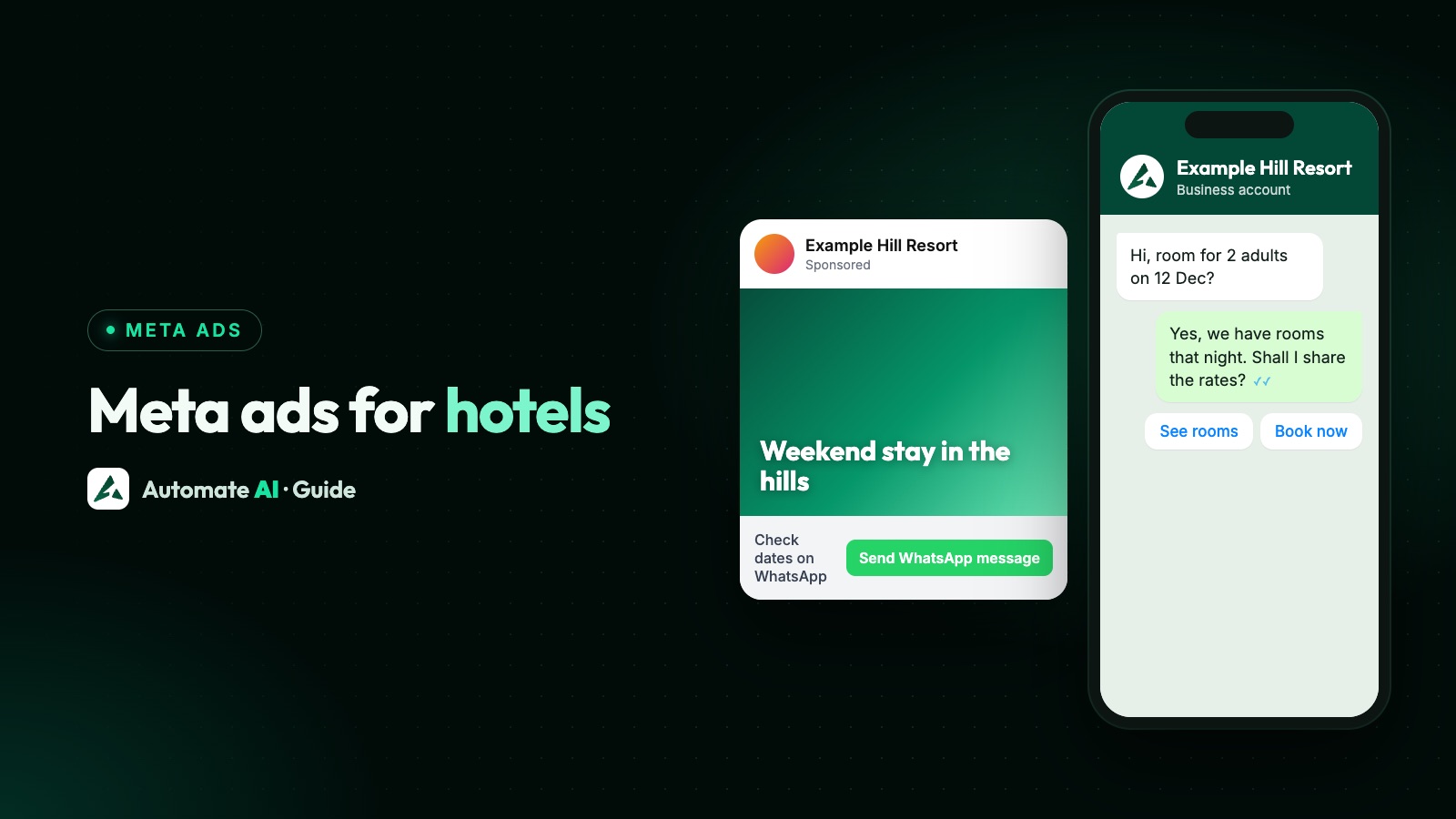
For most independent hotels and resorts, the Meta ad that brings direct booking enquiries is one that opens a WhatsApp chat, shown to people in the cities your guests come from and to people Meta sees planning a trip to your area. The guest asks about dates and rooms in their own words, and your front desk replies with a price and a way to book, with no booking site in between.
This guide covers the ads only: who to target, the Meta rules that apply to hotel ads, sample ads for rooms, weddings and your restaurant, the first replies that turn a chat into a booking, and how to run it from Automate AI. What to send guests once they’ve booked (confirmations, arrival details, feedback) is in WhatsApp for hotels, and packages and tours are covered in Meta ads for travel agencies.
Key takeaways
- Run separate ads for separate reasons to stay: weekend breaks, family holidays, weddings and events, and your restaurant or spa.
- Target three groups: people living in your feeder cities, people interested in travelling to your city, and people recently near the hotel.
- Meta lists hotels, resorts and retreats as not housing ads, so the housing Special Ad Category doesn’t apply. Long-stay rentals can be different.
- Prices in the ad must be real: name the dates, say if it’s per room or per person, and what’s included.
- Lead forms can’t ask for loyalty card numbers, passport numbers or a child’s date of birth. Ask for dates and the number of guests instead.
- Judge each ad by direct bookings, not by the cheapest chat.
Why chat ads suit hotel direct bookings
Guests usually have a question or two before they book: is breakfast included, is there parking? In a chat they just ask, and you quote for their dates. Each reason to stay needs its own setup:
| What you’re selling | Best ad destination | Why |
|---|---|---|
| Weekend breaks and short stays | WhatsApp chat | Guests ask about dates and rooms, and you quote on the spot |
| Family holidays in school breaks | WhatsApp chat | Families ask about extra beds, children’s meals and pools |
| Weddings, banquets and conferences | Lead form, then a WhatsApp template | You need the date, guest count and event type from everyone before a call |
| Restaurant, spa or day passes | WhatsApp chat, aimed near the hotel | People already in town book a table or a slot |
| Rooms bookable online at a fixed price | Your own booking page | Guests who don’t need help can book straight away |
If you sell rooms from a live inventory on your website, Meta also has catalogue-based travel ads for hotels, which need a catalogue and booking events on your site; Meta ads for travel agencies explains when they make sense. For a hotel that sells by conversation, chat ads are the simpler start.
Who to target: three audiences for a hotel
A hotel is unusual: your guests are mostly not where you are. Plan your ad sets around where they are when they decide.
| Audience | How to set it | Good for |
|---|---|---|
| People in your feeder cities | Add the cities your guests usually come from, with Living there chosen | Weekend breaks within driving distance, family holidays |
| People interested in travelling to your city | Add your own city and keep Meta’s Reach more people likely to respond on | Leisure stays from anywhere in the same country |
| People recently near the hotel | A small radius around the hotel, with Recently there chosen | Restaurant, spa, rooftop bar, last-minute rooms |
The middle row works the opposite way to a travel agency. Meta’s help page says that when you choose a city or region, Reach more people likely to respond may be on by default, and finds more people interested in travelling to that place or making purchases there, for example people who searched for it, interacted with Pages about it or have friends living there. Meta names travel as a use: people who may be looking for accommodation. It only includes people who live in the same country as the place you chose, so overseas guests need their own ad set aimed at their country.
In Automate AI’s Meta Ads menu, People in these places lets you choose Living there or recently there, Living there, or Recently there. The Reach more people setting is in Ads Manager.
Meta’s rules that apply to hotel ads
Hotels aren’t housing ads
Meta’s page on housing, employment and financial products ads lists sale, rental and temporary housing listings as housing ads, and says they don’t include hotels, resorts or retreats. So a normal hotel ad doesn’t need the housing Special Ad Category, and you keep age, radius and postcode targeting. If you also rent serviced apartments or rooms by the month, those ads may count as temporary housing: if you advertise in or to the US, Canada or the European countries Meta lists, check before you publish.
The ad itself
- Honest prices. Meta’s Advertising Standards prohibit deceptive pricing. “From ₹6,500” should be bookable on dates you actually have, and the ad should say whether it’s per room or per person, and whether taxes and breakfast are included.
- Your own rooms. Use photos of the actual room type you’re advertising, not the best suite for a standard-room price.
- Talk about the stay, not the viewer. Meta’s personal attributes rule bars ads that assert or imply things like someone’s age, health or a vulnerable financial situation. “Turning 60? Celebrate with us” implies an age; “A quiet anniversary weekend by the lake” doesn’t.
Lead forms
Meta prohibits instant form questions asking for account numbers (it names frequent flyer and loyalty card numbers), government ID numbers such as passport numbers, card or bank details and the date of birth for a child. For a hotel that means: ask for the dates, number of adults and number of children, never ID or card details. Take ID at check-in and payment on a secure page.
Sample hotel ads and pre-filled messages
A Click-to-WhatsApp ad has three bits of text: the ad, the greeting your business shows when the chat opens, and the pre-filled message the guest sends with one tap. Let the pre-filled message name the offer, so you know which ad started the chat. Made-up examples for sample hotels:
| Ad | Headline | Greeting | Pre-filled message |
|---|---|---|---|
| Weekend break (Example Lake Resort, 2 hours from the city) | Two nights by the lake, breakfast included | Hi! Which weekend are you thinking of, and how many adults and children? | Hi, I’d like rates for a weekend stay |
| School holiday stay (Example Hill Hotel) | Family rooms for the December break | Hi! Which dates, and how many children? We can add extra beds. | Hi, do you have a family room in December? |
| Weddings (Example Heritage Hotel) | Lawns and rooms for weddings up to 300 guests | Hi! What’s the date, and roughly how many guests? | Hi, I’d like to know about weddings at your hotel |
| Restaurant (Example City Hotel) | Sunday brunch on the rooftop | Hi! For how many people, and what time would you like? | Hi, I’d like to book Sunday brunch |
In Automate AI, the greeting can be up to 300 characters and the pre-filled message up to 120. Use real photos of the room or view; more patterns are in Click-to-WhatsApp ad examples.
First replies that turn a chat into a direct booking
Reply fast and quote for their dates. A simple order that works for most stays:
- Confirm the dates and guests: “Thanks! Is that check-in Friday 12 December, two nights, for two adults?”
- Offer two room choices with prices: “We have a lake-view room at ₹7,200 a night or a garden room at ₹5,900, both with breakfast. Taxes extra.”
- Give one way to book: a link to your booking page, or a payment request for the advance.
- Confirm in the chat once it’s paid, then send the confirmation as in WhatsApp for hotels.
Hotels in India can take the advance inside the chat. With Request payment in Automate AI’s chat box (every plan, turned on by an owner or manager in Settings › WhatsApp), you enter the amount in rupees and send a Razorpay or PayU payment link (UPI or card) or WhatsApp Pay, and the chat shows when it’s paid. It works in rupees only, so overseas guests need your booking page.
Lead forms for weddings, events and group stays
A wedding or a conference is worth a phone call, and you need the same details from everyone first. Keep the instant form short:
- Type of event: wedding, reception, conference, group stay, other.
- Date or month: a short answer or a choice of months.
- Number of guests: choices such as under 50, 50 to 150, 150 to 300, over 300.
- Opt-in wording: for example, “Example Heritage Hotel will contact you on WhatsApp about your event.” Add it in Ads Manager’s form editor.
Someone who filled in a form hasn’t messaged you, so the first WhatsApp message must be an approved template. With Facebook Leads (Integrations, included in the AI + Automation Plan and Series 4), each lead becomes a contact and gets your template straight away, with a different one per ad if you like. A sample marketing template:
“Hi {{1}}, thanks for asking Example Heritage Hotel about your event. Could you reply with the date you have in mind? Our events team will share lawn and banquet options and a quote. Reply STOP to opt out”
Set-up steps are in Facebook Lead Ads to WhatsApp and on the Facebook Lead Ads integration page.
Run hotel ads from Automate AI’s Meta Ads menu
You can make these ads in Ads Manager or from Meta Ads in Automate AI’s main menu, on every plan, for account owners and managers. Meta bills the ad spend to your own ad account.
- Connect your ad account with Continue with Facebook, and pick the ad account and your hotel’s Page. Chat ads open a chat with your connected WhatsApp number.
- Choose WhatsApp chats (or Lead form for events) and describe the offer in a line, such as “two nights by the lake with breakfast, from ₹5,900 a night, weekends in December”. AI drafts the headline, text, audience, greeting and pre-filled message, using your own AI key added in Settings; without one, write it yourself. Edit anything.
- Set the places: your feeder cities, or a radius around an address or a map pin (1 to 80 km), and choose who counts under People in these places.
- Add a real photo, keep automatic placements or choose your own (WhatsApp Status is one option, though not in the EU, the UK and a few other countries; see WhatsApp Status ads), set a daily budget and an end date for seasonal offers.
- Check the preview and publish. Nothing is spent until you publish, and Meta reviews the ad before it runs.
Ads from the Meta Ads menu are shown to people 18 and over. More on the builder in Click-to-WhatsApp ads and on our Meta ads hub.
Measure bookings, not chats
Nobody can promise you a number of bookings from Meta ads: it depends on your location, season, rates and how quickly you reply. Start with a small budget per offer and judge it on what pays:
- Cost per chat is shown for every ad in Automate AI’s Meta Ads, including ads made in Ads Manager, next to spend, clicks and new contacts.
- Tag each offer in Settings › Lead Sources with a phrase from its pre-filled message, such as “weekend stay” or “weddings”, so each new contact shows which ad brought it.
- Mark bookings with a contact status such as “Booked” and compare ads on cost per booking. Track which ads bring WhatsApp customers shows how.
Frequently asked questions
Do Meta ads work for hotels?
They can, especially ads that open a WhatsApp chat, because guests have questions before they book and a quick, personal quote helps. Results vary with location, season, price and reply speed, so test with a small budget and count bookings, not chats.
Who should a hotel target on Facebook and Instagram?
People living in the cities your guests come from, people Meta finds interested in travelling to your city (keep Reach more people likely to respond on for your own city), and, for your restaurant or spa, people recently near the hotel.
Do hotel ads need the housing Special Ad Category?
No. Meta’s examples say housing ads don’t include hotels, resorts or retreats. Monthly rentals or serviced apartments can count as temporary housing listings, so check those if you advertise in or to the US, Canada or the European countries Meta lists.
Can I ask for passport or loyalty numbers on a hotel lead form?
No. Meta prohibits instant form questions asking for government ID numbers such as passport numbers, account numbers such as loyalty card numbers, card details and a child’s date of birth. Ask for dates and the number of guests.
Can guests pay an advance in the WhatsApp chat?
In India, yes: Automate AI’s Request payment sends a Razorpay or PayU link (UPI or card) or WhatsApp Pay, in rupees, and shows when it’s paid. For other currencies, send a link to your booking page.
Sources
- Meta Business Help Centre: Use detailed targeting
- Meta Business Help Centre: How to reach people interested in your selected cities and regions
- Meta Business Help Centre: About ads for housing, employment or financial products and services
- Meta Business Help Centre: How to choose a Special Ad Category
- Meta Business Help Centre: Questions prohibited on your instant form
- Meta Advertising Standards: Privacy violations and personal attributes
- Meta Advertising Standards: Prohibited commercial practices
- Meta: Pricing on the WhatsApp Business Platform (free entry point window)
WhatsApp rules and prices change. We check these guides against Meta’s documentation, but always confirm current terms with Meta before you rely on them. Questions? Message us on WhatsApp at +91 836 977 8812.