Facebook Ads for Cleaning Businesses: Bookings and Quotes on WhatsApp
Facebook ads for cleaning businesses: separate one-off and regular cleans, quote from photos on WhatsApp, and turn first jobs into repeat bookings.
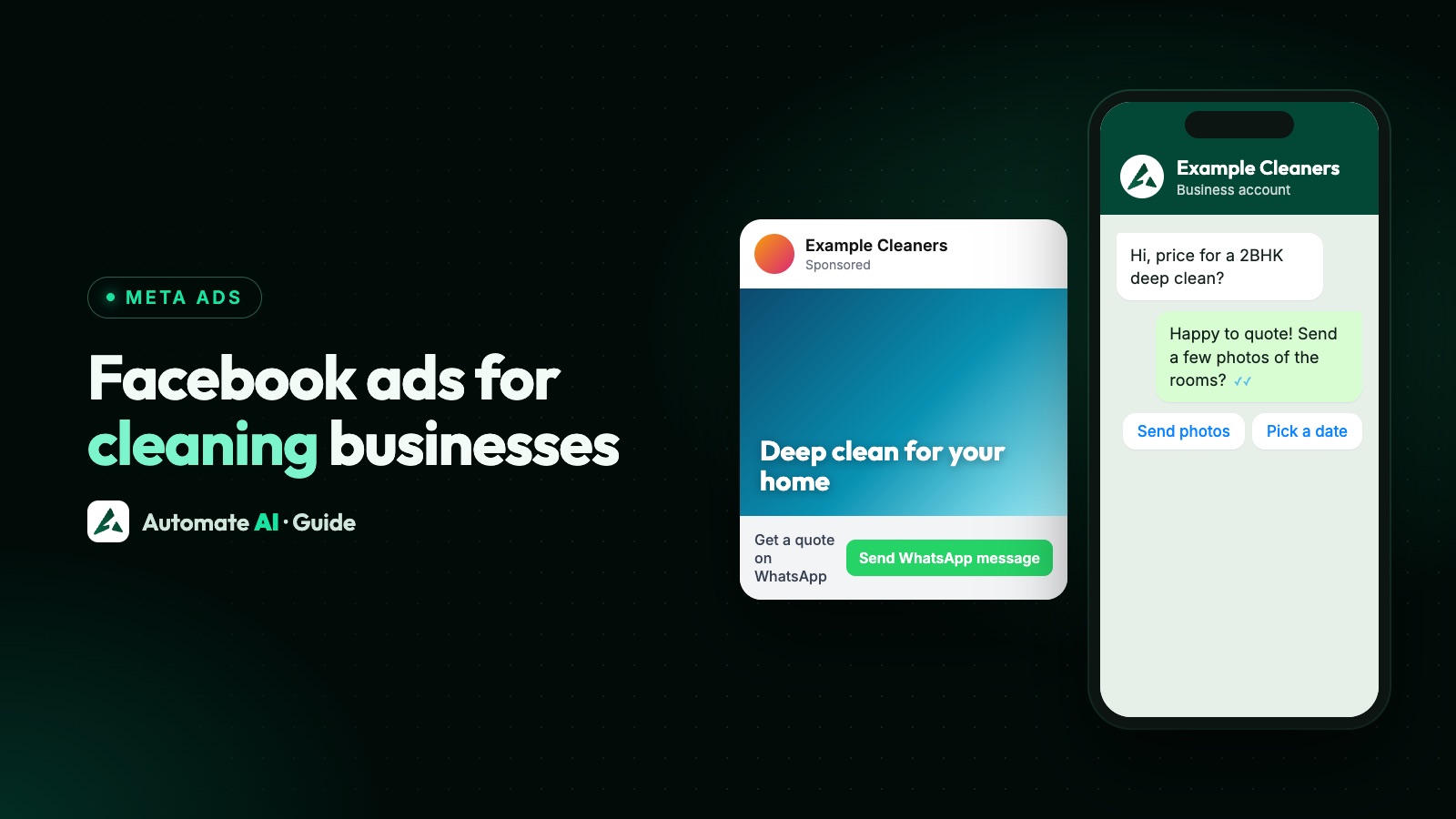
To advertise a cleaning service on Facebook, run a Click-to-WhatsApp ad for each kind of job you sell (a one-off deep clean, a regular home clean, office cleaning), ask for a few photos in the chat, and reply with a price and two time slots. The money in cleaning is in the second, third and tenth visit, so plan the repeat booking before you spend on the first.
This guide covers what’s particular to cleaning: quoting from photos, turning a one-off job into a regular slot, and reminding past customers when their next clean is due, all on WhatsApp. Sample ads and messages use a made-up business. The general local setup is in Facebook ads for local businesses, so we only link to it.
Key takeaways
- Run one ad per job type: deep clean, regular clean and office cleaning attract different people and need different first questions.
- Quote from photos in the chat: rooms, the sofa, the oven. Reply with a price range and two slots, not a long list of rates.
- Ask every one-off customer whether they’d like a regular slot, and send each regular reminder only to people who said yes.
- Booking reminders can be utility templates; “time for your next clean?” is marketing under Meta’s rules, and ends with an opt-out.
- For office and commercial contracts, a lead form with a few questions, followed by an instant WhatsApp template, filters better than a chat ad.
Do Facebook ads work for cleaning businesses?
They can, because cleaning is easy to show and easy to ask about. What pays, though, is the customer who books again, and nobody can promise a number of bookings. So decide which job each ad sells and what happens after it:
| One-off deep clean | Regular home clean | Office or commercial | |
|---|---|---|---|
| Who asks | Movers, hosts before a festival or event, landlords between tenants | Busy households | Office managers, shops, clinics, building managers |
| What they want first | A price for their home | A reliable day and the same team | A site visit and a written quote |
| Best first contact | WhatsApp chat with photos | WhatsApp chat | Lead form, then WhatsApp |
| The next sale | A regular clean or a repeat in a few months | Add-ons: oven, windows, sofa | A longer contract or more sites |
Three ads with sample copy
Each ad opens WhatsApp with a ready-typed first line, so the job type arrives with the chat. The customer can change that line before sending, so phrase it the way a customer would. Automate AI allows 120 characters for that line and 300 for your greeting.
| Ad | Headline | Pre-filled message | Greeting |
|---|---|---|---|
| Deep clean | Moving out? Get a deep-clean price on WhatsApp | Hi, I’d like a price for a deep clean | Hi, Example Clean Co here! How many bedrooms and bathrooms? A photo of the kitchen and one room helps us quote. |
| Regular clean | The same cleaner, every week or fortnight | Hi, I’m looking for a regular cleaner | Hi! Which area are you in, and which day suits you? Weekly, fortnightly or monthly? |
| Sofa or carpet | Sofa looking tired? Cleaned at home | Hi, I need my sofa cleaned | Hi! Could you send a photo of the sofa and say roughly how many seats it has? |
More openers are in Click-to-WhatsApp ad examples.
Quote from photos, not from a rate card
Cleaning prices depend on size and state, and both are hard to describe in words. A few photos answer most of it. Ask for the ones you’d actually use:
| Job | Ask for | What it tells you |
|---|---|---|
| Deep clean | Kitchen, one bathroom, the largest room | How long it takes and whether you need two people |
| Move-out clean | Inside the oven and the fridge, plus room count | The parts that take longest |
| Sofa or mattress | A wide photo and a close-up of any stain | Fabric type and size |
| Office | Floor area or number of desks, washrooms, how often | Hours per visit and visits per week |
You can ask by hand, or let a chatbot do it. In Automate AI’s chatbot builder (Automation › Flows, AI + Automation Plan and Series 4), buttons can sort the chat into Deep clean, Regular or Office, a Collect Media step asks for a photo and saves it (one file per step, so add a step for each photo you need, such as kitchen, then bathroom), and a question asks for the area. Your team picks up the chat in the shared inbox with everything in one place.
A reply that books
“Thanks, Riya! For a 2-bedroom deep clean like this, the price is ₹X with two cleaners for about 4 hours. We can come Saturday 9am or Monday 2pm. Which suits you?” Two slots get a quicker answer than “when are you free?”.
Taking an advance in India? Payments in chat (every plan, switched on in Settings › WhatsApp) send a Razorpay or PayU link or a WhatsApp Pay request, in rupees only, and mark it Paid when the money arrives.
Turn a one-off clean into a regular booking
The best moment to ask is right after a good clean. Ask in the chat, while it’s open: “Glad it went well! Would you like the same team every fortnight? Reply WEEKLY, FORTNIGHTLY or MONTHLY.” Mark everyone who says yes with a contact status, such as Regular – fortnightly.
Outside the 24-hour customer service window, every message is a template, and Meta decides its category. Meta’s rules call a template utility when it’s non-promotional and about something the customer bought or subscribed to, and marketing when it sells, retargets or tries to renew. Anything mixed counts as marketing.
| Message | Sample (Example Clean Co) | Likely category |
|---|---|---|
| Booking reminder for a regular customer | “Hi {{1}}, your next fortnightly clean is on {{2}}. Reply 1 to confirm or 2 to move it.” | Utility |
| Rebooking a past customer | “Hi {{1}}, it’s been a while since your deep clean. Want us back before the holidays? Reply YES for two slots. Reply STOP to opt out” | Marketing |
| Add-on offer | “Hi {{1}}, add an oven clean to your next visit for ₹X. Reply OVEN to add it. Reply STOP to opt out” | Marketing |
Repeat the reminder automatically
- Create the reminder template in Campaigns › Templates and wait for Approved.
- Open Campaigns › Drip Campaigns, click New Drip Campaign and keep Drip Sequence.
- Under the audience, include the status Regular – fortnightly. The first reminder goes when a customer joins, then one every interval after that, so add the status on the day their reminders should start.
- Choose Repeat one template, every 2 weeks, and Unlimited (or a set number of times).
- Fill {{2}} from a contact field such as
next_clean(drip variables are fixed text or a contact field), and update that field after each visit. The repeats follow the drip’s own cycle, not the booked day, so keep the field current. - Turn Stop on reply off. It’s on by default and halts a customer’s drip once they reply, so the first “1” would end their reminders.
Drips are in the AI + Automation Plan and Series 4. The full builder is explained in WhatsApp drip campaigns, and reminder wording in WhatsApp appointment reminders.
Remind occasional customers when the next clean is due
Carpets, sofas and the big pre-festival clean don’t fit a fortnightly cycle. They come round about once a year, so tie the nudge to the date of the last job.
- Create a contact field for that date in Settings › Contact Fields, for example
sofa_cleaned_on, and have whoever closes the job type the date in. Day and month are enough. - In Campaigns › Drip Campaigns, start a new drip and choose Date-based message, then Event Based and Custom Date Field, and pick the field.
- Pick 7 days before, a sending hour, and a contact group made only of customers who said yes to reminders.
Because Automate AI looks only at the day and month, the same contact comes up again each year: a sofa cleaned on 12 March gets its nudge around 5 March. The message asks for a new booking, so submit it as marketing and finish with “Reply STOP to opt out”. Annual pest control contracts work the same way, see Facebook ads for pest control.
Office and commercial cleaning: lead form, then WhatsApp
An office manager comparing three companies would rather fill in a short form than chat. A lead form also screens out jobs that are too small. Meta’s instant forms allow up to 15 questions; keep it to the few you’d use:
- Type of premises: office, shop, clinic, warehouse (multiple choice).
- Size: ranges such as under 1,000 sq ft, 1,000 to 3,000, over 3,000. Meta suggests ranges to keep options short.
- How often: daily, a few times a week, weekly.
- A visit time: Meta’s appointment request question lets them pick a date and time.
- Opt-in wording: “Example Clean Co will contact you on WhatsApp about your quote.”
In Automate AI’s Meta Ads, the Lead form ad type can use a form you built in Ads Manager, or Make a new form on your Page. That builder has no consent field, so add opt-in wording in Ads Manager’s form editor and pick the form in Meta Ads.
Meta’s advice is to capture leads immediately and run lead ads during the hours you can follow up. With Facebook Lead Ads in Integrations (AI + Automation Plan and Series 4), each new lead becomes a contact, or updates an existing one, and gets an approved template straight away. A sample:
“Hi {{1}}, thanks for asking Example Clean Co about cleaning for your {{2}}. Could you reply with a couple of photos of the space? We’ll then suggest a time to visit and quote. Reply STOP to opt out”
Set-up is in Facebook Lead Ads to WhatsApp and on the Facebook Lead Ads integration page.
Set it up in Automate AI’s Meta Ads
All three ads are made from Meta Ads in Automate AI’s menu (every plan): pick WhatsApp chats for the home-cleaning ads and Lead form for offices, then link each pre-filled phrase, such as “deep clean”, to a source in Settings › Lead Sources so every chat shows which ad brought it.
The ad spend is billed by Meta to your own ad account, and Meta reviews each ad before it goes live.
Step-by-step screens are on the Click-to-WhatsApp ads page and in the Meta ads hub.
What to measure
Meta’s pricing page says that when someone messages you from a Click-to-WhatsApp ad on the WhatsApp Android or iOS app and you reply within the 24-hour customer service window, a free entry point window opens for up to 7 days, with no Meta charge for your messages. That usually covers the quote and the booking. Automate AI still charges its normal rates for those messages.
- What each chat cost you. Meta Ads in Automate AI lists it per ad, beside the spend.
- Quotes sent and jobs booked, by ad: the Lead Sources tag tells you which ad each chat came from. See track which ads bring WhatsApp customers.
- Customers on a regular status a few months later. This is the number that tells you whether an ad really paid.
- First reply time. People asking for a cleaner often message two or three companies. See speed to lead.
Frequently asked questions
How do I advertise my cleaning service on Facebook?
Run a Click-to-WhatsApp ad for each job you sell, aimed at the area your team can reach, ask for photos in the chat, and reply with a price and two time slots. Use a lead form for office contracts.
Should a cleaning ad get WhatsApp chats or form leads?
Chats suit homes: people send photos and book quickly. Forms suit offices and commercial sites, where you need size and frequency before visiting. You can send every form lead a WhatsApp template straight away.
How do I get repeat cleaning bookings?
Ask right after a good clean whether they’d like a regular slot, mark those who say yes, and send them a booking reminder on a repeating schedule. In Automate AI that’s a drip set to Repeat one template.
Is a cleaning reminder a utility or marketing template?
A reminder about a booking the customer already has is usually utility. A message asking a past customer to book again, or offering an add-on, is marketing. Meta makes the final call when it reviews the template.
Do cleaning ads count as housing ads?
It only matters if you advertise from the US or to the US, Canada or the listed European countries. There, a plain cleaning service isn’t among Meta’s housing examples, but Meta names housing repairs, so an ad bundling cleaning with repairs or painting, or tied to a rental or sale, may need the Housing category.
Sources
- Meta Business Help Centre: About ads for housing
- Meta Business Help Centre: How to choose a Special Ad Category
- Meta Business Help Centre: Best practices to respond to leads from your lead ads
- Meta Business Help Centre: Add custom questions to your lead ads with instant form
- Meta for Developers: Template categorization
- Meta: Pricing on the WhatsApp Business Platform (free entry point window)
- WhatsApp Business Messaging Policy
WhatsApp rules and prices change. We check these guides against Meta’s documentation, but always confirm current terms with Meta before you rely on them. Questions? Message us on WhatsApp at +91 836 977 8812.